

Last December, I watched a friend pull in $847 in affiliate commissions from Pinterest — and she didn’t own a blog, a website, or even a domain name. Just a free Pinterest account, a Canva subscription, and about 40 Pins she’d made over a weekend. That’s when I started seriously digging into affiliate marketing on Pinterest as a standalone income stream, not just a traffic booster for a website.
Here’s what most guides won’t tell you: Pinterest now openly allows direct affiliate links on Pins. No blog required. No website redirect. Just Pin → click → product page → commission. But there’s a catch — actually, several catches — and getting them wrong is the difference between $0 and $2,000 a month.
This guide walks through exactly how affiliate marketing works on Pinterest in 2026, what the platform’s rules actually say (versus what people assume), and the two strategy paths: with a blog and without. I’ll also share the design and disclosure mistakes I see new affiliates make every week — the kind that get accounts suspended or kill conversion before it starts.
What Is Affiliate Marketing on Pinterest?
Affiliate marketing on Pinterest means promoting products through your Pins using a special tracking link. When someone clicks your Pin and buys the product, you earn a commission — typically 3% to 50% of the sale, depending on the program.
The mechanics are simple: you join an affiliate program (like Amazon Associates, ShareASale, or Impact), grab your unique tracking link for a product, then attach that link to a Pin you create. Pinterest serves your Pin to people searching related keywords, they click through to the merchant, and you get paid for any resulting sale.
What makes Pinterest different from Instagram or TikTok is intent. 97% of Pinterest searches are unbranded — people are searching for ideas and solutions, not following a specific creator. They’re already in shopping mode. Pinterest’s own data shows that 85% of weekly users have made a purchase based on something they saw on the platform. That’s not engagement — that’s intent to buy.
The platform has roughly 570+ million monthly active users, with 60% being women and 45% of US users earning over $100K per household. If your affiliate niche is home, fashion, beauty, food, parenting, finance, or wellness, your buyers are already there. For a full overview of how Pinterest fits into a wider monetization mix, see my guide on proven ways to make money on Pinterest.
Yes, You Can Do Affiliate Marketing on Pinterest Without a Blog
This is the question I get most often, so let me answer it directly: yes, you can run an affiliate business on Pinterest with no blog, no website, and no email list. Pinterest has explicitly allowed direct affiliate links on Pins since 2017, after briefly banning them in 2015.
That said, “allowed” doesn’t mean “no rules.” Pinterest’s current Community Guidelines and Merchant Guidelines require a few things you absolutely must follow:
- Disclose the affiliate relationship clearly. Pinterest requires you to use #ad, #affiliate, or similar language in the Pin description. The FTC requires this too — it’s not optional.
- The destination URL on the Pin must match the link you click through to. No cloakers that redirect to something different. Pinterest tests this and will deactivate your Pins if they detect mismatch.
- No link shorteners that hide the destination (bit.ly, tinyurl, etc.). Use the affiliate program’s own tracking link or a branded link cloaker like Pretty Links if you have a domain.
- No spam — no posting the same Pin to 20 boards in an hour. Pinterest’s spam filter is aggressive. Pace your saves out, and only to relevant boards.
- Some affiliate programs have their own rules about Pinterest. Amazon Associates, in particular, prohibits direct affiliate links on social platforms — you must drive traffic to your own site first. ShareASale, Impact, CJ, and most fashion programs allow direct linking.
Get any of those wrong and you risk three things: Pinterest deactivating your Pins, the affiliate program kicking you out, or the FTC fining you (yes, this has happened to influencers).
How Affiliate Marketing on Pinterest Actually Works
Once you understand the rules, the workflow is straightforward. Here’s the 5-step path from zero to first commission — with screenshots of what each step actually looks like, taken from my own working Make Money Hunter account.
Step 1: Set Up a Pinterest Business Account
Convert your personal Pinterest account to a free business account (or create a new one). This unlocks analytics, ad-eligible Pin formats, and the credibility signal that tells Pinterest you’re a creator, not a casual saver. You’ll know you’re set up correctly when your account dropdown shows the “Business” label, like this:
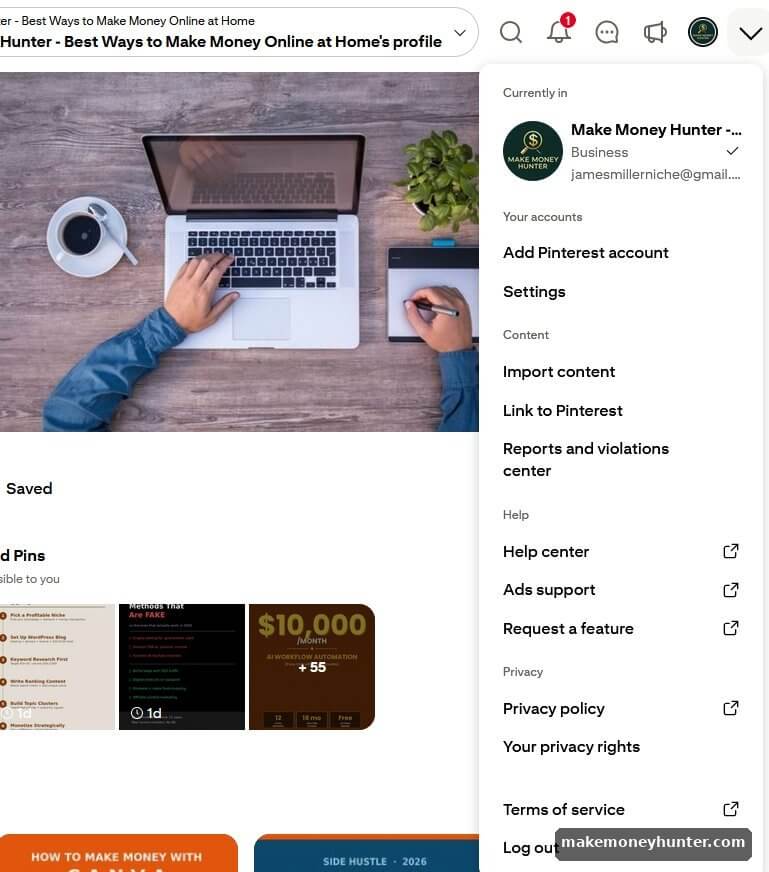
A few things to verify on the same dropdown: the email matches the one you’ll use for affiliate program signups (programs sometimes cross-check), and your account is set to “Business” — not “Personal.” Switching to business is free, takes 30 seconds, and is required if you want access to Audience Insights and Pinterest Trends later on.
Once that’s done, complete your public profile. Add a clear bio with keywords related to your niche — Pinterest’s search algorithm reads your bio when deciding who to show your Pins to. Here’s what a properly set-up profile looks like, with the bio describing the niche, a website URL listed (you can verify a domain later if you want a Rich Pin badge), and the “Created” tab populated with Pins:
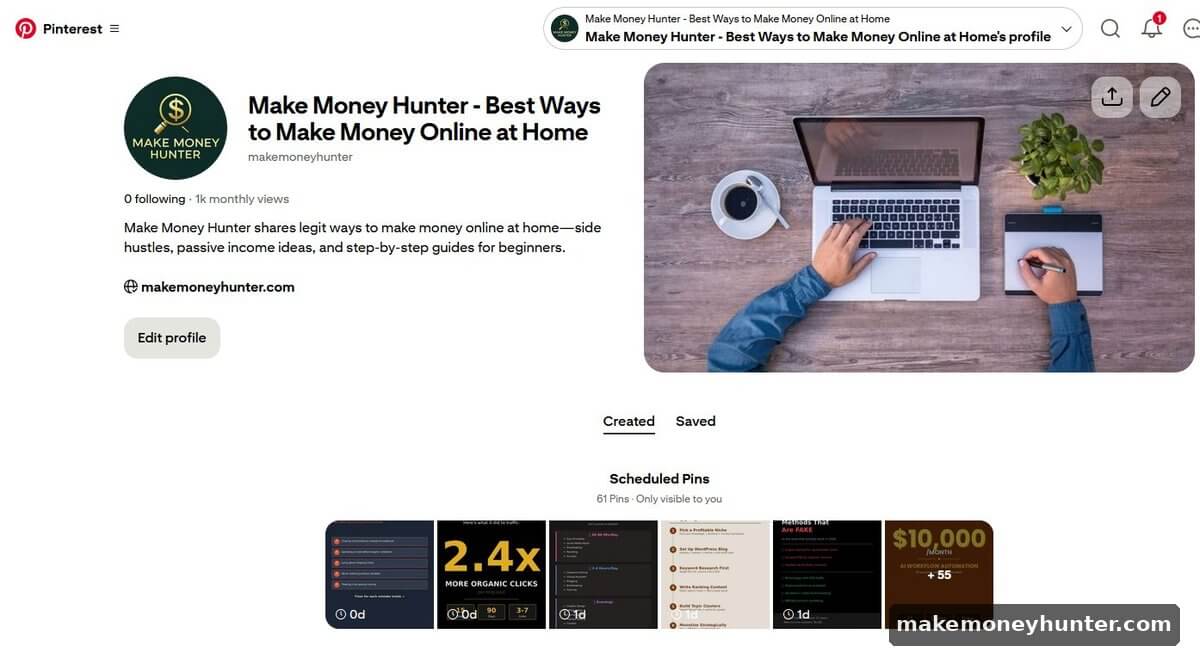
Notice three things in the screenshot above. The bio is specific (“side hustles, passive income ideas, and step-by-step guides for beginners”) — that’s the kind of phrasing Pinterest’s algorithm can categorize. The website is listed right there as a clickable link. And “1k monthly views” is shown, which is the impressions metric Pinterest uses for early profile credibility. You don’t need a blog to do this — anyone with an affiliate strategy can plug their main destination URL here, even an Amazon storefront or LTK profile.
Step 2: Choose a Profitable Niche
Pinterest’s traffic is heavily concentrated in a few categories: home decor, fashion, food, beauty, weddings, parenting, DIY, fitness, finance, and travel. If your niche fits one of these, you have a head start. If it doesn’t (B2B SaaS, for instance), Pinterest is probably the wrong platform.
The fastest way to validate niche demand is Pinterest’s free Audience Insights tool, available to all business accounts. It shows what categories your audience already engages with, ranked by reach:
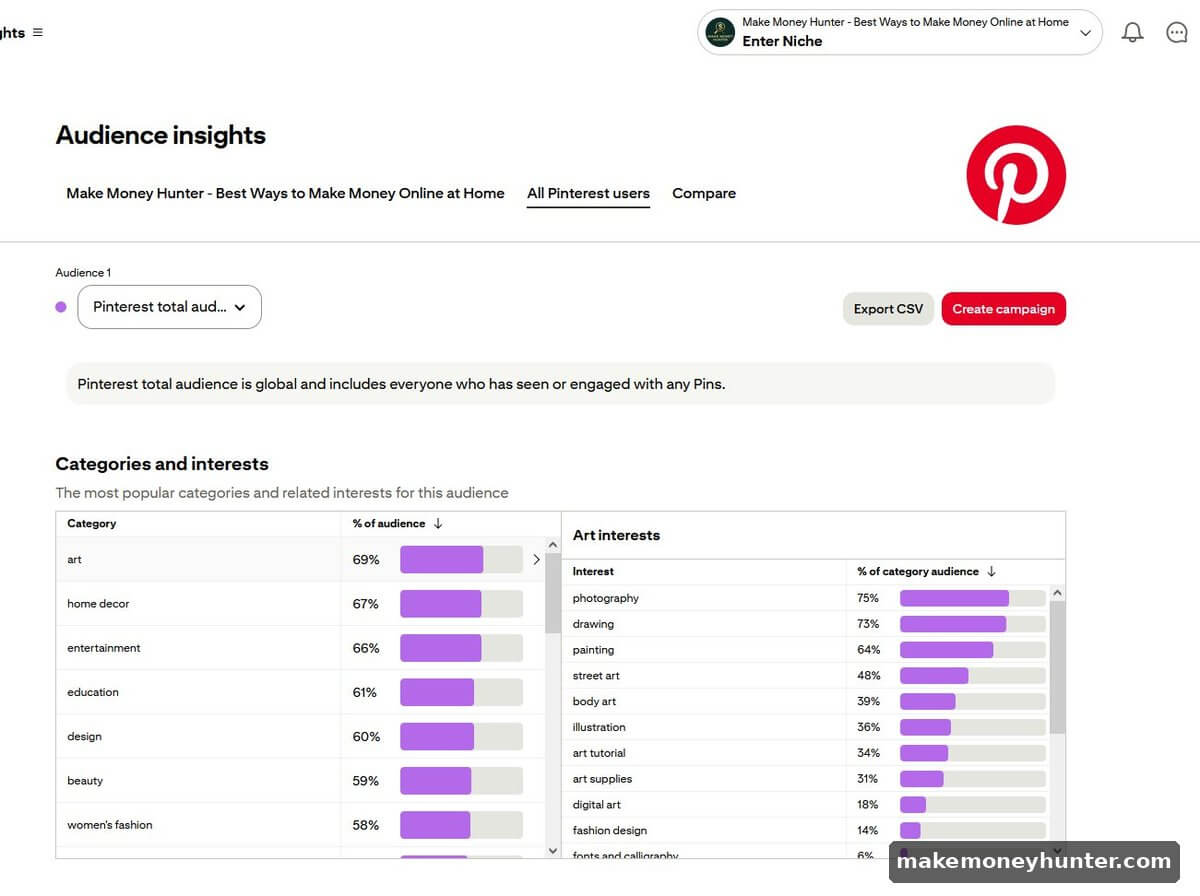
The percentages in this view tell you what fraction of Pinterest users engage with that category. Notice art at 69%, home decor at 67%, entertainment at 66% — these are massive, broad pools of buyer attention. But you don’t want to compete in those exact phrases (they’re saturated). You want to drill into the sub-interests panel on the right — “photography,” “drawing,” “street art,” “illustration,” and so on. That’s where the long-tail opportunity lives.
Inside your niche, pick a specific angle. “Home decor” is too broad. “Small apartment storage solutions” is specific enough to dominate. The narrower the focus, the easier it is to rank in Pinterest search. If you’re still figuring out which direction feels right, my breakdown of choosing a profitable blog niche walks through the same framework — Pinterest niche validation works on similar criteria: search volume, buyer intent, and your ability to keep showing up.
Step 3: Join Affiliate Programs That Allow Pinterest
Not every program lets you Pin direct links. Start with these confirmed Pinterest-friendly programs:
- ShareASale — thousands of merchants, allows direct social promotion
- Impact — same model, used by major brands like Walmart and Target
- CJ Affiliate — older but still solid, particularly for retail and finance
- RewardStyle / LTK — fashion and lifestyle focused, designed for content creators
- Etsy Affiliate Program (via Awin) — perfect if you Pin handmade or vintage finds
- Awin — large network with both physical and digital products
Apply with a real Pinterest account that already has 10-20 Pins and a coherent niche. Empty profiles get rejected. After acceptance, you grab tracking links from the merchant dashboard. For a deeper walkthrough of how the underlying affiliate model works, my affiliate marketing for beginners guide covers the full mechanics from cookie windows to commission structures.
Amazon Associates is the one to be cautious with. The dashboard looks tempting — clean interface, big creator university, “Trending Now” suggestions:
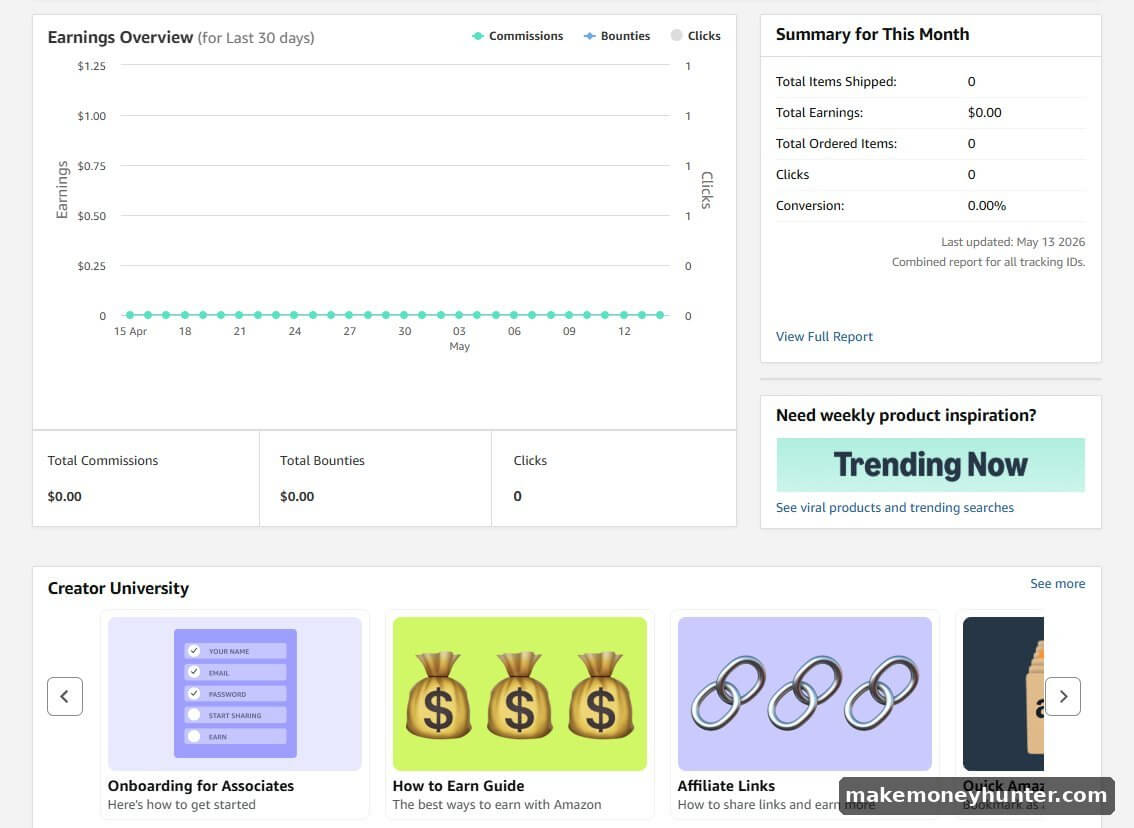
What this screenshot doesn’t tell you is the rule buried in Amazon’s Operating Agreement: Amazon affiliate links cannot be posted directly to social media platforms, including Pinterest. You must drive Pinterest traffic to your own site (or specific Amazon Idea Lists in some cases), then place Amazon links inside your blog content. Violate this and Amazon closes your Associates account — and they’re aggressive about enforcing it. Stick to the networks above for direct Pin links, and save Amazon for your blog if you build one.
Step 4: Create Pins That Look Like Pinterest Content, Not Ads
This is where most people fail. They take the merchant’s product photo, slap it on a Pin, and wonder why nothing converts. Pinterest is a visual search engine — Pins that win are the ones that look like genuine inspiration, not promotion.
Studying what’s already ranking is the fastest way to understand what works in your niche. Search any commercial keyword on Pinterest — let’s say “vps hosting” — and look at the first row of results before anything else:
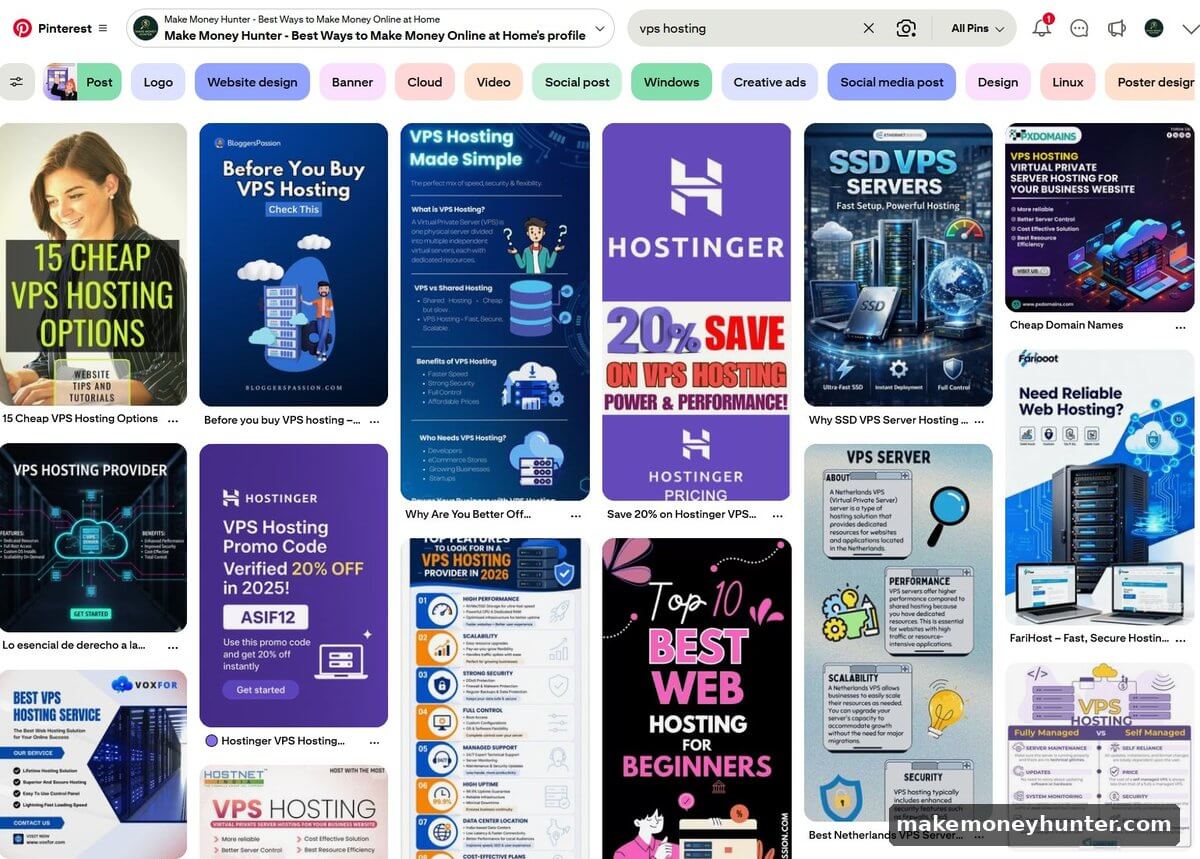
Two things to study here. The colored filter tags across the top (Logo, Website design, Banner, Cloud, Video, Social post, Windows, Creative ads, Social media post, Design, Linux, Poster design) — these are the sub-intents Pinterest sees for that keyword. Each tag is a separate audience you can target with a differently-designed Pin.
The first row of results shows you the visual language Pinterest is rewarding right now in that niche. Notice the vertical format, bold text overlays, strong color contrast, and clean templates. Your Pins need to look like they belong in this lineup — not like a banner ad pasted on top of a product photo.
The basics for your own Pins: vertical format at 1000 × 1500 pixels (2:3 ratio), high-contrast text overlay, brand colors that match the product’s aesthetic, and a hook in the first 40 characters of the title. Tools like Canva have hundreds of Pinterest templates ready to use — free version is fine to start.
Once your design is ready, the Pin creation flow lives under the hamburger menu → Create content → Create Pin (under “Organic”):
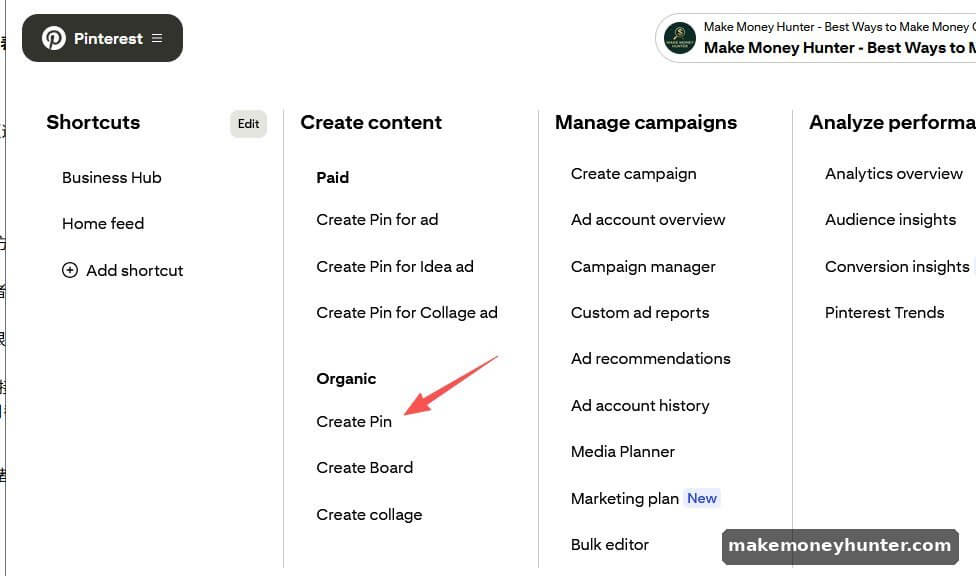
Avoid “Create Pin for ad” unless you’re running paid campaigns — for organic affiliate marketing, you want the regular “Create Pin” under the Organic section. The paid options route your Pin through Pinterest’s ads system, which has different rules around affiliate disclosures.
Create 3-5 different Pin designs for every affiliate product. Pinterest’s algorithm rewards variety. The same product, pinned five different ways over a month, will outperform the same Pin saved five times.
Step 5: Publish, Schedule, and Disclose Correctly
Inside the Pin editor, you’ll fill in four critical fields: title, description, destination link, and the board you’re saving to. Here’s what a properly set-up affiliate-style Pin looks like:
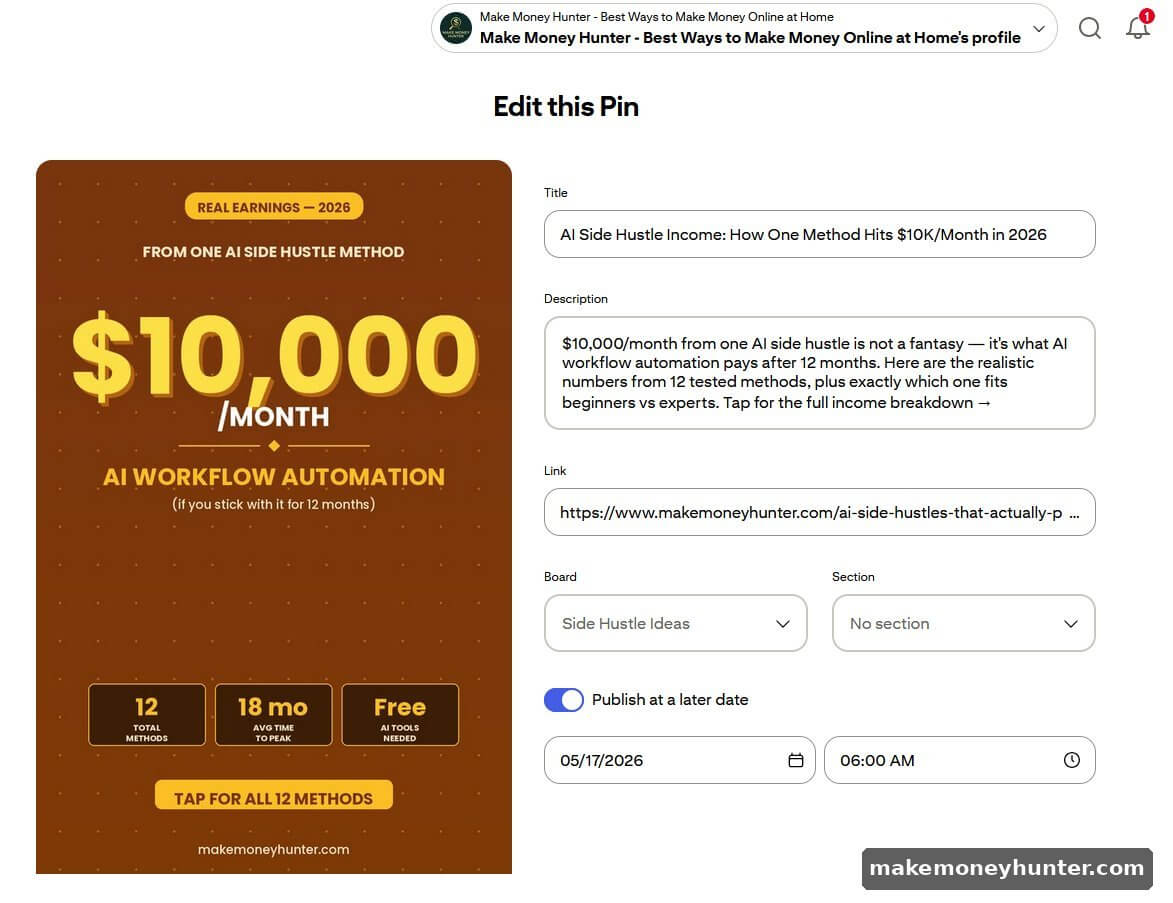
A few things to copy from this setup. The title leads with a specific outcome and number (“$10K/Month”) — that’s what stops the scroll. The description is conversational and ends with a clear CTA (“Tap for the full income breakdown →”).
The destination link is the real, full URL — no shorteners, no redirects, exactly the page the Pinner will land on. And the Pin is scheduled for a specific date and time (06:00 AM in this example), which is how you space out multiple Pins of the same content over weeks instead of dumping them on one day.
If you’re using an affiliate link instead of a blog post link, the same fields apply — but you must add disclosure language to the description. The simplest, FTC-safe format is appending “(affiliate)” or “#ad” to the description, like: “My favorite tools for this — see the full list (#ad #affiliate).” That’s all that’s required. Don’t try to be clever about it.
Save 3-5 Pins per day to relevant boards, spread out over time (not in one batch). Use Pinterest’s built-in scheduler (visible in the screenshot above) or Tailwind for automation. After 30 days, open Pinterest Analytics and look at outbound clicks — not impressions, not saves, but actual clicks that left Pinterest. That’s the metric that drives commissions. Double down on whatever’s working, kill whatever isn’t.
With a Blog vs. Without a Blog: Two Different Strategies
Both paths work in 2026, but they earn money in very different ways. Here’s the honest comparison.
Path A: Direct Affiliate Links on Pins (No Blog)
How it works: Pin → click → merchant page → purchase. You earn the commission on whatever they buy within the cookie window (usually 24 hours to 30 days, depending on the program).
Pros: Zero setup cost. No hosting fees. No SEO learning curve. You can launch in a weekend. Faster path to your first $100 — I’ve seen people get there in 60-90 days with consistent pinning.
Cons: You’re entirely dependent on Pinterest. If your account gets flagged or the platform changes rules, your income disappears overnight. You also can’t build an email list, which means you can’t promote anything to past visitors. And your earnings are capped — Pinterest sees you as a low-trust source compared to a content creator with a real site.
Best for: Someone testing whether the make money online path appeals to them, a beginner who needs a quick win, or someone in a visual niche (fashion, home, beauty) where Pinterest is the natural buyer’s habitat.
Path B: Pinterest Drives Traffic to Your Blog (With Blog)
How it works: Pin → click → your blog post → affiliate link in the post → merchant. The reader is now warmed up by your content before they click out. Commissions are higher because trust is higher.
Pros: Higher conversion rates (often 2-5x what direct Pins produce). Email list capture. Multiple monetization paths from the same Pin traffic (ads, sponsorships, digital products, multiple affiliates per article). The asset you build belongs to you — Pinterest is one traffic source among many.
Cons: Slower start. You’ll spend the first 2-3 months building the site before Pinterest traffic translates to real income. Hosting and tools run $20-50/month. There’s a real learning curve.
Best for: Anyone who’s serious about treating this as a long-term business. After 12 months, the blog path usually outearns the no-blog path by 5-10x. If this resonates with you, my blogging for beginners guide walks through the technical setup, and how to drive traffic to your blog shows exactly how Pinterest plugs into a wider traffic strategy.
Pin Design Principles That Drive Affiliate Clicks
I’ve tested probably 200 different Pin designs across various niches. The winners almost always follow the same rules. Bad Pins look like ads. Good Pins look like the kind of saved inspiration that the user would put on their own board.
Use vertical format, 1000 × 1500 pixels. Anything horizontal gets crushed in the mobile feed (85% of Pinterest users are on mobile).
Lead with the benefit, not the product. “Cozy fall living room ideas” beats “Buy this throw blanket.” The Pin’s job is to get the click; the merchant’s job is to sell. Don’t try to do the merchant’s work.
Use text overlay that’s readable at thumbnail size. Open Pinterest on your phone. Can you read your Pin’s text without zooming? If not, the font is too small. Big, bold, high-contrast text wins every time.
Match the visual aesthetic of the niche. Beauty Pins use soft pastels and clean fonts. Finance Pins use bold colors and confident typography. Home decor Pins use warm neutrals. Mismatch the aesthetic and people scroll past, even if your offer is great.
Create 5 different designs per affiliate product. Different colors, different text angles, different layouts. Pin one each week to relevant boards. The data will tell you which design works — usually within 30 days you’ll see a clear winner getting 3-5x the clicks of the rest.
Common Mistakes That Kill Affiliate Marketing on Pinterest
These are the mistakes I see new affiliates make over and over. Avoiding them is half the battle.
Mistake 1: Not disclosing the affiliate relationship. The FTC requires it, Pinterest requires it, and skipping it can get your account banned or worse. Put #ad, #affiliate, or “(affiliate link)” in every Pin description.
Mistake 2: Pinning Amazon affiliate links directly. Amazon’s Operating Agreement explicitly prohibits posting affiliate links on social media without going through your own website first. They’ll close your Associates account if they catch it. Use Amazon affiliate links inside blog posts, not on Pins.
Mistake 3: Promoting random products instead of building topical authority. Pinterest’s algorithm rewards consistency. If you Pin home decor for a month, then suddenly switch to fitness products, the algorithm gets confused and shows your Pins to fewer people. Pick a lane.
Mistake 4: Treating Pins as one-time content. A single Pin can drive traffic for months or years. Don’t delete underperformers too fast — give them 90 days. And don’t stop pinning a winning design just because you’ve already saved it once.
Mistake 5: Going for cheap, generic products. A $10 product paying 5% commission is $0.50. You need 200 sales for $100. Versus a $200 product at 10% — 5 sales gets you the same $100. Higher-ticket products almost always win on Pinterest because the traffic is intent-driven.
Mistake 6: Ignoring seasonality. Pinterest is the most seasonal platform on the internet. Christmas content needs to be pinned in September. Valentine’s Day in December. Summer fashion in March. Pin 60-90 days ahead of the season and you’ll catch the wave; pin during the season and you’ve missed it.
How Much Money Can You Actually Make?
Let me give you realistic numbers, not the screenshots you see on YouTube. Based on what I’ve observed across multiple niches, here’s a rough timeline:
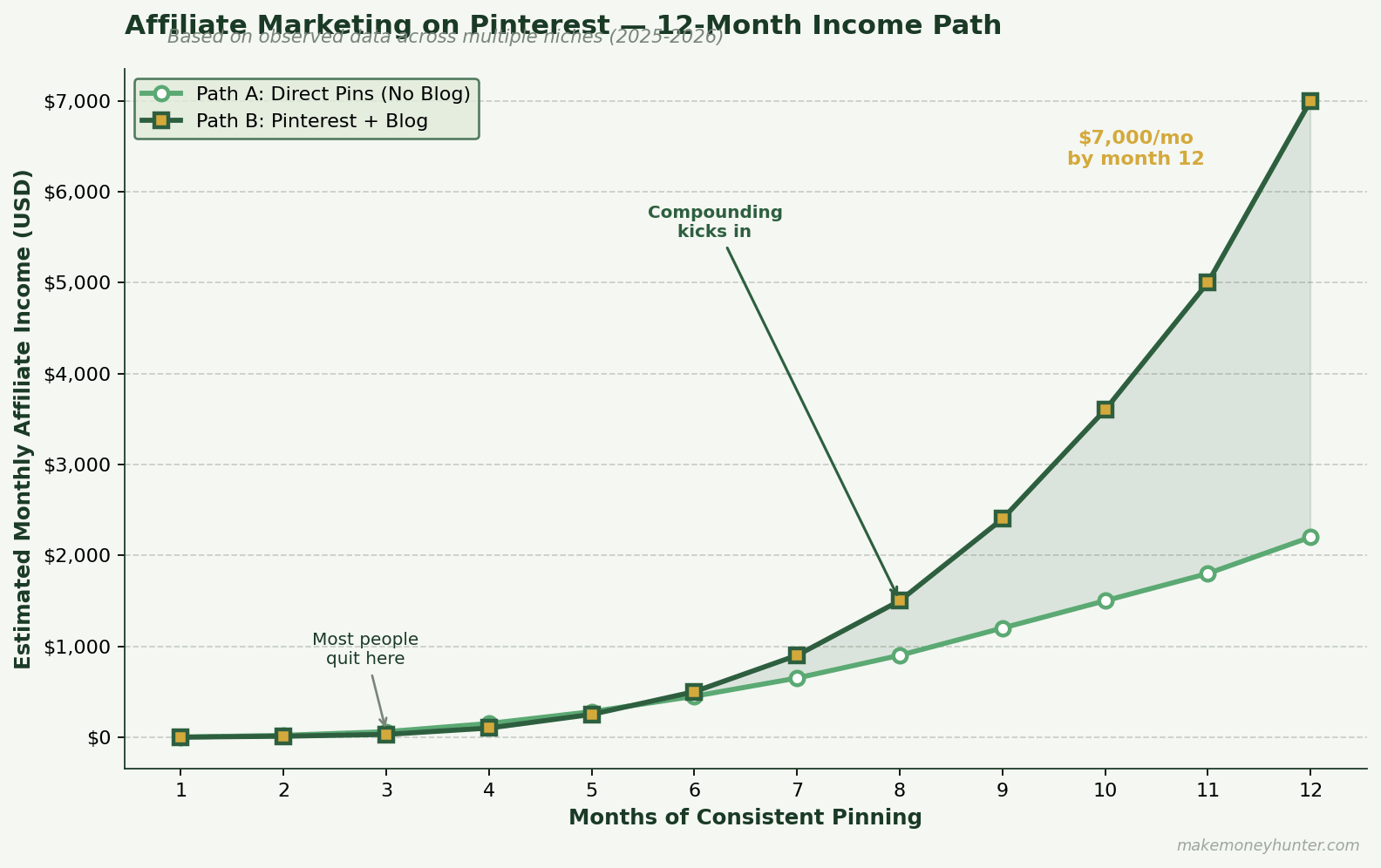
Months 1-3: Almost nothing. $0-50/month range. You’re still building Pin volume and learning what works. This is when most people quit.
Months 4-6: First real traction. $100-500/month is realistic if you’ve been pinning 3-5 times per day to the right boards in a good niche.
Months 7-12: Compounding starts to work. Pins from month 2 are still driving clicks. Top performers get re-Pinned by other users. The $1,000-3,000/month range becomes achievable for the focused operators.
Year 2 and beyond: This is where the no-blog path tends to plateau (at $2-5K/month for most people) while the blog-supported path keeps growing into the $5-15K/month range. For the broader long-game perspective, my piece on building passive income online covers what that compounding looks like beyond year one.
None of this is guaranteed. Pinterest’s algorithm changes. Niches saturate. Programs change commission rates. But the people I’ve seen make this work treat it like a real business — consistent pinning, quarterly review of what’s working, willingness to drop losing products fast.
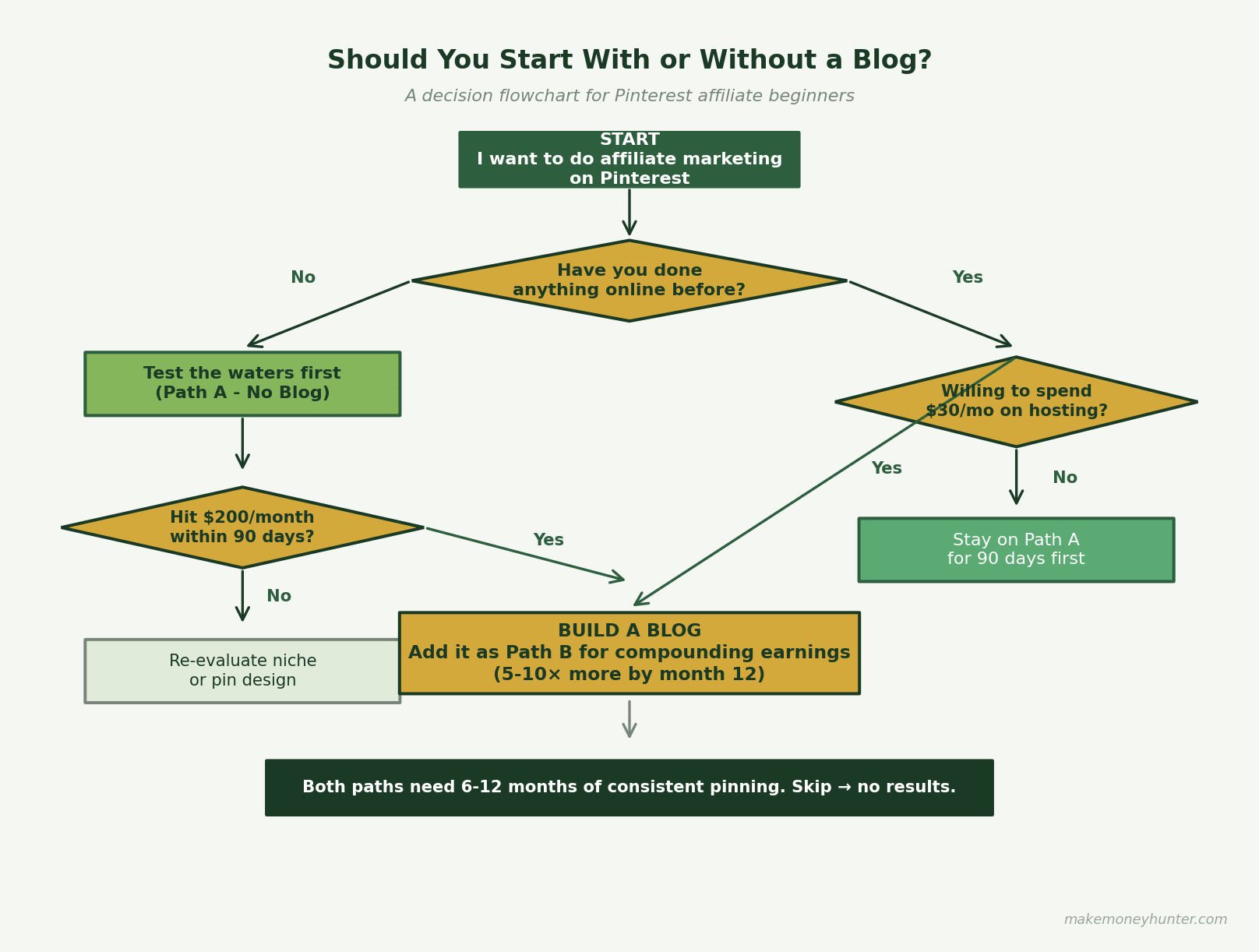
If you’re trying to decide which path fits your situation, here’s a quick decision flowchart:
FAQ
Can I do affiliate marketing on Pinterest without spending any money?
Yes. A free Pinterest business account, free Canva account, and free affiliate program memberships will get you started. The only costs are time. Most successful Pinterest affiliates eventually upgrade to Canva Pro ($13/month) and Tailwind ($15/month) for scheduling, but neither is required to begin.
Which affiliate networks work best on Pinterest in 2026?
ShareASale, Impact, CJ Affiliate, RewardStyle/LTK, and Awin are the main ones that explicitly allow direct Pinterest promotion. Avoid Amazon Associates for direct Pins — use Amazon links inside your blog posts instead.
How long until I make my first affiliate commission on Pinterest?
For most people, somewhere between 4-12 weeks of consistent pinning. The first commission is psychologically huge but financially small — usually $5-30. Scaling from there is where the actual work happens.
Do I need a lot of Pinterest followers to make money?
No. Pinterest is a search engine, not a social network. Your follower count barely matters. What matters is whether your Pins show up in search results and category feeds. A new account with great Pins can outperform an old account with 50,000 followers and poor Pin design.
Is Pinterest affiliate marketing still worth starting in 2026?
Yes, with caveats. The platform is more crowded than it was in 2020, and the algorithm rewards consistency over volume. But buying intent on Pinterest is still higher than almost any other social platform. If you can commit to 6-12 months of consistent effort, it’s still one of the most accessible affiliate income paths available.
Final Thoughts
One last thing — ignore anyone who tells you Pinterest affiliate marketing is “passive income.” It’s not, at least not in the way the gurus sell it. You’re front-loading the work. The first 100 Pins are work. The next 100 are work. Then somewhere around Pin 300, the early ones start compounding, and the math shifts in your favor.
That’s a much better deal than passive — it’s an asset you’re building, and it keeps paying as long as you keep showing up. Pick your niche, set up your business account this week, and start pinning. The hardest part of this whole business is starting; everything after that is just iteration.
Pinterest is a piece of the puzzle, not the whole thing. But for someone starting from zero today, with no audience and no budget, it’s one of the most accessible pieces I can recommend.