Last quarter, I pulled the public sales data on a single Etsy seller pushing Canva templates. The shop had 847 templates listed and was making roughly $4,200 a month — almost all of it passive after the initial design work. That number isn’t an outlier. It’s the median for a seller who treats this like a real business instead of a weekend experiment.
Canva went from a design tool to a full-blown income engine somewhere around 2022, and the trend has only accelerated. With over 230 million monthly active users worldwide as of 2025, the demand for ready-made templates, social graphics, and printables keeps growing. The catch: most of the “make money with Canva” advice online is recycled fluff. People skip the platform mechanics, the pricing reality, and what actually sells in 2026.
This guide breaks down 10 ways to make money with Canva that are working right now. Some take a weekend to set up. Others compound for years. I’ll tell you the realistic income range for each, who it’s actually suited for, and the mistakes that quietly kill most beginners. No hype, no “$10,000 in 30 days” lies — just the methods I’d recommend if you asked me at a coffee shop.
Why Canva Became a Side Hustle Goldmine in 2026
Here’s what most guides skip — the part that actually determines which method you should pick. You need to understand why Canva works so well as an income source in the first place.
Canva isn’t valuable because it’s a design tool. Figma is more powerful. Adobe Express has deeper integrations. Canva won because it removed the design skill barrier completely. That created an enormous secondary market: millions of small business owners, course creators, bloggers, and Instagram users who need designs but can’t (or won’t) design from scratch.
You’re not selling designs to designers. You’re selling shortcuts to non-designers. That’s a much bigger market, and it pays better than most beginners assume.
Three more reasons the timing is right in 2026:
- Canva’s Affiliate Program pays up to $36 for each new Canva Pro subscriber — straightforward, recurring payments with regular Paypal payouts.
- Etsy’s digital products category grew over 35% year-over-year as of late 2024, with templates and printables leading the pack (Etsy investor reports).
- AI tools inside Canva (Magic Studio, Magic Design, AI image generation) cut template creation time by 60–70%. You can produce in an afternoon what took a full day in 2023.
Bottom line: low barrier, big audience, AI leverage. That’s the rare combination that creates real opportunity. Now let’s get to the methods.
1. Sell Canva Templates on Etsy
This is the #1 entry point for a reason. Etsy gives you traffic, a built-in payment system, and buyers who are already in “I want a digital download” mode. You design a template in Canva, save the editable link, and Etsy handles the rest.
One quick search on Etsy for “canva templates” shows what’s actually selling — and the numbers are eye-opening for anyone who thinks this niche is too saturated.
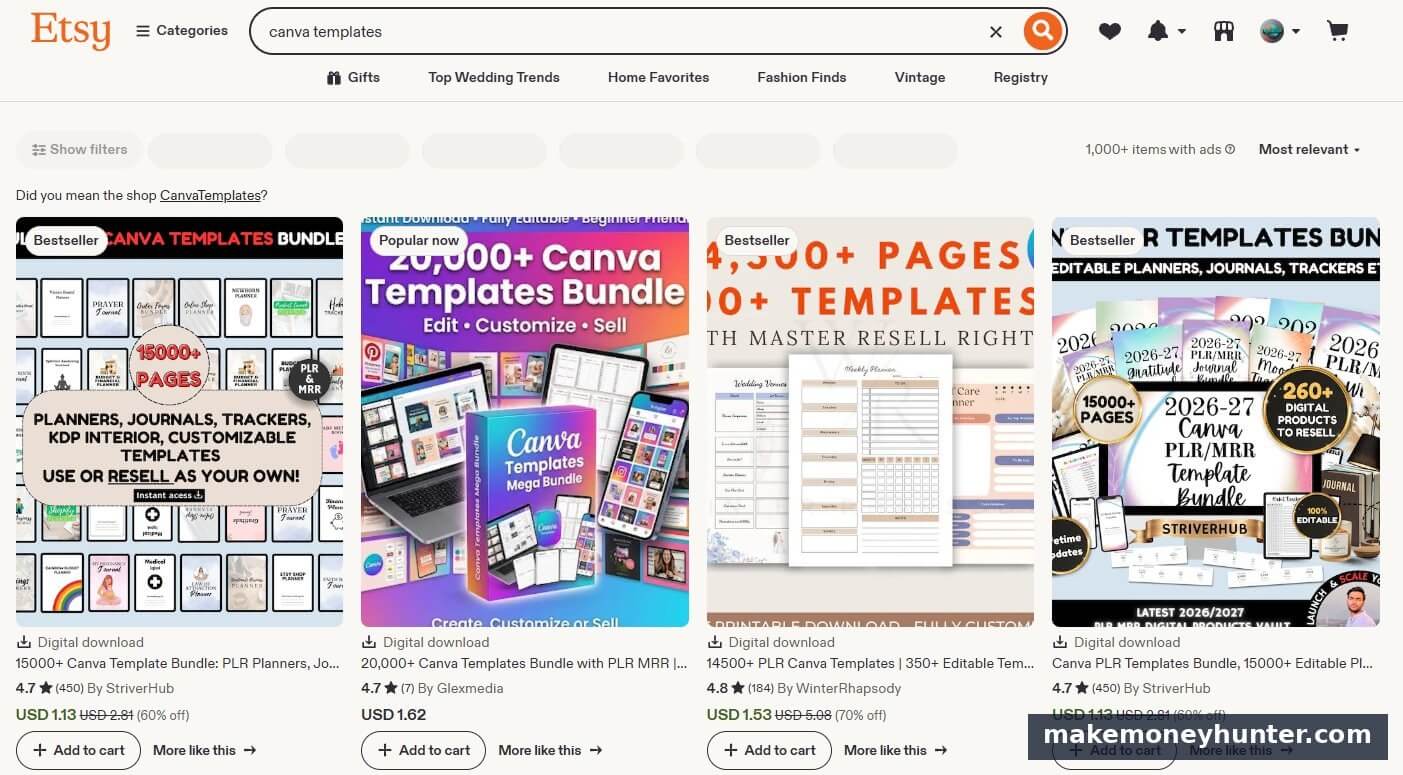
Notice the pattern in the top results: these aren’t single templates. They’re massive bundles — 15,000+ pages, 20,000+ templates, 4,500+ pages with master resell rights. The top sellers in 2026 aren’t winning on uniqueness, they’re winning on perceived value-per-dollar. A $1.62 bundle of 20,000 templates feels like a steal, even though the buyer will probably only use 50.
That’s the new game. The old “niche down to wedding planners in Texas” strategy still works for premium positioning, but the volume sellers are stacking bundles.
Realistic income range: $50–$500/month in the first 3 months, $1,000–$5,000/month for established shops with 50+ listings. Top sellers in popular niches (wedding planners, social media kits, business templates) clear $10,000+/month, but those shops typically have 500–1,500 listings and 2+ years of compounding reviews.
What actually sells in 2026:
- Instagram post and story templates in cohesive 30-pack bundles ($12–$25)
- Resume and CV templates targeting specific industries ($8–$18)
- Wedding planning printables — invitations, seating charts, day-of timelines ($5–$15 each, $30+ as bundles)
- Digital planner pages for GoodNotes and Notability ($10–$30)
- Pinterest pin templates for bloggers ($10–$20)
Here’s the part most guides skip: bundle, don’t sell singles. A single $3 grocery list won’t survive Etsy’s saturation. A “Complete Home Management Binder” with 50 pages at $12 will. The 2026 strategy is value-stacking, not endless niche-down.
You’ll also need to check the “Created with AI” disclosure box if you used AI generation as the core of your design — Etsy made this mandatory in 2024 and they enforce it. Using AI for inspiration or background elements is fine and doesn’t require disclosure. Using Magic Design to generate the whole template does.
If you want to go deeper on this specific platform, I’ve broken down the full Etsy seller strategy in this guide on making money on Etsy — including keyword research and listing optimization.
How Big Is the “Canva Templates” Search Demand?
If you’re wondering whether this niche has real volume or is already saturated, the data tells a clear story.
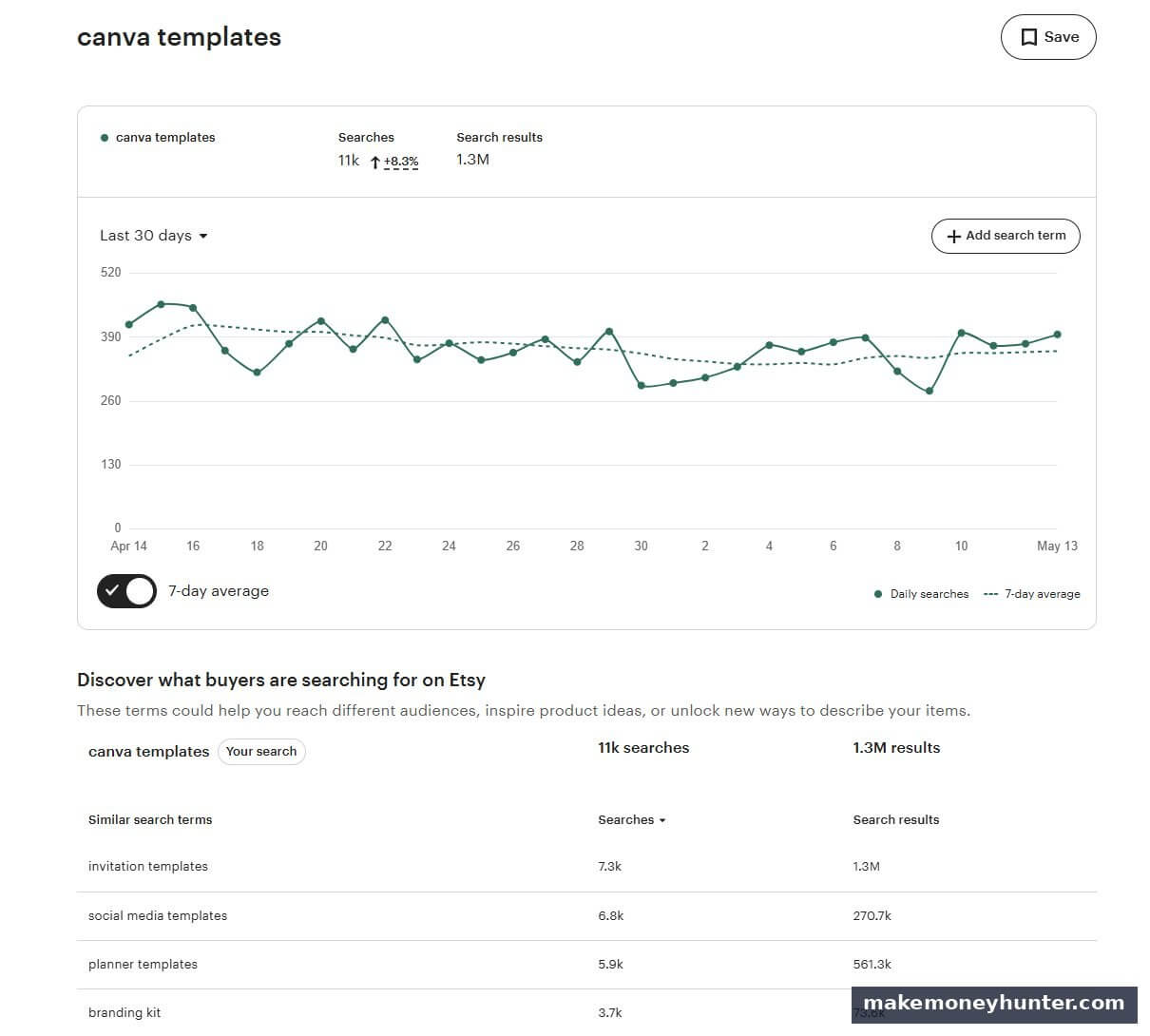
The keyword “canva templates” pulls 11,000 monthly Etsy searches — and Etsy searches are buyer-intent searches, not Google’s mix of researchers and shoppers. That’s a 8.3% growth trend month-over-month.
Now look at the related searches: “invitation templates” at 7.3K, “social media templates” at 6.8K, “planner templates” at 5.9K, “branding kit” at 3.7K. Each one of those is a sub-niche you could build a shop around. Add them up and you’re looking at 30,000+ monthly buyer-intent searches just on Etsy alone.
This is why I always tell people not to obsess over saturation. Yes, there are 1.3M results for “canva templates.” But there are also 11K buyers searching every single month. If your shop captures even 0.1% of that traffic — 11 buyers a month — at a $15 average order value, you’re already at $165/month from one keyword. Stack 8-10 keywords like this and the math gets interesting.
2. Sell Templates on Your Own Site with Gumroad or Payhip
Etsy gives you traffic but takes 6.5% transaction + listing fees + ads if you want visibility. Once you’ve validated a few products, moving to your own platform keeps more of the money.
Gumroad has become the default home for indie template creators in 2026. The catalog is massive and reviews are visible everywhere.
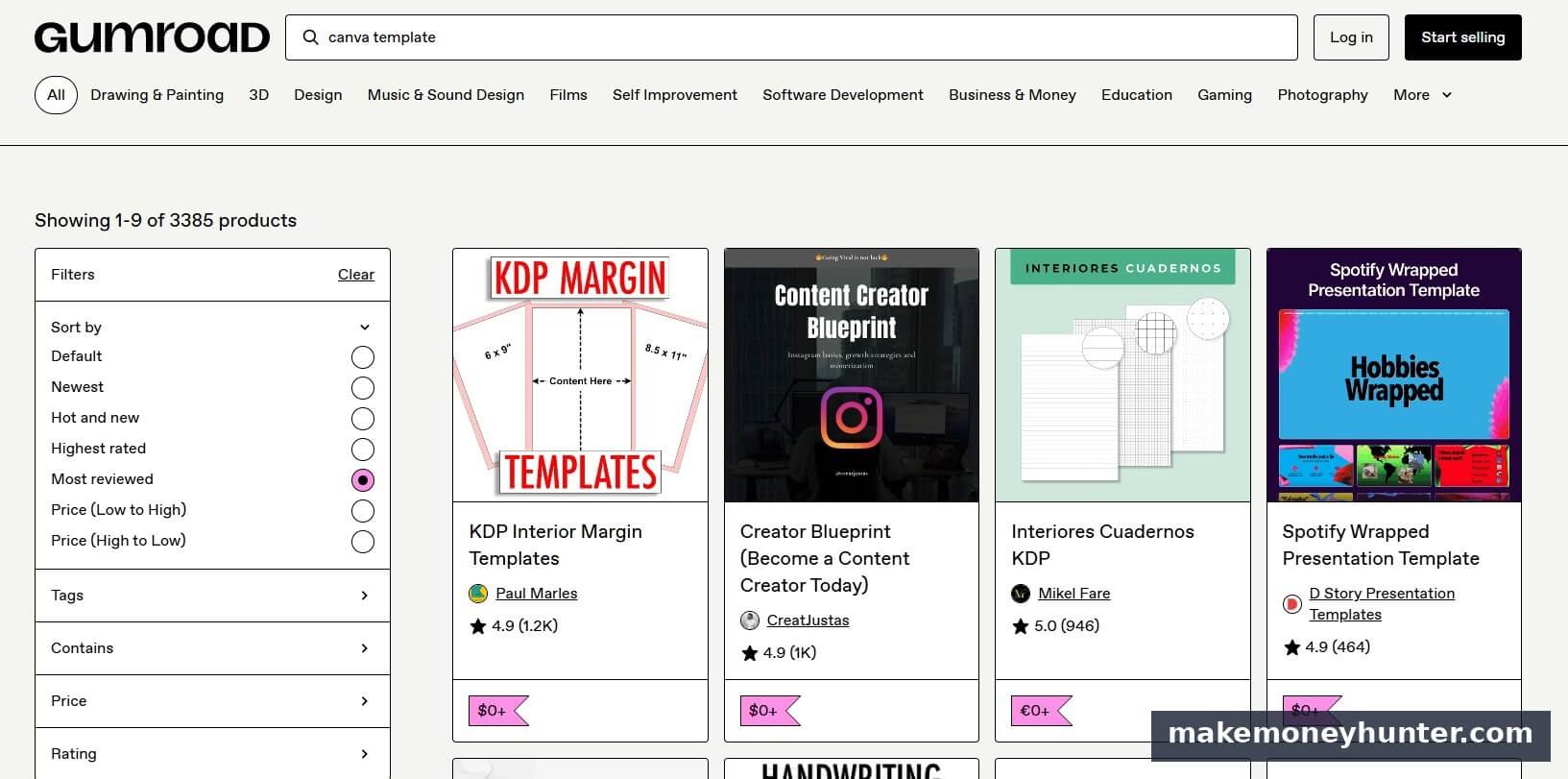
3,385 Canva template products on Gumroad alone — and the top sellers have hundreds to thousands of reviews. “KDP Interior Margin Templates” has 1.2K reviews. “Creator Blueprint” has 1K reviews. These aren’t side projects — they’re real businesses run by solo creators.
Gumroad charges 10% of each sale (no monthly fee). Payhip charges 5% on the free plan and 0% on a $29/month plan. Both let you embed checkout into a blog, share direct links on social, and avoid Etsy’s algorithm games.
Realistic income range: Heavily dependent on your traffic source. Creators with an email list of 5,000+ regularly clear $2,000–$8,000/month. Without an audience, sales will be slow — you’re trading platform reach for higher margins.
The smart move is to run both. Use Etsy as your discovery channel, then build an email list from buyers (Etsy lets you include a thank-you PDF with your site link) and sell premium upgrades through Gumroad. The customer who paid $12 for your bundle on Etsy is the same customer who’ll pay $47 for your “complete library” on Gumroad.
This dual-platform approach is how most six-figure template sellers actually structure their business. The “I quit Etsy” videos on YouTube are usually misleading — they quit selling on Etsy after building an audience there for years.
3. Become a Canva Affiliate
The Canva Affiliate Program is one of the cleaner SaaS affiliate setups in 2026. You get a unique link, share it through your content, and earn commission when someone signs up for Canva Pro through it.
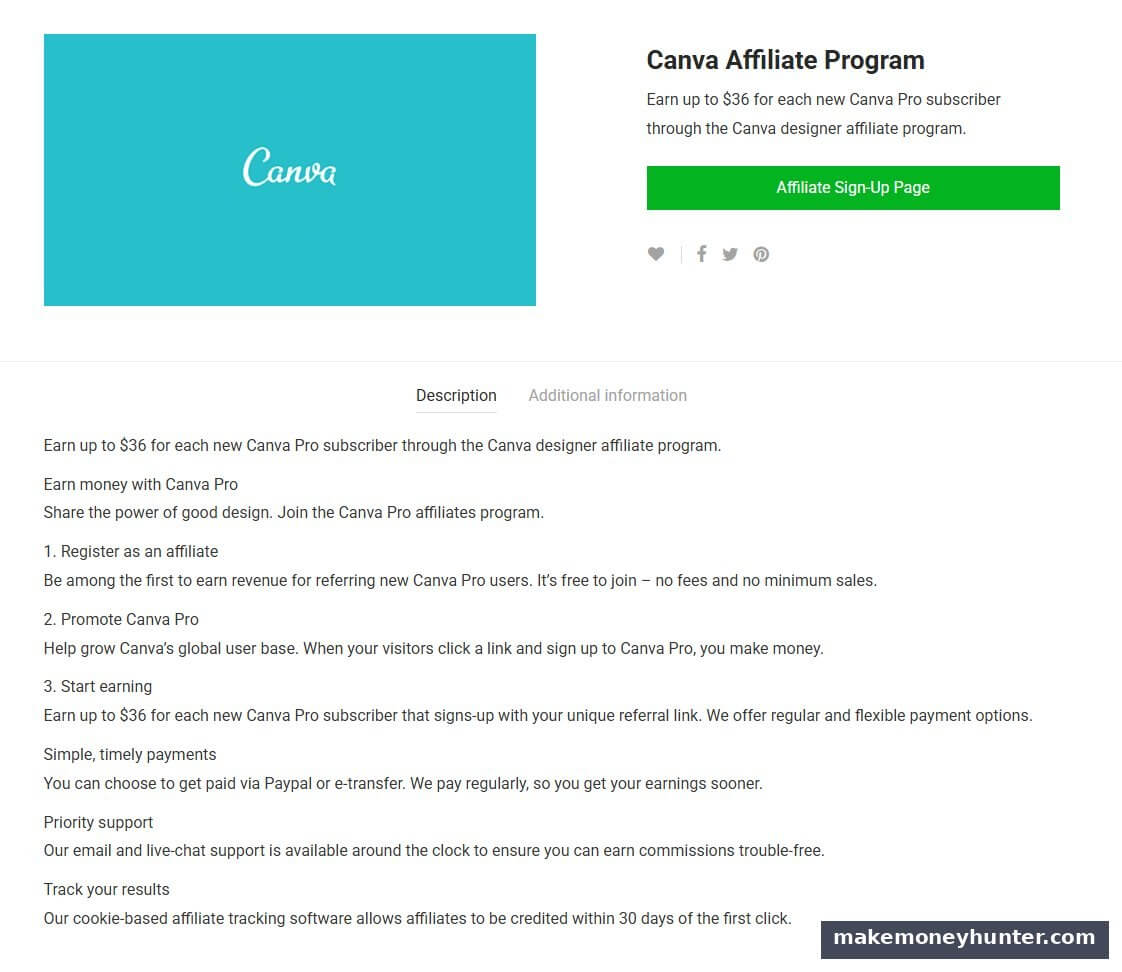
The official program pays up to $36 for each new Canva Pro subscriber through your referral link. It’s free to join, no minimum sales requirements, and payouts come through Paypal or e-transfer with a 30-day cookie window.
The math gets serious when you compound it. Canva Pro costs $12.99/month or $119.99/year. If your content drives even 20 signups a month, that’s $720. At 100 signups (which is doable with a moderately trafficked blog or YouTube channel), you’re at $3,600/month from this single program.
Realistic income range: $100–$500/month for affiliates with a small blog or YouTube channel (under 5,000 monthly visits). $1,500–$8,000/month for content creators in design/business niches with 20,000+ monthly visits and well-placed content.
What works for Canva affiliate content:
- “Canva Pro vs Free” comparison articles (commercial intent, ready-to-buy traffic)
- “Best Canva templates for [specific use case]” lists
- YouTube tutorials showing Canva Pro features (the Pro Magic tools especially)
- Pinterest pins linking to your blog reviews
The mistake beginners make: stuffing affiliate links everywhere. Conversion rate matters more than link quantity. Better to build 5 high-converting articles than 50 links scattered across random posts.
If you’re new to this revenue model, my complete beginner’s guide to affiliate marketing walks through the full setup process — content strategy, link placement, disclosure rules, and conversion optimization.
4. Offer Canva Design Services on Fiverr or Upwork
This is the fastest path to income if you can use Canva confidently. You’re not building products — you’re selling time directly. The trade-off: it’s not passive, but the cash starts flowing in weeks rather than months.
The pricing range on Fiverr is wider than most beginners realize.
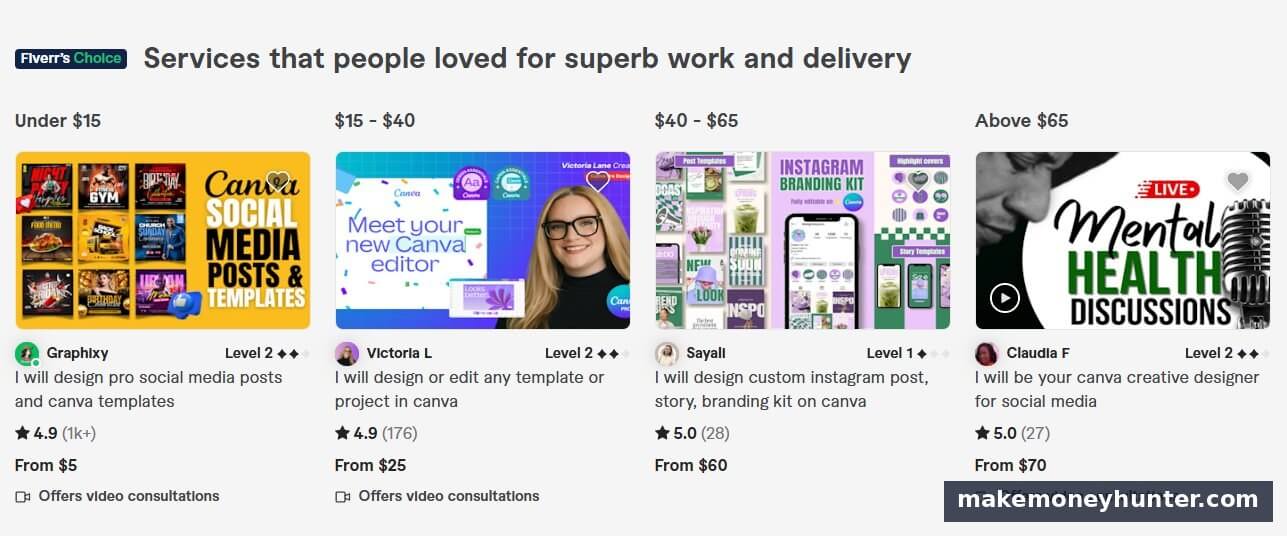
From the screenshot above, you can see established Canva sellers operating at four very different price points: under $15 (volume play, 1K+ reviews), $15-$40 (mid-tier specialists), $40-$65 (premium positioning), and above $65 (high-end branded work). Notice the ratings — all 4.9 or 5.0 stars. Quality matters at every tier; pricing is about positioning, not skill.
Common gigs that sell well in 2026:
- Custom Instagram template packs ($25–$150)
- Pinterest pin design for bloggers ($5–$30 per pin, often bundled)
- Logo and brand kit creation ($35–$200)
- Lead magnet design (ebooks, checklists, workbooks for course creators) — $75–$400
- Resume design ($20–$80)
Realistic income range: $300–$800/month part-time on Fiverr in the first 3–6 months. Established sellers clear $2,000–$6,000/month, with top-tier Pro sellers passing $10,000/month. Upwork tends to pay more per project but takes longer to land clients.
One thing I’ve watched newcomers get wrong: trying to compete on price. The $5 Fiverr gigs you see at the top? Those sellers have 2,000+ reviews and operate at volume. As a new seller, you’ll burn out matching that pricing. Position higher ($25–$50 entry tier) and emphasize specifics — “Instagram templates for wellness coaches” beats “I will design Instagram posts.”
This path also has a hidden benefit: clients become your case studies. Every gig you complete is portfolio material for higher-paying work or your own template shop later.
5. Sell Printables on Etsy, Pinterest, and Your Blog
Printables are templates’ simpler cousin — PDF designs that buyers print at home or use digitally. Lower price points ($3–$15), but huge buyer volume, especially around seasonal gift-giving and back-to-school periods.
What sells consistently:
- Wall art prints — quotes, abstract designs, kids’ room art
- Educational worksheets — homeschool curricula, ABC printables, math practice
- Planner inserts — meal planners, budget trackers, habit logs
- Greeting cards and invitations
- Coloring pages for adults and kids
Realistic income range: $100–$1,500/month for active sellers with 100+ listings. Top printable shops clear $5,000+ monthly during peak seasons (October–December especially).
Canva makes printable creation almost trivial — you design, export as high-resolution PDF (300 DPI minimum for print quality), and list. The volume strategy works well here: you can produce 5–10 simple printables in a single afternoon, where one template might take that same afternoon.
Pinterest is the secret weapon for driving traffic. A friend of mine runs printables sales primarily through Pinterest pins linking to Etsy listings — about 73% of her sales come from Pinterest discovery, not Etsy search. The platform’s discovery algorithm rewards consistent pinning over follower count, which makes it accessible even with zero existing audience. If you want the full breakdown, my guide to making money on Pinterest covers the strategy in depth.
6. Create and Sell Online Courses About Canva Itself
The meta move: teach people how to do the thing you’re doing. Canva courses sell well because there’s constant demand from new users, and the platform updates frequently enough to keep content fresh.
Take a look at what’s currently selling on Udemy.
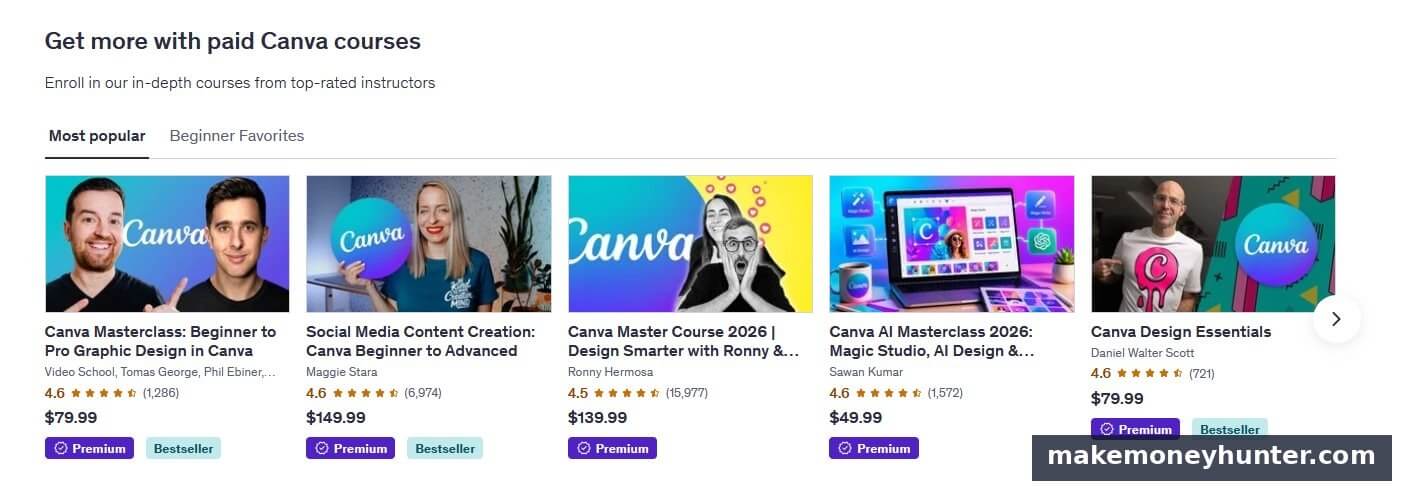
Look at the social proof — “Social Media Content Creation: Canva Beginner to Advanced” has 6,974 reviews. “Canva Master Course 2026” has 15,977 reviews. Even at the lower end, “Canva Design Essentials” has 721 reviews at $79.99. If we assume conservatively that 1 in 20 enrollments leaves a review, that’s roughly 140,000 paid enrollments for the top Canva courses. Each course earns the instructor a percentage of every sale, even years after publication.
Course types that perform well:
- “Canva for Beginners” on Skillshare and Udemy ($20–$50 retail, royalties on each enrollment)
- “How to Sell Canva Templates” as a premium course ($97–$297 on your own platform)
- Niche-specific courses — “Canva for Real Estate Agents,” “Canva for Wedding Planners” ($47–$197)
- Bundled course + templates — teach the skill and give the assets ($147–$497)
Realistic income range: Skillshare creators with 1–2 published classes typically earn $50–$300/month from royalties. Udemy instructors with established courses see $200–$2,000/month per course. Self-hosted courses on platforms like Teachable can clear $1,000–$20,000+ per launch with the right audience.
The honest reality: course creation takes 40–80 hours of focused work for a quality result. Don’t romanticize this — it’s serious upfront effort. But once published, a Canva course can generate income for 2–4 years before significant updates are needed.
One trick I’ve seen work: bundle a 5-hour course with 100 done-for-you templates. Buyers feel they’re getting both education and assets, which justifies a $147+ price tag where a course alone would cap at $97.
7. Build a Pinterest Account and Monetize Through Affiliate Links
Pinterest is a search engine disguised as a social platform, and Canva is purpose-built for the visual content Pinterest rewards. This is one of the most underrated paths in 2026.
The model works like this: you create Canva designs as Pinterest pins, link them to either affiliate offers, your own products, or a blog post with ads and affiliate links. Pins compound over time — a pin you create today can drive traffic for years.
Niches that work especially well:
- Personal finance and budgeting (high-value affiliate offers)
- Home decor and DIY (Amazon affiliate + product affiliates)
- Health and wellness (supplement and program affiliates)
- Travel destinations (booking platform affiliates)
- Business and side hustle content (course and SaaS affiliates)
Realistic income range: $0–$200/month for the first 4–6 months while accounts gain traction. Established creators with 50,000+ monthly viewers commonly earn $500–$4,000/month. The top earners I’ve seen clear $10,000+/month, but they have 500,000+ monthly viewers and have been pinning consistently for 18+ months.
Patience is the real entry fee. Pinterest moves slower than Instagram or TikTok, but the traffic it sends is more search-intent, which means higher conversion rates on affiliate offers. The platform compounds in ways short-form video platforms don’t.
8. Design Social Media Content for Local Businesses
While everyone’s chasing online clients, there’s a quieter opportunity: walk into any restaurant, salon, or gym in your area, and most of them have terrible Instagram content. They need someone who can make them look professional. Canva makes that doable in an evening.
Service packages that work:
- Social media management retainer — 12–20 posts/month, $300–$1,200/month per client
- One-time brand kit + 30-day content pack — $500–$1,500
- Event flyer design for restaurants and venues — $50–$200 per flyer
- Menu redesign for restaurants — $200–$600
Realistic income range: $500–$2,000/month with 2–4 local clients, scaling to $4,000–$8,000/month with a roster of 8–12 retainer clients. This path requires local networking and outreach, which most online creators avoid — which is exactly why the opportunity is wide open.
The hidden advantage: local clients pay invoices, they don’t haggle over $20, and they refer other business owners. Three good referrals can fill your client roster faster than six months of Fiverr grinding.
9. Sell Done-For-You Lead Magnets to Online Coaches and Course Creators
Every coach, consultant, and course creator needs lead magnets — ebooks, workbooks, checklists, and templates that they give away to build email lists. Most of them don’t have design skills. You design these in Canva and sell them as private label rights (PLR) products or custom commissions.
Product structures:
- PLR lead magnet bundles — 10 editable lead magnets in a niche, sold for $47–$147 per bundle
- Custom lead magnet commissions — $150–$800 per project
- Workbook + tutorial bundles — sold to fitness coaches, business consultants, and online educators
Realistic income range: $400–$2,500/month for solo creators offering PLR bundles. Custom commission work can clear $3,000–$7,000/month with steady client flow.
This niche has less direct competition than general template selling because it requires understanding what coaches actually need. If you’ve spent time in the online business world or follow course launches closely, you have an edge most general designers don’t.
10. Become a Canva Verified Expert or Brand Designer
Canva has a paid expert directory where verified designers get matched with businesses needing professional design help. The application bar is higher than Fiverr, but the rates and client quality are noticeably better.
Canva also runs design contests and a Creator Marketplace where approved designers can sell templates directly through the Canva platform itself — earning royalties when other Canva users purchase or use their designs.
Realistic income range: $1,500–$10,000/month for established Canva Verified Experts. Creator Marketplace earnings are smaller and harder to predict, typically $50–$1,000/month per top-performing template, with the very best designers earning more.
This path takes longer to access. Canva wants a portfolio that demonstrates consistent quality across multiple categories. But once you’re in, the platform itself feeds you clients — you’re not constantly hunting on Upwork or marketing on Instagram. For designers who want stable, higher-value work, it’s worth pursuing as a 12-month goal.
How to Pick the Right Canva Method for You
Ten options is overwhelming. Here’s how I’d narrow it down based on your current situation.
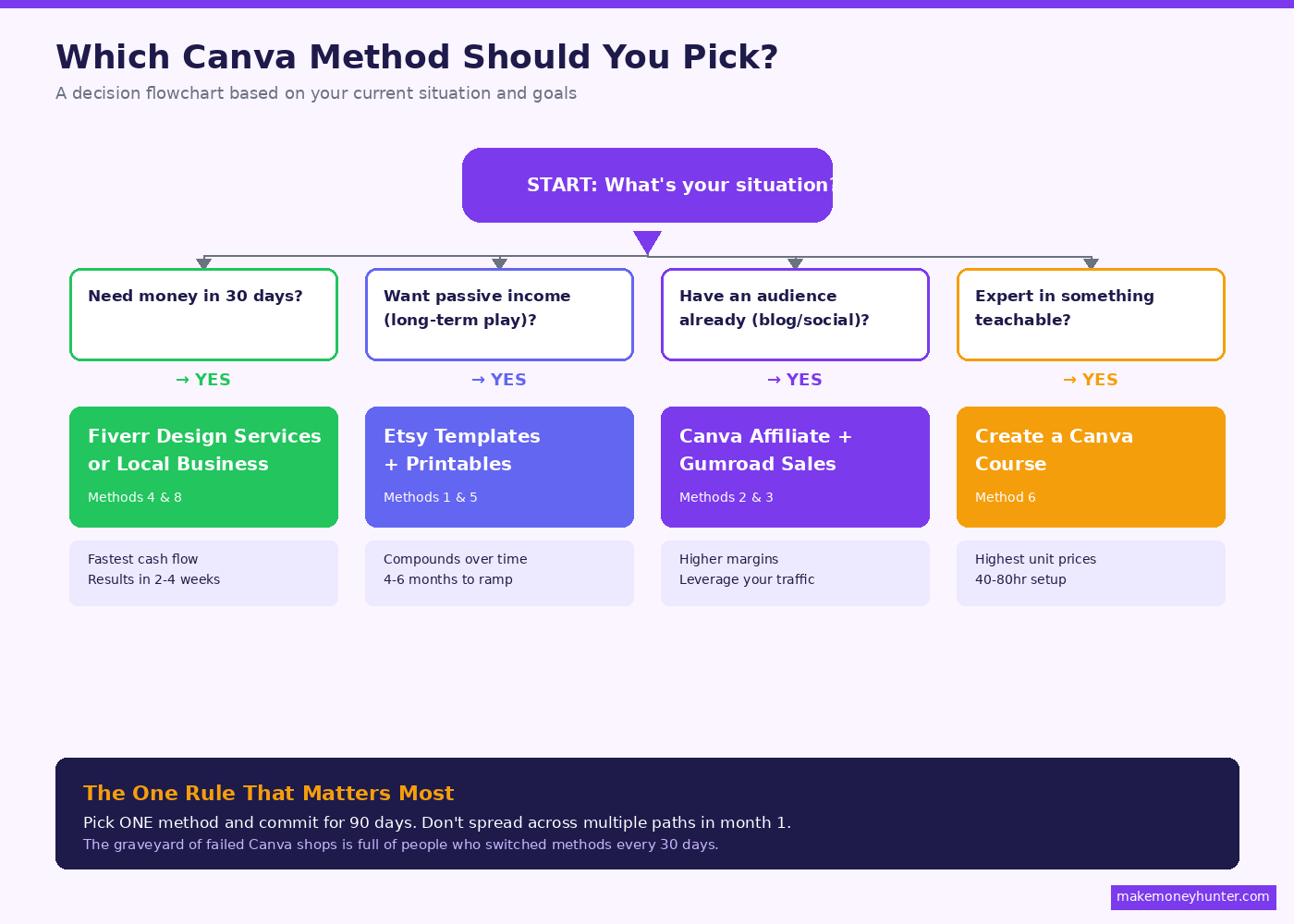
If you need money in the next 30 days: Start with Canva design services on Fiverr (method 4) or local business social media (method 8). These pay fastest. Templates and affiliate marketing take 60–90+ days to generate meaningful income.
If you want long-term passive income: Build an Etsy shop with templates and printables (methods 1 and 5). Be honest with yourself — this means committing to 4–6 months of consistent listing creation before income gets interesting. The broader landscape of passive income opportunities follows similar compounding rules — patience is what separates winners from quitters.
If you already have an audience: The Canva affiliate program (method 3) and selling templates on your own site (method 2) will outperform Etsy by a wide margin. Your existing readers/viewers convert better than cold Etsy shoppers.
If you’re a teacher, consultant, or expert in something: Create a Canva course teaching your specialty (method 6). Pairing your existing expertise with a teachable skill is the highest-leverage path.
Don’t try to do all 10 at once. Pick one, give it 90 days of consistent effort, then evaluate. Most people who fail at making money with Canva fail because they spread thin and quit before any single method had time to compound.
The Tools You Actually Need (Beyond Free Canva)
You can start free, but a few tools accelerate the path noticeably:
- Canva Pro ($119.99/year) — Brand Kit, Magic Resize, premium templates and elements. Pays for itself within 2–3 template sales.
- Everbee or eRank ($14–$30/month) — Etsy keyword research. The difference between guessing and knowing what buyers search for.
- A simple email tool — ConvertKit, Beehiiv, or MailerLite all have free tiers. Capturing buyer emails is the single highest-ROI move for repeat sales.
- Tailwind (~$15/month) — Pinterest scheduling. Essential if you’re driving traffic from Pinterest.
Total minimum monthly cost to operate seriously: about $30–$50. Compared to nearly every other business model, the operating costs are nothing.
Common Mistakes That Quietly Kill Most Canva Income Attempts
I’ve watched a lot of people try this and fail. The failure patterns are predictable:
- Listing 5 products and waiting for sales. The realistic threshold for Etsy momentum is 30–50 listings. Below that, you don’t have enough surface area to get discovered.
- Copying trending templates without changing them meaningfully. Canva has terms of service against reselling template elements verbatim, and Etsy will remove shops that get reported.
- Pricing at the floor. A $3 template signals “amateur” to buyers. Most successful template shops cluster at $12–$25 for individual items, $30–$60 for bundles.
- No SEO research before creating. Without keyword data, you’re guessing. Spend $14 on Everbee for a month and learn what actually gets searched in your niche.
- Quitting at month 2. Templates and affiliate content compound slowly. Most shops don’t have their breakout month until somewhere between months 4–9. The graveyard of failed Canva shops is full of people who would’ve made it if they’d held on 60 more days.
If you can avoid these five mistakes alone, you’ll be ahead of about 80% of the people who start this year.
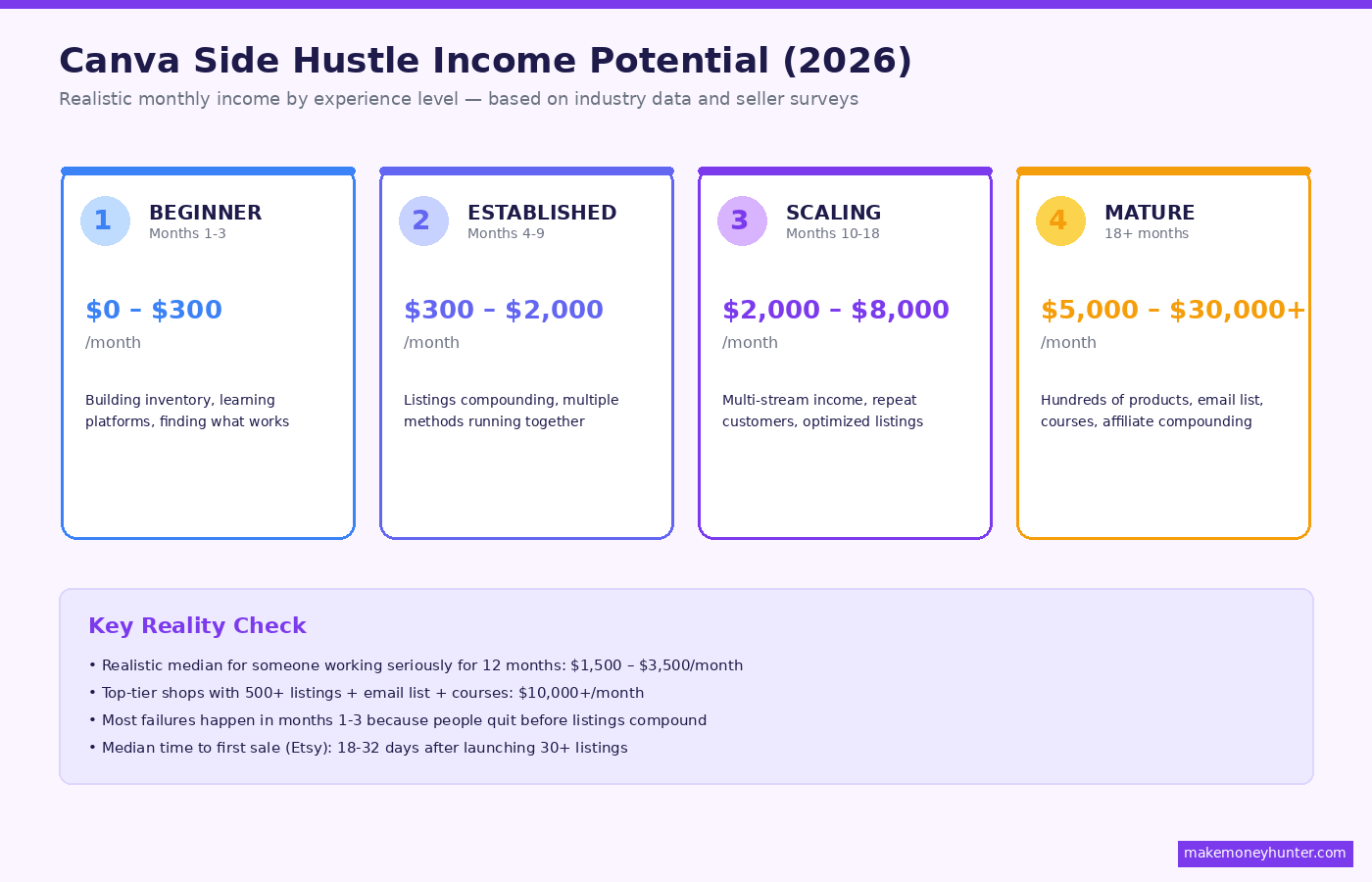
How Much Money Can You Realistically Make with Canva?
Let me ground this with actual ranges instead of hype:
- Beginner (months 1–3): $0–$300/month. You’re building inventory, learning the platforms, and finding what works.
- Established (months 4–9): $300–$2,000/month. Listings are compounding, you have a few methods running together, and you’re starting to see patterns.
- Scaling (months 10–18): $2,000–$8,000/month. Multiple income streams running, repeat customers, optimized listings.
- Mature business (18+ months): $5,000–$30,000+/month. Top operators have hundreds of products, an email list, courses, and affiliate income compounding together.
The realistic median for someone who treats this seriously for 12 months is around $1,500–$3,500/month. That’s not life-changing yet, but it’s a real second income, and the system keeps compounding if you keep at it.
The unrealistic version — the version most YouTube videos sell you — is “make $10,000 in your first month.” I haven’t seen it happen organically, and I’ve looked carefully. The people who appear to do this almost always have an existing audience, an existing brand, or an existing email list before they “started.” Without one of those, you’re playing a different game.
Frequently Asked Questions
Can I make money with the free version of Canva?
Yes, though Canva Pro accelerates the process. The free version gives you access to thousands of templates, design tools, and basic export options. You can absolutely build templates, design printables, and offer client services on the free plan. Pro pays for itself once you start selling — features like Brand Kit, Magic Resize, and premium element access save hours of work weekly.
Is selling Canva templates allowed under Canva’s terms of service?
Yes, with one important caveat: you can sell your own designs created using Canva, but you cannot resell Canva’s stock photos, illustrations, or premium elements as standalone products. The design as a whole template that combines elements you’ve arranged is yours to sell. The individual stock photo inside it isn’t. Read Canva’s content licensing policy directly to understand the full scope.
Do I need design experience to make money with Canva?
No, but you need taste. Canva removes the technical skill barrier, but you still need to recognize what looks good versus generic. The fastest way to develop this is to study what sells in your niche — browse top-selling Etsy shops, save Pinterest pins that perform well, and notice patterns in color, typography, and composition.
How much should I price my Canva templates?
For Etsy, most successful individual templates price at $8–$18. Bundles of 5–10 related templates sell for $20–$45. Comprehensive systems (50+ pages) command $30–$80. Avoid pricing under $5 — it signals low quality and the platform fees eat your margin. Test prices in $2–$3 increments and watch conversion rates.
How long does it take to start earning money with Canva?
If you’re offering design services (Fiverr, Upwork, local clients), you can land your first paid project within 2–4 weeks. For Etsy template sales, plan for 60–120 days before consistent sales kick in, as listings need time to gain search visibility and reviews. Affiliate marketing through content takes the longest — usually 4–9 months for traffic to build to a meaningful level.
Final Thoughts
Making money with Canva isn’t complicated, but it isn’t fast either. The methods above are all real — I’ve watched friends, students, and clients succeed with each one. What separates the people who hit $3,000/month from the people who quit at $100 isn’t talent or luck. It’s the willingness to commit to one method for 90 days before evaluating.
Don’t try to run 10 methods at once. Pick the one that matches your current situation — fast cash, passive income, or audience-leveraged — and spend the next 30 days building only that. Set a target of 30 new Etsy listings, or 10 Fiverr gigs filled, or one published Canva course. That single focused push will teach you more about this space than reading 50 more guides.
The market for Canva-created products keeps growing. AI tools keep making creation faster. The opportunity window is genuinely open. The only question is whether you’ll be one of the people actually building in it, or one of the people still reading about it next year.