

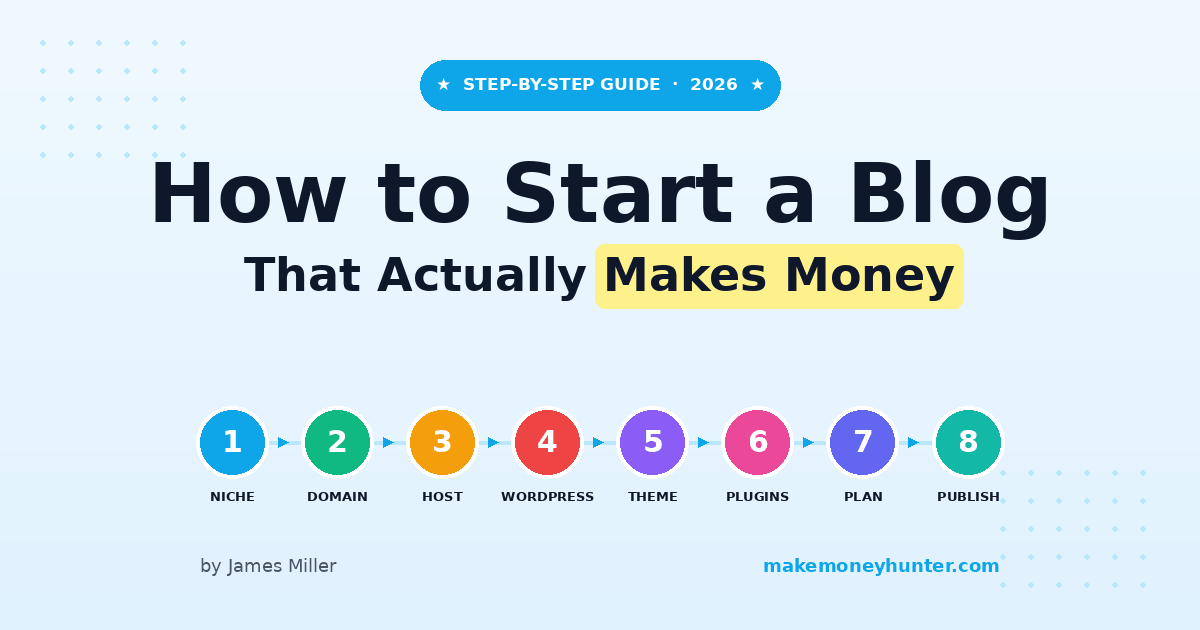
My first blog earned $12.47 in its first month. Three years later, the same niche site was generating over $3,200 a month — almost entirely while I slept. That’s the strange math of blogging: the gap between “doing it wrong” and “doing it right” isn’t talent or budget. It’s a handful of decisions you make in the first 30 days.
If you’ve been searching how to start a blog and make money, you’ve probably noticed the same problem I had back in 2010 — most guides skip straight from “buy a domain” to “earn passive income” with no honest middle. This guide doesn’t do that. It walks you through the exact 30-day plan I’d give a friend in 2026, including the AI tools that didn’t exist when I started, the hosting setup that actually matters, and the honest income timeline based on what I’ve seen across 100+ projects.
By the end of this guide you’ll know how to start a blog the right way, the four monetization paths that actually pay, and where most beginners quit (usually around month 3).
What Does It Actually Take to Start a Blog?
Starting a blog in 2026 takes three things: a domain name ($10–$15/year), web hosting ($65–$200/year), and content. That’s the technical side. The non-technical side is harder — picking a profitable niche, learning enough SEO to rank, and not quitting in month three when the traffic graph is still a flat line.
Here’s the thing most “start a blog” guides won’t tell you: the platform is the easiest decision you’ll make. WordPress.org powers over 40% of all websites for a reason — it’s free, flexible, and every monetization tool you’ll eventually want plugs into it. The hard part isn’t the setup. The hard part is the next 90 days of writing into the void.
If you want a broader overview before committing, my full blogging for beginners guide covers the mindset and learning curve in more depth. This article assumes you’ve decided to start and just need the steps.
How Much Does It Cost to Start a Blog in 2026?
The honest first-year cost for a real, monetizable blog is between $80 and $250. Not $5/month, not $2,000 — somewhere in that range. Here’s what that breaks down to in 2026 prices:
- Domain name — $10–$15/year. Buy directly from Namecheap, Porkbun, or Cloudflare Registrar. Skip the upsells.
- Web hosting — $65–$200 for the first year on a beginner plan. This is where most of your money goes, and it matters more than people realize.
- Theme — $0 if you use a free WordPress theme like Kadence or GeneratePress. $50–$80 one-time if you want a premium child theme.
- Email tool — $0 for the first 1,000 subscribers on MailerLite or Brevo. You don’t need this in month one.
- Stock photos / design tools — $0. Canva Free + Unsplash covers everything a new blog needs.
I know guides exist that say you can start a blog for $2.95/month. That’s true — for the first 12 months on a promotional Bluehost plan. Then renewal hits at $10.99/month and the cheap math falls apart. Plan for renewal prices from day one and you won’t get surprised.
The two costs worth paying for, not skimping on: hosting and a clean domain name. Everything else can be free in year one.
Step 1: Pick a Profitable Niche (Not a “Passion Niche”)
Most beginners pick a niche based on what they love. That works in maybe 20% of cases. The other 80% end up writing about a topic with no buyers, no search volume, or no advertisers — and they wonder why month six is still $0.
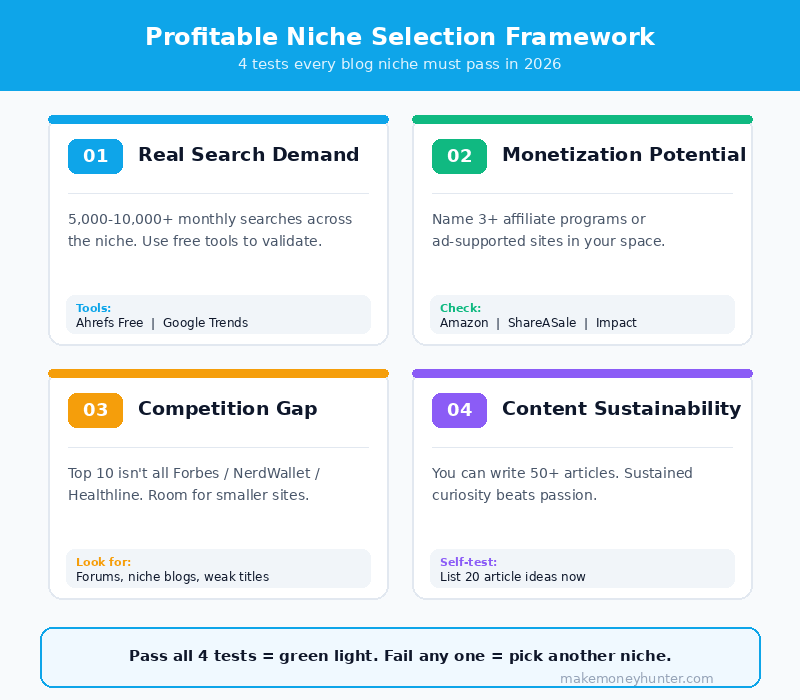
A profitable niche in 2026 passes four tests:
- People are already searching for it. Use a free tool like Google Trends or Ahrefs’ free keyword generator. You want topics with at least 5,000–10,000 monthly searches across the niche.
- Someone is paying for products in this niche. If you can’t name three affiliate programs or ad-supported sites in your topic, that’s a red flag.
- The competition has a ceiling you can break through. Search your top 5 keywords. If every result is from Forbes, NerdWallet, and Healthline — pick a more specific corner.
- You can write 50+ articles about it without losing interest. Passion isn’t the goal. Sustained curiosity is.
Examples of niches I’ve watched perform well in 2026: budget-friendly home gym equipment, RV travel for retirees, AI tools for solo founders, hiking gear reviews for women, and credit card travel hacking. Examples I’ve watched fail: general “lifestyle blogs,” personal journal-style sites, and anything where the writer can’t explain who’s paying whom.
If you’re stuck on this step, I wrote a separate deep-dive on how to choose a blog niche that walks through the three-dimensional framework I use to validate ideas before committing. It’s the single most important decision you’ll make in your first month — worth spending real time on.
Step 2: Choose Your Domain Name and Register It
Your domain is your brand. Once you pick it, you’re stuck with it — changing domains later costs you SEO rankings and is genuinely painful. Spend an hour on this, not five minutes.
Three rules I’ve used for every domain I’ve registered since 2010:
- Stick to .com if possible. Other extensions (.co, .net, .blog) work, but .com still carries the highest trust signal, especially for older readers.
- Keep it under 15 characters. Short domains are easier to type, remember, and share. “thebestbudgettravelblogforyou.com” is a no.
- Avoid hyphens, numbers, and unusual spellings. “Flickr” worked once. It probably won’t work twice.
For broad niches, brandable names beat keyword-stuffed ones. “Wirecutter” tells you nothing about its niche but ranks for thousands of product keywords. “BestBudgetLaptopReviews.com” sounds spammy and ages badly. Aim for something you’d be proud to say out loud.
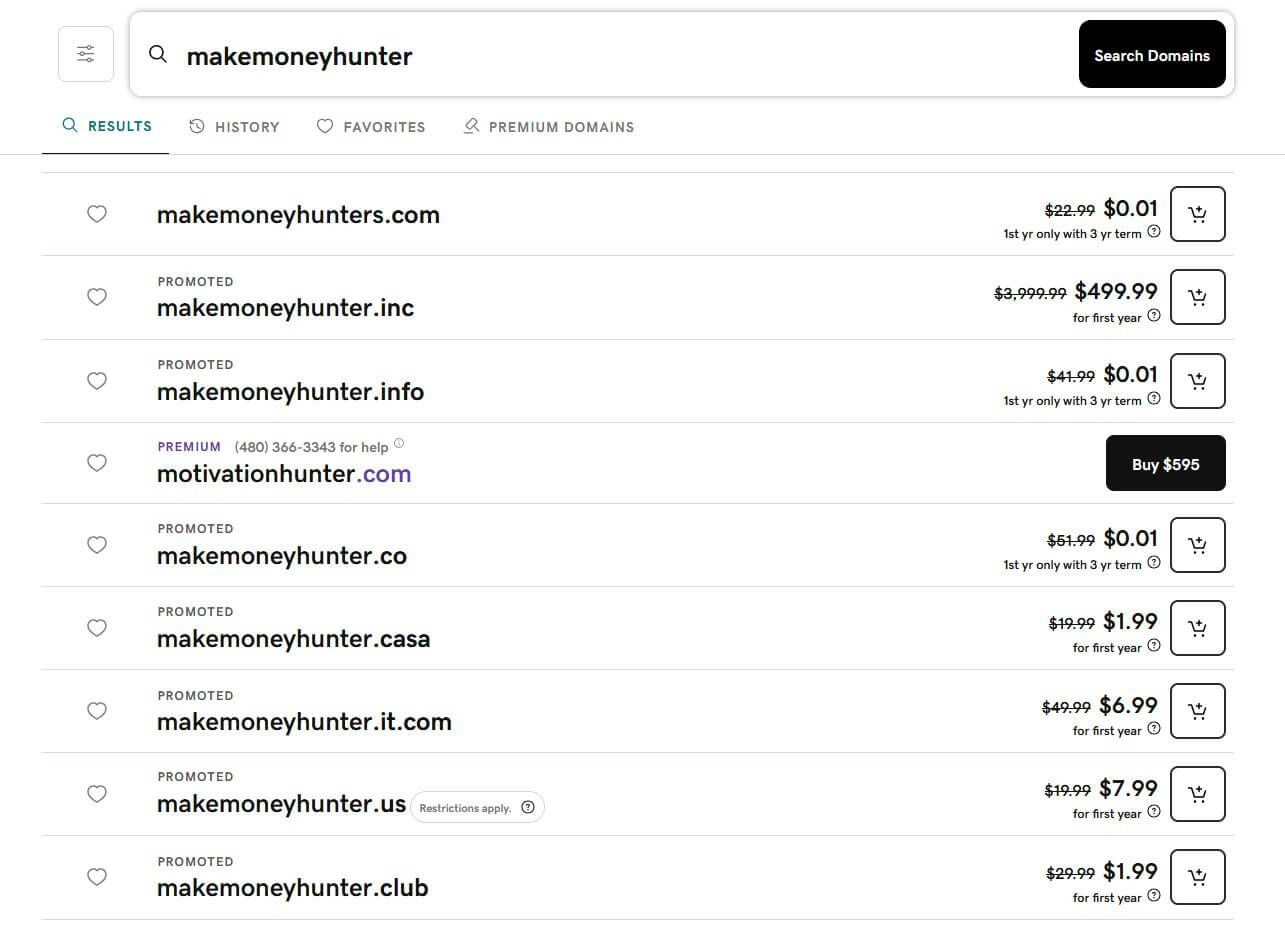
When I searched for available domain extensions while picking a name, the screenshot above is what most registrar dashboards look like today. Notice the typical pattern — the desirable .com is usually taken or premium-priced, while alternative extensions are available cheap. Don’t be tempted by the $0.01 first-year deals on weird extensions. Those usually renew at $40+ and lose you trust signal. Pay full price for a clean .com or pick a different name.
Register at Namecheap, Porkbun, or Cloudflare Registrar. Avoid GoDaddy’s upsells if you can — they push privacy, email, and security add-ons that should be free elsewhere. Expect to pay $10–$15/year. WHOIS privacy should be included free (it is at all three registrars above).
Step 3: Get Web Hosting (And Why This Matters More Than You Think)
Hosting is the engine of your blog. A slow host means slow pages, which means worse SEO, which means less traffic, which means less money. In 2026, Google’s Core Web Vitals are real ranking signals — and most cheap shared hosts can’t hit them.
For a new blog, you have three realistic options:
- Budget shared hosting ($3–$5/month promo, $10–$13/month after): Bluehost, Hostinger, SiteGround. Fine for a brand new blog with under 5,000 monthly visitors. You’ll outgrow it by month 12 if things go well.
- Cloud VPS hosting ($2.50–$40/month depending on resources): Vultr, DigitalOcean, Linode. My current pick — I’ll explain why below.
- Managed WordPress hosting ($15–$30/month): Cloudways, Rocket.net, Kinsta. Significantly faster than shared hosting and easier than raw VPS.
Here’s the honest take based on what I’m actually running in 2026: cloud VPS hosting has become the sweet spot for new bloggers. Five years ago, VPS meant you needed to be a developer. Today, providers like Vultr have one-click WordPress installs that are as simple as Bluehost — but with significantly better performance.
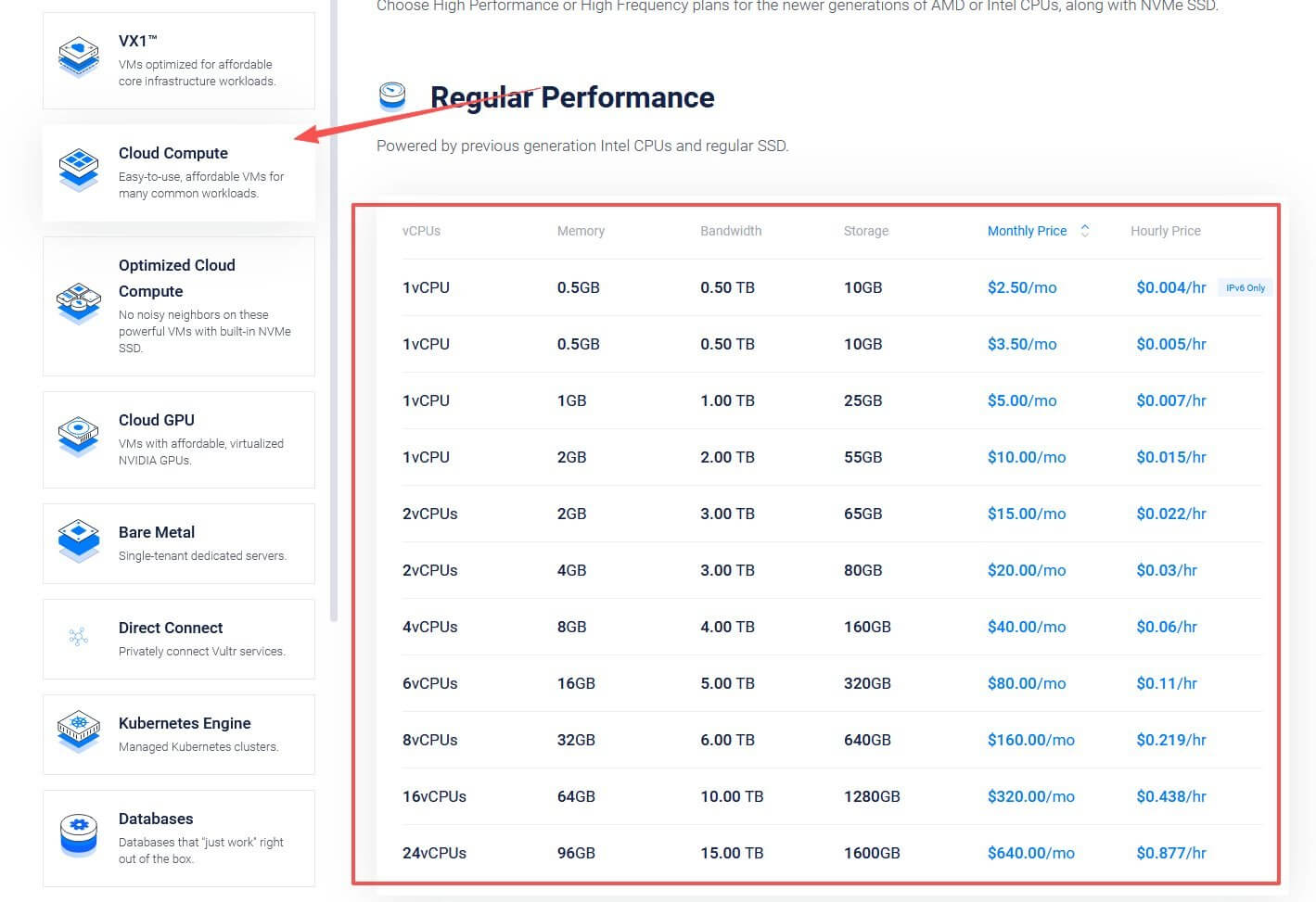
Look at the pricing table above. A new blog can start on Vultr’s $5/month plan (1 vCPU, 1GB RAM, 25GB storage) — that’s roughly the same monthly cost as a Bluehost promo plan, but with dedicated resources you don’t share with 200 other websites. By month 6, when your traffic justifies more horsepower, you click upgrade and you’re on a 2vCPU, 2GB RAM plan for $15/month. No migration, no downtime.
For comparison, here’s what one of my current Vultr servers looks like in the dashboard — a 4 vCPU / 8GB RAM / 180GB NVMe SSD instance running a content site:
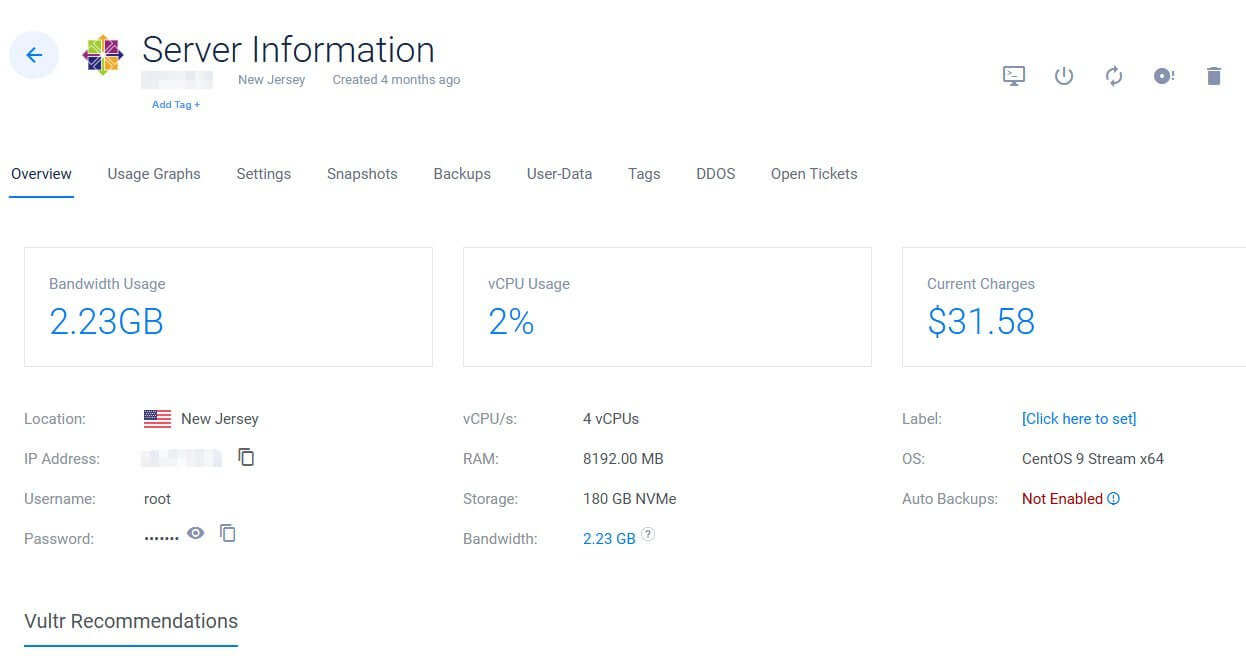
What I want you to notice: the bandwidth usage is 2.23GB and vCPU usage is only 2%. That’s the difference between dedicated resources and shared hosting. On a shared plan with 100+ neighbors, my site would already be throttled. On VPS, I have headroom — and Google rewards fast sites.
Why I Recommend Vultr for New Bloggers in 2026
After testing every major host since 2010 — Bluehost, SiteGround, Cloudways, Kinsta, DigitalOcean — Vultr is what I currently use and recommend for new bloggers. Here’s why:
- Real dedicated resources from day one starting at $2.50/month, not “unlimited” shared resources that throttle when neighbors get busy.
- 32 global data center locations — pick one close to your audience for faster load times (huge SEO win in 2026).
- One-click WordPress install via their Marketplace. No command line needed.
- Scale up or down anytime — start at $5/month, upgrade to $15/month when you grow, no migration headaches.
- Hourly billing — if you screw up and need to start over, you lose pennies, not a year’s prepayment.
New users get $300 in free credits through my referral link below, which gives you roughly 5–6 months of free hosting to test the platform before paying anything.
If you sign up through this link, I earn a small commission at no extra cost to you. It’s what funds this blog.
If you’d rather stay on traditional shared hosting, Hostinger or Bluehost will get you off the ground for under $50 for the first year. Just plan to migrate by month 12 — shared hosting hits a ceiling fast.
Step 4: Install WordPress (The 5-Minute Setup)
Every major host has a “one-click WordPress install” button. It takes about five minutes from click to logged-in dashboard. Here’s the order of operations:
- Sign up for hosting and complete checkout
- Connect your domain (your registrar might handle this automatically if you bought everything from the same place)
- Click the “Install WordPress” button in your hosting dashboard
- Set up your admin username and password (use a password manager — please don’t use “admin123”)
- Wait 5–10 minutes for DNS to propagate, then log into yoursite.com/wp-admin
That’s it. You now own a blog. The hard part is done. The really hard part — writing things people actually want to read — hasn’t started yet.
First-day WordPress checklist: enable HTTPS (free via Let’s Encrypt, your host should handle this automatically), set your permalink structure to “Post name” (Settings → Permalinks), and delete the default “Hello World” post and “Sample Page.”
Step 5: Pick a Lightweight Theme
Themes are where new bloggers waste the most time. I’ve watched people spend two weeks comparing themes and then never publish a single article. Don’t be that person.
For a new blog in 2026, three free themes will outperform 95% of the paid options:
- Kadence — Lightweight, fast, comes with a free starter template library. My current default for new sites.
- GeneratePress — Even lighter than Kadence. Free version is excellent; premium is $59/year if you want more design control.
- Astra — The most popular free theme, with the largest template library. Slightly heavier than the first two but still fast.
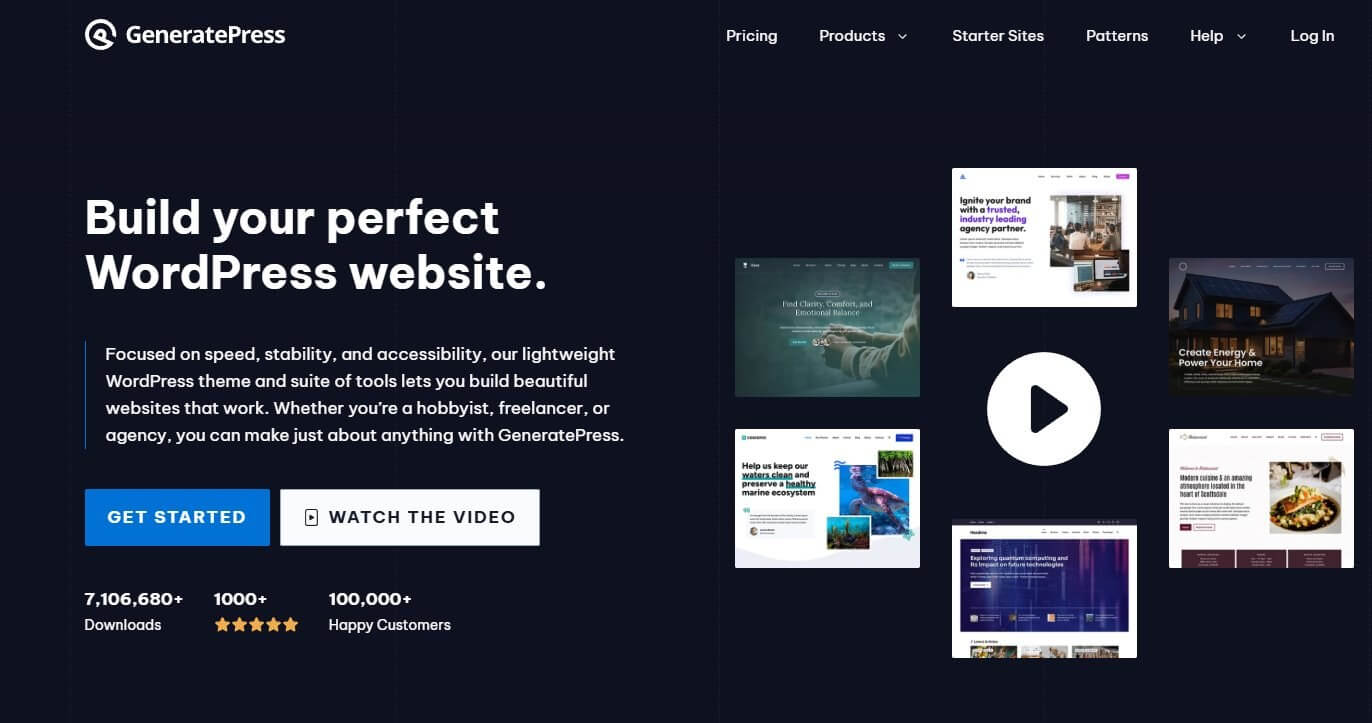
GeneratePress alone has 7 million+ downloads and 100,000+ happy customers — and the free version handles everything a new blog needs. Don’t get tempted by “all-in-one” themes that promise everything. Heavy themes like Divi, Avada, or anything requiring a page builder plugin to function look impressive in demos but create slow, bloated sites in practice.
The most important page-speed decision you make is your theme choice — pick wrong and you’ll be fighting the bloat for years. Set up your theme in under 90 minutes. If you’re tweaking design at hour three, you’re procrastinating on writing.
Step 6: Install the Essential Plugins (Just 5 of Them)
Plugins are powerful but easy to over-install. Each plugin you add is one more thing that can break, slow your site down, or create a security hole. For a new blog, you need exactly five:
- Rank Math or All in One SEO (AIOSEO) — Handles your meta titles, descriptions, XML sitemap, and schema markup. Pick one, never both.
- WP Rocket or LiteSpeed Cache — Caching plugin for speed. LiteSpeed is free if your host supports it; WP Rocket is $59/year and works everywhere.
- ShortPixel or Imagify — Compresses images automatically as you upload them. Most free plans cover the first 100–200 images/month.
- Wordfence Free — Basic security and login protection. Keeps the bots from brute-forcing your admin login.
- UpdraftPlus — Free backup plugin. Schedule weekly backups to Google Drive or Dropbox. The first time your site breaks, you’ll be glad.
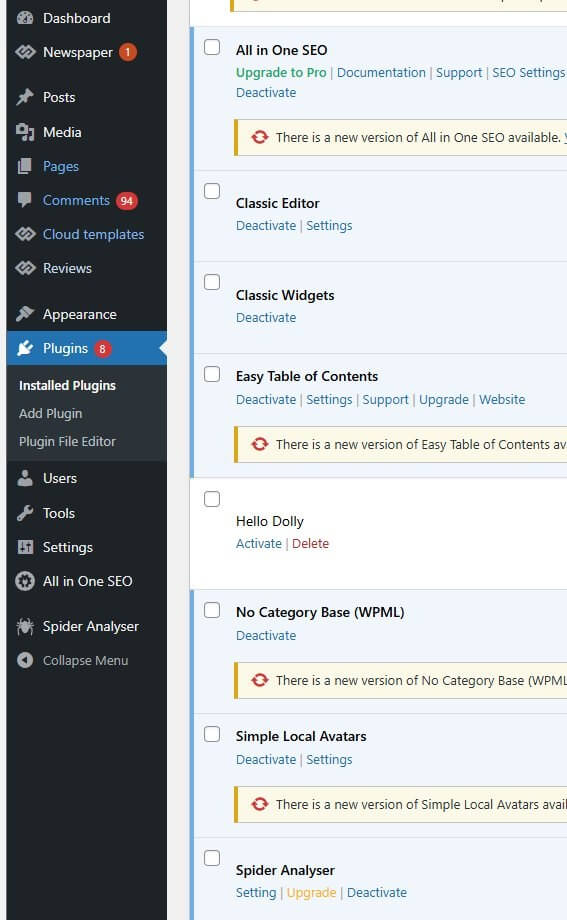
Above is a screenshot from one of my actual WordPress installs. Notice it’s clean — no bloat, just the essentials plus a couple of utility plugins (Easy Table of Contents for auto-generated TOCs, No Category Base to clean URL structure). You’ll see “Spider Analyser” there too — that’s for tracking which search engine crawlers visit your site, useful once you’re past month six.
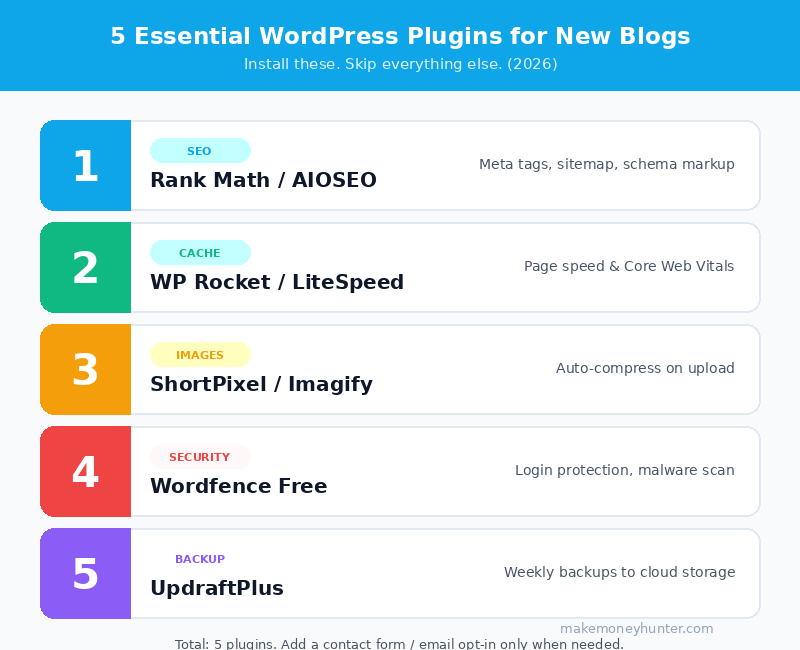
That’s the full list for the first six months. Add a contact form plugin (WPForms Lite is fine) when you actually need a contact page. Add an email opt-in plugin when you have a real lead magnet. Don’t pre-install based on what you might use someday.
Step 7: Plan Your First 10 Articles (Before You Write Any of Them)
This is the step that separates blogs that earn money from blogs that don’t. Most beginners write whatever comes to mind. Successful blogs write what people are actively searching for.
Before you publish a single post, build a list of 10 article ideas that hit these three criteria:
- The keyword has real search volume. Aim for 500–5,000 monthly searches per topic. Use the free version of Ahrefs Keyword Generator or Google Keyword Planner.
- The keyword has manageable competition. If the top 10 results are all from sites with millions of monthly visitors, skip it for now. Look for results that include forums, smaller blogs, or weak titles — those are gaps you can fill.
- The keyword has commercial potential. “Best budget hiking boots” has buyers. “What is hiking” doesn’t.
For each article, write down the target keyword, three related long-tail variations, and a one-sentence angle that’s different from what’s already ranking. This is what I call your “information gain” — what does your article add that the top 10 don’t already say?
The truth is, in 2026 Google’s March 2026 core update made information gain the single most important ranking signal for new sites. If your article is just a paraphrased summary of what’s already on page one, it will sit on page eight forever. For a complete optimization framework on every article you publish, my on-page SEO checklist for bloggers covers the 15 elements that move new posts from page 8 to page 1.
Step 8: Write and Publish Your First Article
Your first article won’t be great. Mine wasn’t. Most bloggers’ first articles aren’t. The goal isn’t perfection — it’s publishing. You can’t improve articles that don’t exist.
A solid first article in 2026 hits these benchmarks:
- 1,500–2,500 words (long enough to cover the topic, short enough to actually finish)
- Target keyword in the title, first paragraph, and at least two H2 subheadings
- Three to five images (compressed, with descriptive alt text)
- A clear introduction that answers the search question in the first 200 words
- A conclusion with one call-to-action (sign up for email list, read related post, click affiliate link — pick one)
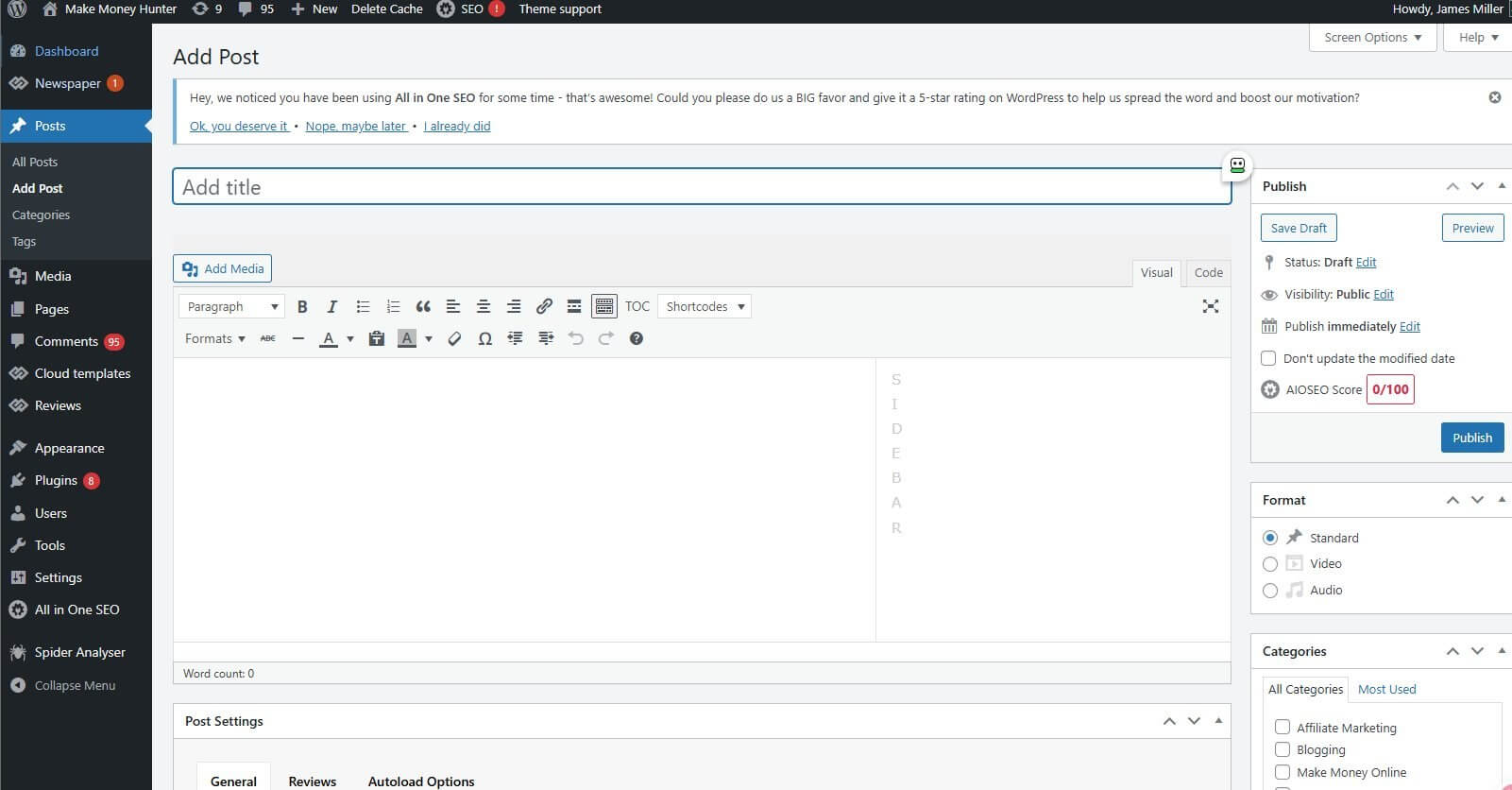
This is the editor screen where you’ll spend most of your blogging hours. The Classic Editor (shown above) is what I recommend over Gutenberg block editor for content-heavy blogs — it’s faster, cleaner, and doesn’t fight you on formatting. Notice the AIOSEO score widget on the right at “0/100” — that’s your live SEO feedback as you write. Aim for 75+ before publishing.
AI tools have changed this game. In 2026, using Claude, ChatGPT, or Jasper to help with outlines, first drafts, and idea generation is standard practice. Google explicitly said in 2024 that AI-assisted content is fine as long as it’s high-quality and helpful — and that hasn’t changed. What’s still not fine: publishing pure AI output with no human editing. The line between “AI-assisted” and “AI-dumped” is real, and Google’s algorithms have gotten very good at spotting the difference.
My current workflow: outline manually based on SERP analysis, generate a draft with Claude using my specific structure, then rewrite ~40% of it in my own voice with personal examples. The final article is mine — AI just removed the staring-at-blank-page friction.
How Do You Make Money From a Blog?
This is the part most “how to start a blog” guides hand-wave. Let me be specific. There are four monetization methods that actually pay in 2026, and they each work on a different timeline. For a complete deep-dive on each, see my full guide on how to make money blogging — what follows is the condensed version.
1. Affiliate Marketing (Starts Working at ~1,000 Monthly Visitors)
You recommend a product, include a tracking link, and earn a commission when someone buys. The best affiliate niches in 2026: web hosting (commissions of $65–$200 per signup), SaaS tools (recurring commissions on subscriptions), online courses (30–50% on $200–$2,000 products), and physical products via Amazon Associates (1–10%, but easy to qualify for).
Affiliate income scales with traffic but also with intent. A thousand visitors searching “best web hosting for new blogs” earns more than ten thousand visitors searching “what is web hosting.” Commercial intent keywords are gold. If you want to dig deeper into the mechanics, the complete affiliate marketing income blueprint walks through the 7-step process I’ve used to scale affiliate income across multiple sites.
2. Display Ads (Starts Working at ~50,000 Monthly Pageviews)
You let an ad network like Mediavine, Raptive, or AdSense show ads on your site. Mediavine requires 50,000 monthly sessions; AdSense has no minimum but pays significantly less. Expect $15–$30 per 1,000 pageviews on a decent niche with Mediavine — so a 100,000-pageview month earns roughly $1,500–$3,000 from ads alone.
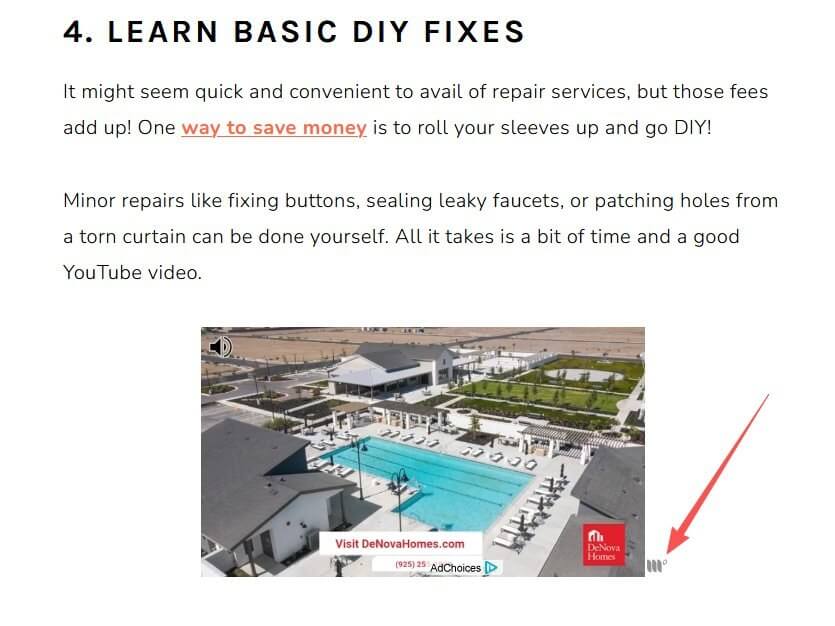
Above is what display ads look like in practice — an in-content ad placed naturally between paragraphs. With networks like Mediavine and Raptive, you don’t choose what ads appear; the network auto-selects based on the reader’s behavior and the page’s content. The site above is earning revenue every time someone reads the article, even if they don’t click anything.
Display ads are passive but require real traffic. Don’t optimize for ad revenue until you’ve crossed 30,000 monthly sessions. Below that threshold, focus on affiliate.
3. Digital Products (Starts Working Whenever You Build One)
Ebooks ($9–$29), online courses ($97–$497), templates ($5–$50), and printables. The advantage: you keep nearly 100% of the revenue. The challenge: you have to build the product first, then convince your audience to buy it. Email list size matters more than blog traffic here — a thousand engaged email subscribers can outperform 50,000 random blog visitors.

The screenshot above is a real example of how successful bloggers monetize through digital products. A 380-page Pinterest traffic ebook priced at $129 (down from a “value” of $630) — sold directly from the blog with a single “buy now” button. No middlemen, no affiliate commissions, just direct sales to an audience that already trusts the blogger.
The math is striking: if this ebook converts at 2% of email subscribers and the author has a 5,000-person list, that’s roughly 100 sales × $129 = $12,900 from a single product launch. That’s why digital products are usually a blogger’s highest-margin revenue stream once you’ve built an audience.
4. Sponsored Content (Starts Working at ~10,000 Monthly Visitors)
Brands pay you to write about their product, mention them in a roundup, or feature them in an existing post. Rates vary wildly — a small blog with 10,000 monthly visitors might charge $200–$500 per sponsored post; a 100,000-visitor site can charge $2,000–$5,000.
The catch: sponsored content is the least passive monetization method. You’re trading time for money, and brands expect specific deliverables. Most serious bloggers use it as a supplement, not a foundation.
Bonus: How I Personally Make Money With Vultr Hosting Referrals
Here’s a real-world affiliate example you can replicate. Web hosting is one of the highest-paying affiliate niches because the customer lifetime value is high (people stay on hosting for years) and the commissions are generous.
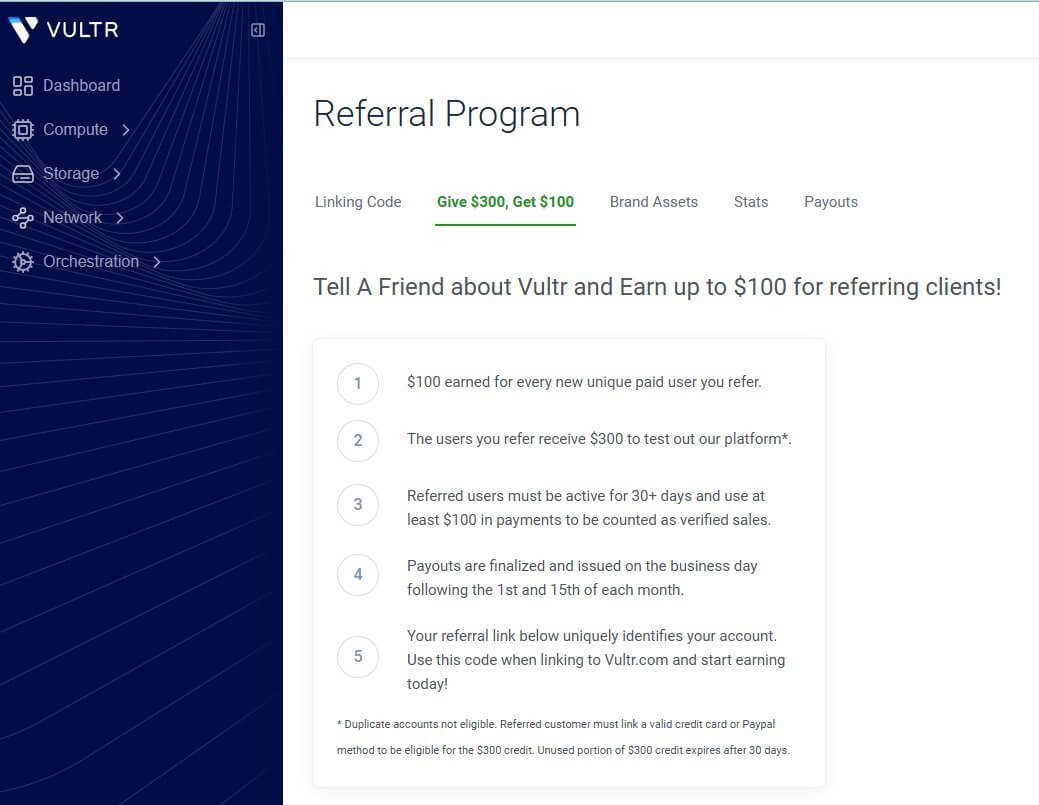
Vultr’s referral program pays $100 for every new paid user you refer — and the referred user gets $300 in free credits to try the platform. That’s a genuinely good offer for the customer, not just for me, which makes it easy to recommend honestly.
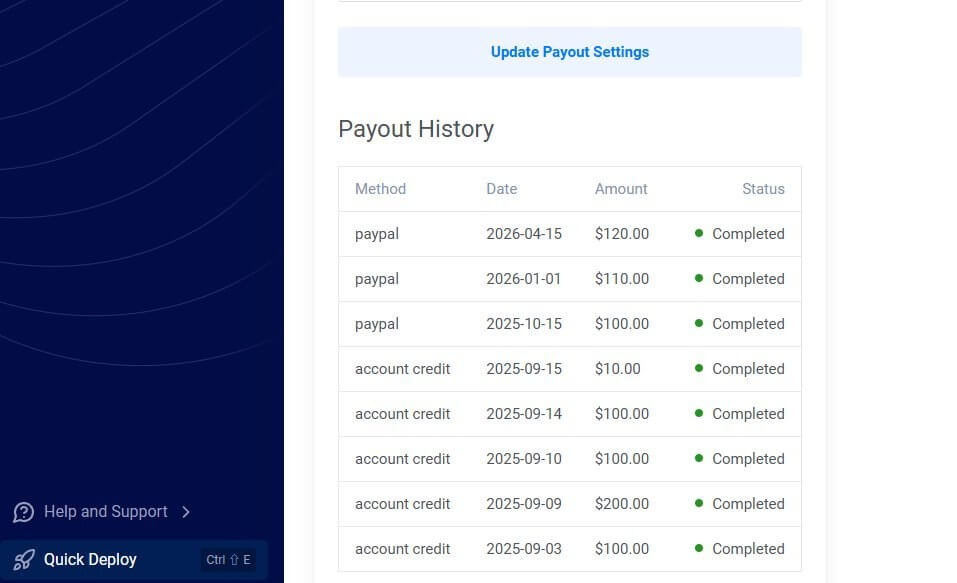
Here’s what my actual payout history from Vultr looks like — a mix of account credit (used to offset my own hosting bills) and PayPal cashouts:
And the click-to-signup stats from a single month:
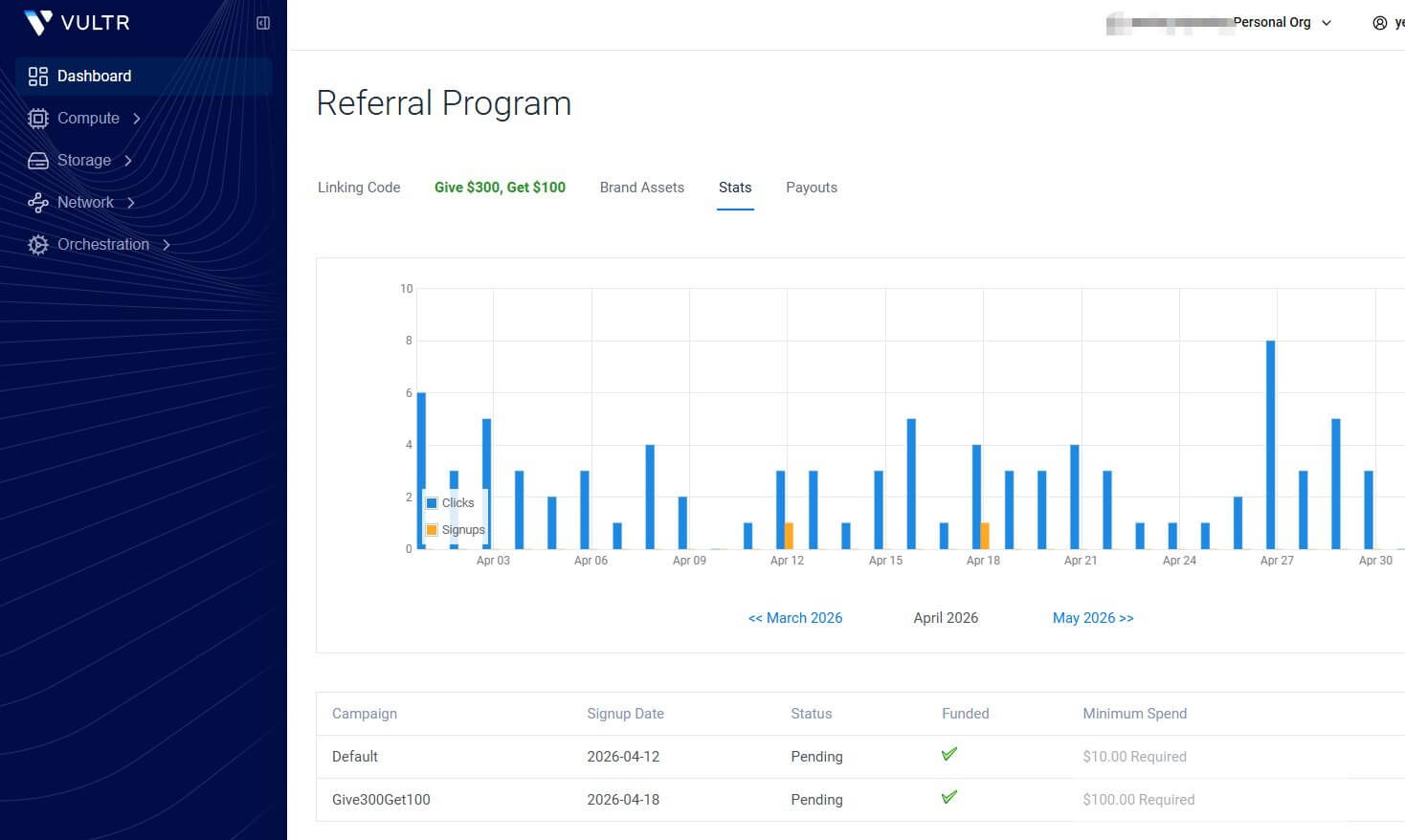
The pattern here is what every aspiring blogger should internalize: I’m not making $5,000/month from a single Vultr referral. I’m making $100–$300/month consistently from hosting affiliates because I’m linking to a product I actually use. Multiply this across 5–10 hosting/SaaS/tool affiliates and you have a four-figure monthly income from a single niche.
This is the long-tail income structure most successful bloggers run on. Not one viral product. Twenty boring monthly checks that add up.
The Honest Income Timeline for a New Blog
Here’s what nobody tells you straight: most blogs make $0 for the first six months. Not because the bloggers are bad — because Google takes time to trust a new site, and traffic compounds slowly at the start.
Realistic milestones based on what I’ve watched dozens of new sites hit (when they don’t quit):
- Month 1–3: $0. You’re publishing, learning, indexing. Don’t check earnings yet.
- Month 4–6: $10–$100. First affiliate commission usually lands here. It feels like a big deal because it is.
- Month 7–12: $100–$1,000. Traffic starts compounding. Older posts move up in rankings. The flywheel begins.
- Year 2: $1,000–$5,000/month is realistic if you’ve published consistently and chosen the right niche.
- Year 3+: $5,000–$20,000+/month is possible for sites that combine affiliate, ads, and digital products well.
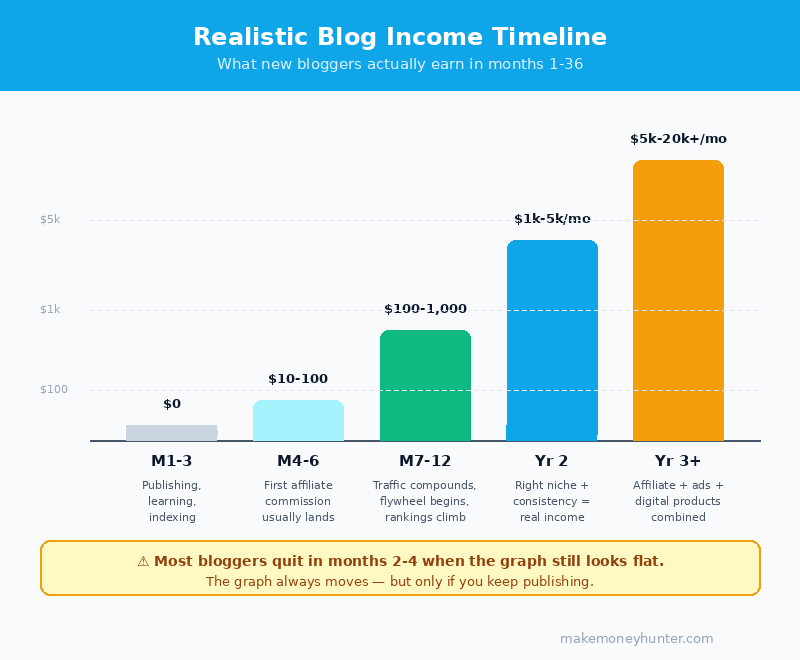
Most people who quit, quit somewhere in months 2–4. The traffic graph is flat, and they assume it’ll never move. It always moves — but only if the writing keeps showing up. The thing pushing the graph up isn’t luck — it’s traffic. My guide on how to drive traffic to your blog covers the 15 free methods I’ve tested across 100+ sites, ranked by what actually works for new blogs in their first 12 months.
Common Mistakes to Avoid in Your First Year
I’ve watched the same handful of mistakes kill 90% of new blogs. Here are the ones worth knowing about before you make them:
- Writing without keyword research. If nobody’s searching for your topic, nobody will find your article. Free tools like Ahrefs’ keyword generator and Google’s “People Also Ask” boxes cost zero and save you months of wasted writing.
- Buying every plugin, theme, and course you see advertised. The “shiny object syndrome” budget on a new blog can easily exceed $1,000 in tools nobody needed. Resist.
- Publishing once a month and calling it a blog. Google needs frequency signals to take a new site seriously. Aim for 1–2 quality articles per week minimum in year one.
- Ignoring the email list. Free traffic from Google is great until an algorithm update cuts it in half. An email list is the only asset you actually own. Start collecting emails in month two, even if your list is tiny.
- Quitting in month three. The single most predictable mistake. Blogs are a 12–24 month investment before they start paying real money. Treat it like a part-time business, not a get-paid-this-week side gig.
- Spending more on tools than on content. If your monthly tool bill is bigger than your content output, you’ve got the ratio wrong.
Tools I Actually Use to Run a Blog in 2026
For full transparency, here’s what’s on my desk right now for the sites I’m running this year. None of this is required to start — but it’s what I’ve settled on after testing alternatives:
- Hosting: Vultr (starting at $5/month, scales to $30–$50/month for established sites).
- Domain: Cloudflare Registrar. At-cost pricing on renewals, no upsells.
- Theme: GeneratePress Free or Kadence Free.
- SEO plugin: Rank Math or All in One SEO.
- Keyword research: Ahrefs ($129/month) for serious sites, free tools (Ahrefs Free, Ubersuggest free tier) when starting out.
- AI writing assistance: Claude for outlines and first drafts, ChatGPT for brainstorming.
- Image creation: Canva Pro ($13/month) and Midjourney for original images.
- Email tool: MailerLite (free up to 1,000 subscribers).
Total monthly cost for a serious blog: roughly $180/month once you’re past month six. Total monthly cost when starting out: under $20.
FAQ: How to Start a Blog
How long does it take to make money from a blog?
Most blogs see their first affiliate commission around month 4–6 and first $1,000 month around month 12–18. Display ad income (via Mediavine) typically requires 12–24 months to hit the 50,000 monthly sessions threshold. Anyone telling you they earned thousands in month two either had an existing audience, ran paid ads, or is selling you a course.
Can you start a blog for free?
Technically yes — platforms like WordPress.com, Medium, and Blogger let you publish for free. Practically no — if you want to make real money, you need your own domain and self-hosted WordPress. Free platforms own your content and restrict your monetization options.
Do I need to know how to code to start a blog?
No. WordPress and its themes are entirely point-and-click in 2026. If you can use Gmail, you can run a WordPress blog. The only “technical” skill you really need is the patience to Google a problem when something breaks.
What’s the best blogging platform for beginners in 2026?
Self-hosted WordPress.org. It’s not even close. WordPress powers 40%+ of all websites because it’s free, flexible, and works with every monetization tool you’ll eventually want. Squarespace and Wix are easier to use but cap your earning potential.
How often should I publish new blog posts?
For a new blog, aim for 1–2 quality articles per week minimum in year one. Consistency matters more than volume — Google rewards sites that update regularly with fresh, useful content. Don’t burn yourself out trying to publish daily; the long-term math favors steady output over sprints.
Is blogging still profitable in 2026 with AI everywhere?
Yes, but the bar is higher. Generic, AI-written articles get buried. The blogs that earn well in 2026 are the ones with real expertise, original data, personal experience, and a distinct voice. AI is now a tool every blogger uses — the difference is whether you’re using it to amplify your own thinking or to replace it. The first works. The second doesn’t rank.
Final Thoughts: Start Today, Not Someday
One last thing — ignore anyone who tells you blogging is passive income. It’s not. It’s front-loaded income. You write hard now so the results keep paying you for years. That’s a much better deal than passive, because passive implies the work was easy. It isn’t. But it’s also one of the rare income streams that actually compounds — every article you publish today can still be earning money in 2030 if it’s targeting the right keyword and answering a real question. For more on what truly passive (and not-so-passive) online income looks like, my breakdown of passive income online covers 15 methods compared on effort, payoff, and timeline.
The single biggest predictor of whether someone’s blog makes money isn’t talent, budget, or niche choice. It’s whether they’re still writing in month nine. Most aren’t. The ones who are have something the others don’t — a half-built asset that’s about to start paying them back.
Buy the domain today. Set up hosting this weekend. Publish your first article within seven days. Don’t optimize, don’t redesign, don’t research a second theme. Just get the first piece out. Then do it again next week. That’s the whole game.