

Most SEO advice on this topic is wrong — and it costs new bloggers months of wasted writing. The common assumption is that a “low-competition keyword” is anything with a KD (Keyword Difficulty) score under 30. That’s a starting filter, not an answer.
KD is a single estimate from a single tool, and tools regularly score the same keyword 15 points differently. The real signal of a low-competition keyword isn’t a number — it’s what’s actually sitting on Page 1 of Google.
If the top results are forum threads, Quora answers, and small blogs with 50 referring domains, that keyword is genuinely winnable. If the top results are Forbes, Investopedia, and Wikipedia, no KD score under 30 will save you.
I’ve been running niche sites and analyzing SERPs since 2009, and the workflow below is the exact 3-step filter I now use before writing a single word. It takes about 8 minutes per keyword and has saved me from publishing dozens of articles that would have gone nowhere.
By the end of this guide, you’ll know how to find low-competition keywords using free tools, how to read the SERP signals most KD scores miss, and how to validate that the keyword actually matches what searchers want. If you’re still working through the basics of starting a blog as a beginner, this filter is the single most important habit to build before writing your first 10 posts.
What Counts as a Low-Competition Keyword in 2026?
A low-competition keyword is one where a small or new site can realistically rank on Page 1 without thousands of dollars in backlinks. That’s the only definition that matters. Search volume doesn’t define it. KD score doesn’t fully define it. The competition you’re up against on Page 1 does.
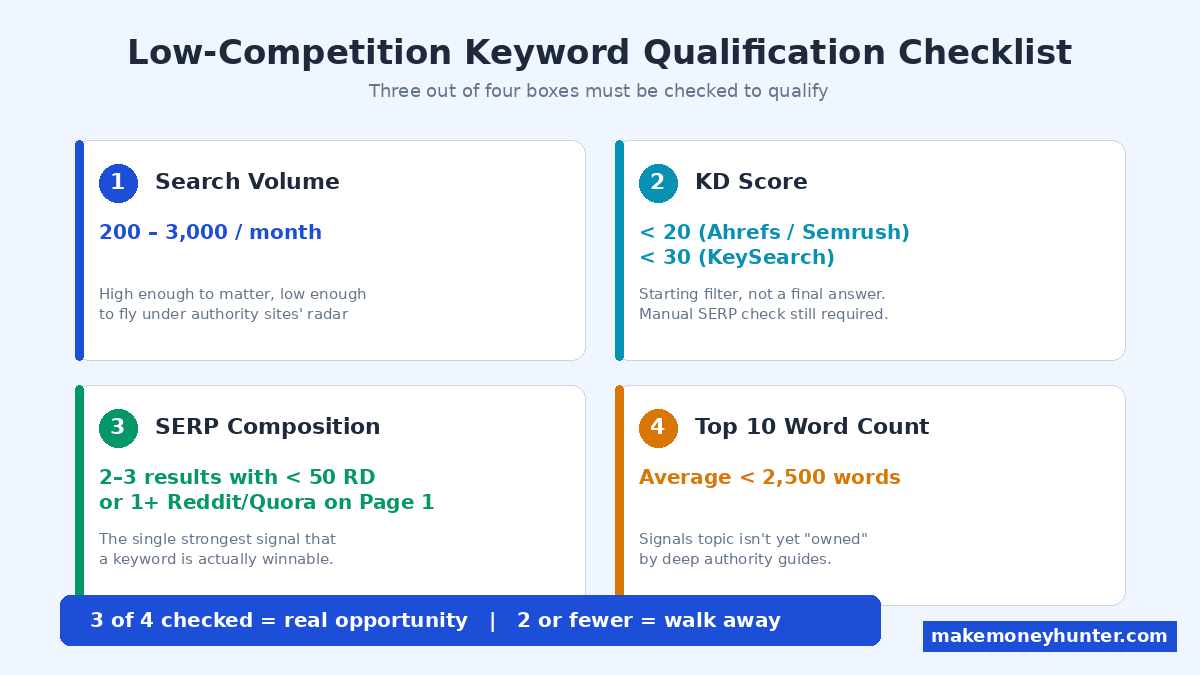
Here’s the practical benchmark I use for makemoneyhunter.com and recommend to new bloggers:
- Search volume: 200 to 3,000 monthly searches (high enough to matter, low enough to fly under the radar of authority sites)
- KD score: Under 20 in Ahrefs or Semrush, under 30 in KeySearch
- SERP composition: At least 2-3 results from sites with under 50 referring domains, or at least 1 forum/Reddit/Quora result on Page 1
- Top 10 average word count: Under 2,500 words (signals the topic isn’t yet “owned” by deep guides)
If three of those four boxes are checked, you have a real opportunity. Two or fewer, move on. Don’t fall in love with a keyword that fails the SERP test — no amount of writing will fix a bad target.
Why Most “Low-Competition Keyword” Lists Are Useless
You’ve probably searched something like “free low competition keywords list” and downloaded a PDF with 1,000 keywords. Here’s the truth about those lists: by the time they’re public, the easy keywords are gone. Other bloggers who downloaded the same PDF are already publishing for those terms. Public lists destroy the very thing they promise.
The same goes for keyword tools that have a “low difficulty” filter and call it a day. KeySearch will tell you a keyword has a difficulty of 18. Ahrefs will tell you 32. Semrush will tell you 24. Who’s right? None of them, fully. Every KD score is a guess based on backlink data from the current Page 1. The score can’t see whether Google’s algorithm considers that SERP “done” or “open to challengers.”
The screenshot below shows the Semrush Keyword Magic Tool with the KD filter set to 0-20%. This is the kind of filter most bloggers stop at — and it’s where they go wrong. The tool returned 130 keywords with an average KD of 16% for the seed “make money online,” but the SERP for each of those keywords could still be impossible to crack. The filter is useful as a first cut; it isn’t a validation.
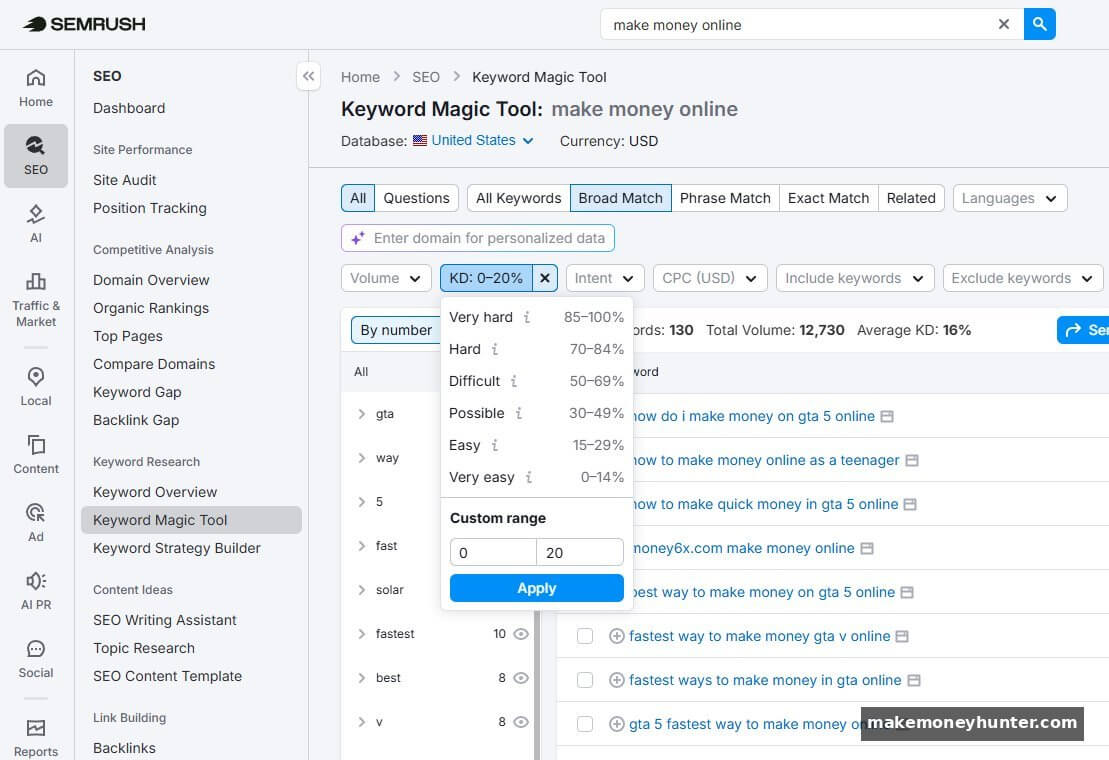
The fix isn’t a better tool. The fix is doing 60 seconds of manual SERP analysis on every keyword that passes the KD filter. That’s step 2 in the workflow below, and it’s the step that separates writers who waste 6 months from writers who get traffic in their first 90 days.
How to Find Low-Competition Keywords: The 3-Step Filter
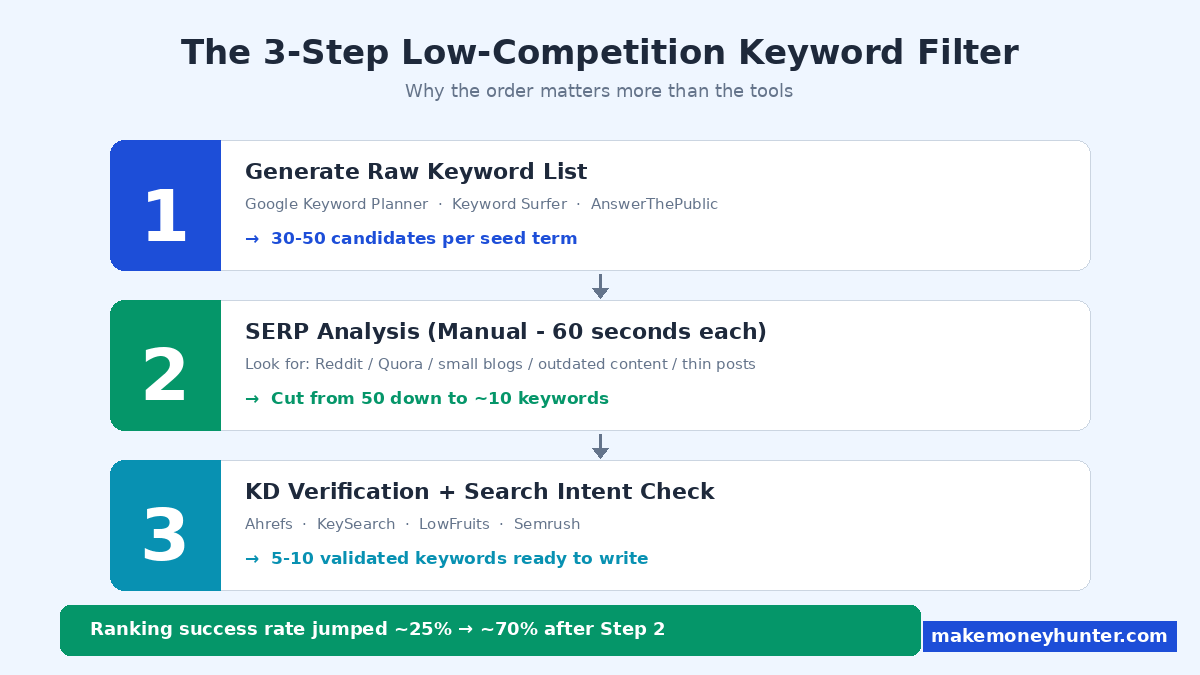
This is the exact workflow I use. Three steps, in this order. Don’t skip ahead — each step exists because the previous one creates false positives. After 15 years of niche site work, I can tell you the order matters more than the tools.
Step 1: Generate a Raw Keyword List With a Free Tool
Start with volume, not difficulty. You want a wide funnel at the top because most candidates will get rejected later. Free tools that work well in 2026:
- Google Keyword Planner — Free if you have any Google Ads account (you don’t need to run ads). Shows search volume ranges and competition for paid ads (different from SEO competition, but useful as a signal).
- Keyword Surfer (Chrome extension) — Shows search volume right inside Google search results.
- Answer The Public — Free tier shows question-based keywords, which tend to have lower competition.
- Google autocomplete + “People Also Ask” — The cheapest and most underused keyword source on the internet. Just type your seed term in Google and harvest the suggestions.
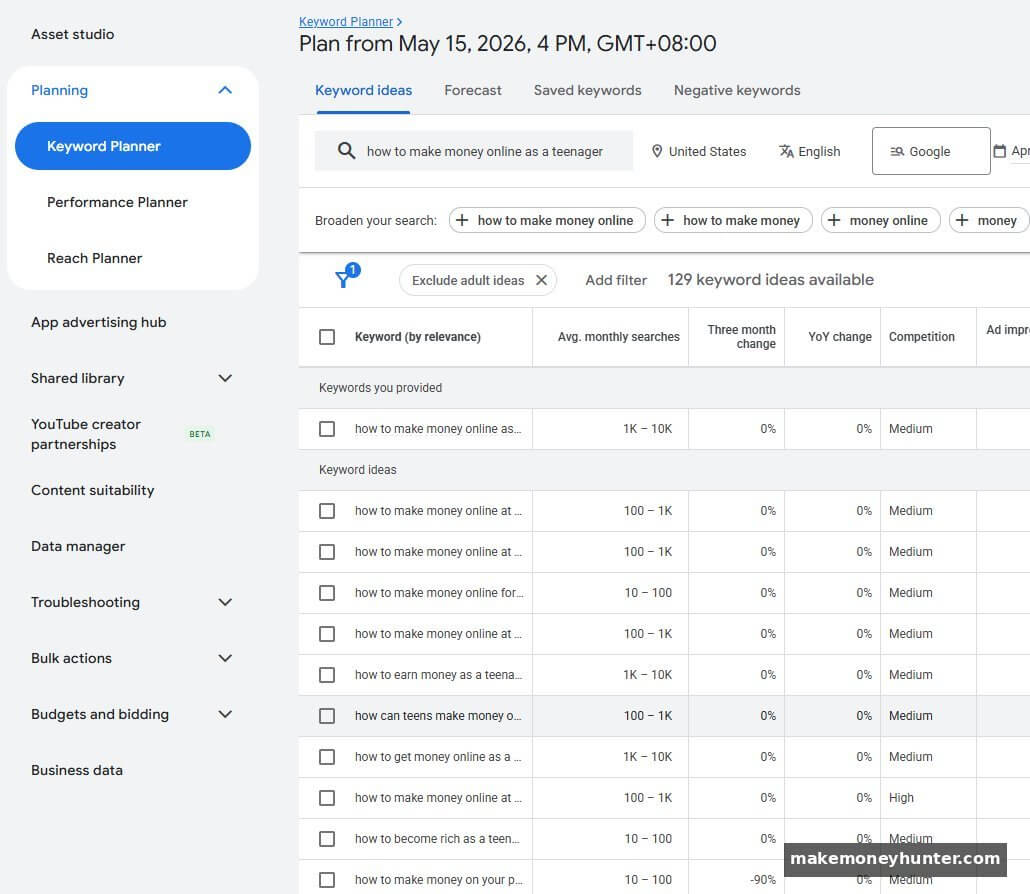
The screenshot below shows Google Keyword Planner’s output for the seed term “how to make money online as a teenager.” Notice the “Avg. monthly searches” column shows ranges (1K-10K, 100-1K, etc.) and the “Competition” column reflects Google Ads competition — not SEO competition. The ranges are rough, but they’re free and accurate enough to filter your raw list before moving to Step 2.
Pick a seed topic relevant to your niche. For makemoneyhunter.com, my seed terms include “affiliate marketing,” “blogging income,” “side hustle,” and “SEO for beginners.” Type each seed into your tool of choice, then export every variation that returns at least 200 monthly searches. Don’t filter for difficulty yet — you’d be surprised which “boring” keywords have weak SERPs.
Target list size: 30-50 candidate keywords per seed term. This sounds like a lot, but you’ll cut 80% in the next two steps. Picking the right seed topics matters too — if you haven’t done the upstream work yet, see this guide on how to choose a profitable blog niche before going deeper on keyword research.
Step 2: SERP Analysis — The Single Most Important Step
This is where most keyword research stops being lazy. For each candidate keyword from Step 1, open Google in an incognito tab and search the term. Spend 60 seconds analyzing Page 1.
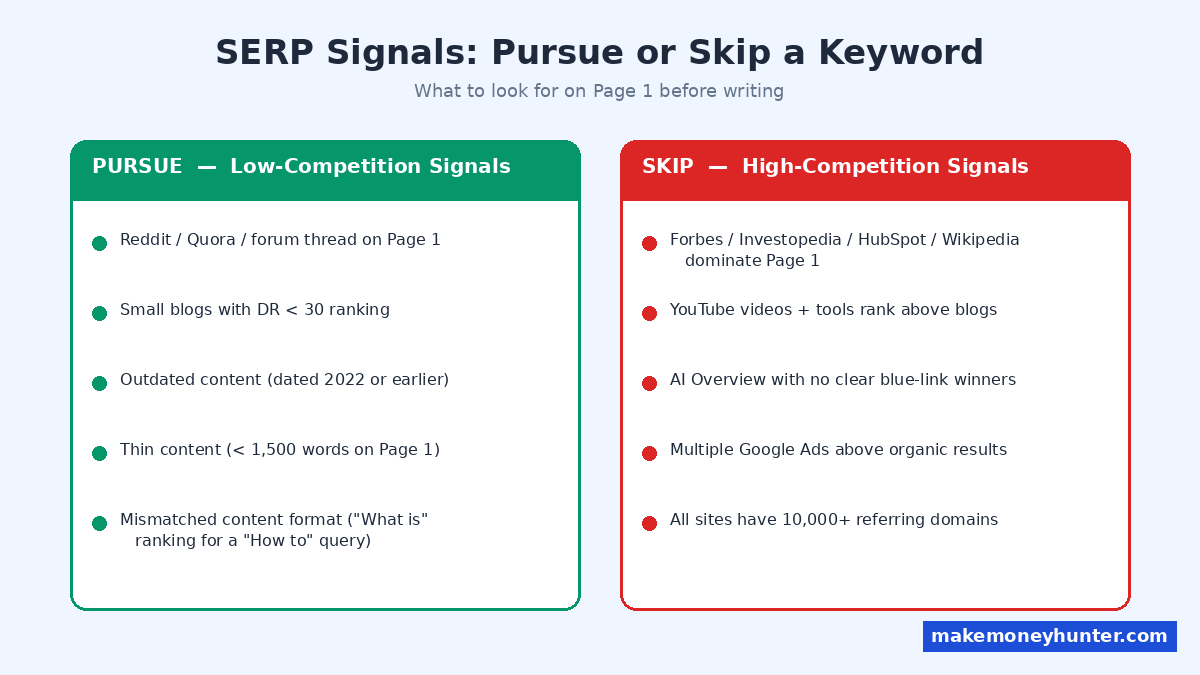
Look for these “low-competition signals”:
- A Reddit thread, Quora answer, or forum post ranking on Page 1 — this is the strongest signal a keyword is winnable. Google ranks Reddit because it has no better option. A well-written blog post can replace it.
- Small blogs in the results — sites you’ve never heard of, with no recognizable brand. Check their domain authority with the free Ahrefs DR checker. DR under 30 on Page 1 means the door is open.
- Outdated content — articles dated 2022 or earlier still ranking suggest the topic hasn’t been refreshed by competitors.
- Thin content — Page 1 articles under 1,500 words. If you can write a better, more thorough piece, you’ll outrank them.
- Mismatched content — articles that don’t quite answer the question (e.g., the keyword asks “how to” but Page 1 returns “what is” content).
Here’s a perfect real-world example. Search “how to make money online as a teenager” in Google and look at what shows up on Page 1:
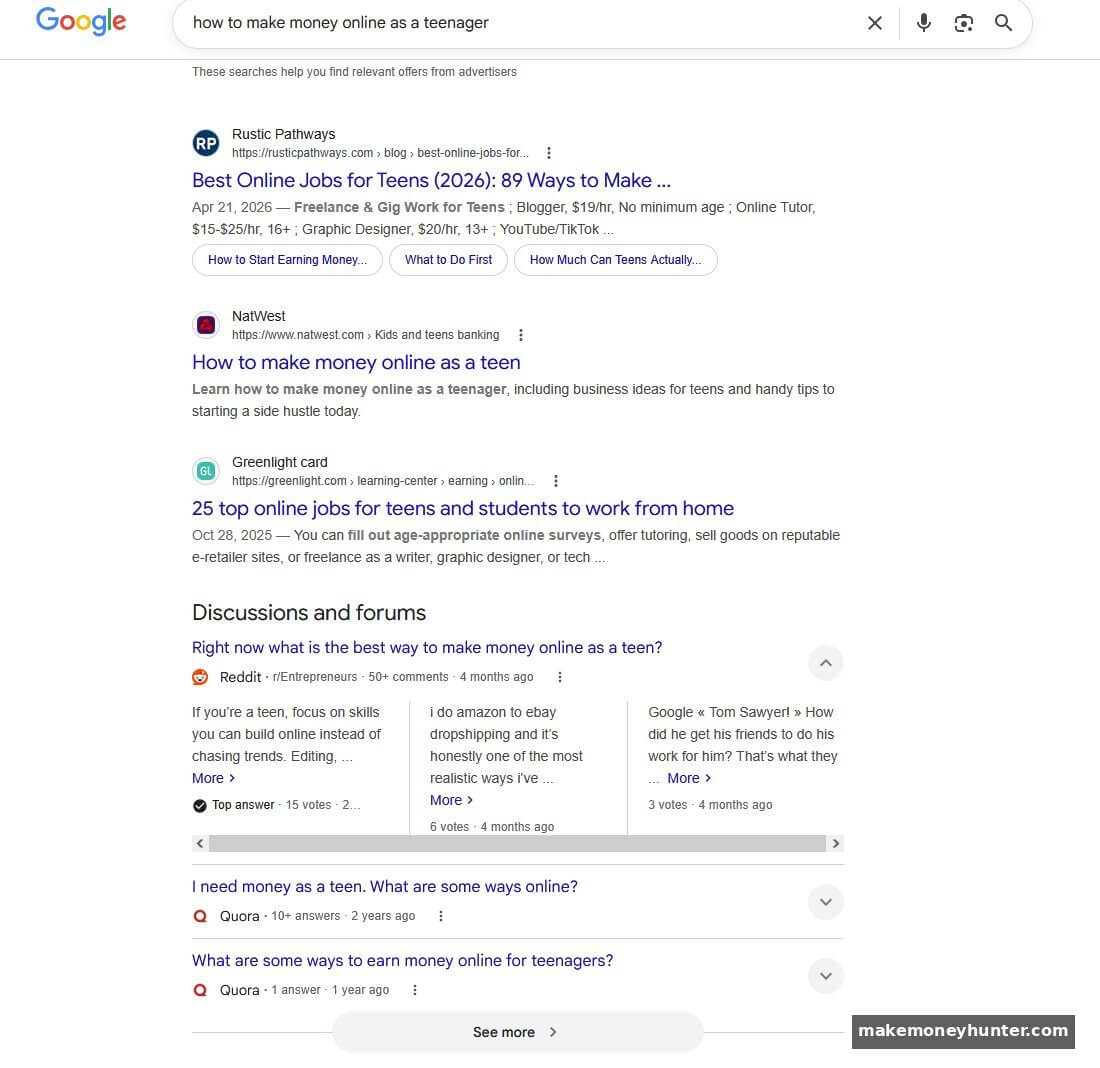
Notice the “Discussions and forums” section midway down the page. That entire block is Reddit and Quora threads — three of them, with no editorial blog post even competing in that slot.
Google is literally telling you it couldn’t find enough high-quality blog posts for this query, so it’s pulling in community discussions to fill space. This is the door wide open. A well-structured 2,500-word teen-focused guide with real income examples can absolutely take that real estate from Reddit.
Walk away if you see these “high-competition signals”:
- All Page 1 results from sites with 10,000+ referring domains (Forbes, Investopedia, HubSpot, Wikipedia)
- YouTube videos and tools dominating the SERP (Google is signaling the user wants video or interaction, not a blog post)
- An AI Overview at the top with no clear blue-link winners below it
- Multiple Google Ads above the organic results (signals high commercial intent + advertiser money, which usually means hard competition)
That same teenager keyword also surfaces an AI Overview block — and this is where SERP analysis gets nuanced. Look at this view:
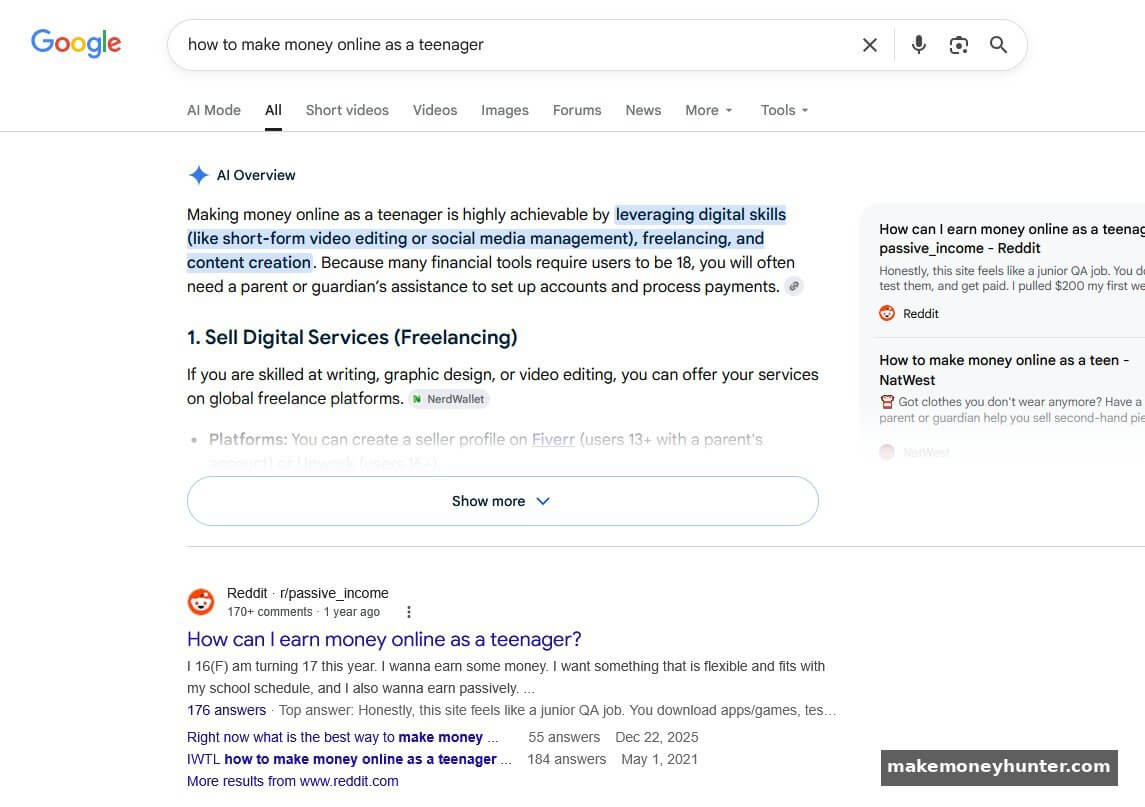
An AI Overview can be a red flag, but it isn’t automatically. The signal you want to read is what’s below the AI block. In this case, Google’s first organic result is a Reddit thread from r/passive_income with 170+ comments. That tells you Google still hasn’t found a “definitive” blog post for this query — and your article could be that post. The AI Overview citations also reveal which sites Google trusts (NerdWallet, Reddit, NatWest), which gives you a clear E-E-A-T benchmark to beat. From my own data: when I started filtering keywords this way in 2022, my ranking success rate jumped from about 25% to 70%.
Step 3: KD Verification + Search Intent Check
Now you can finally check the KD score. By this point, you’ve cut your list from 50 to maybe 10 keywords that survived SERP analysis. Use any of these tools to verify difficulty:
- Ahrefs free Keyword Difficulty Checker — Limited to a few daily checks but accurate for spot-checking.
- KeySearch — Specifically designed for finding low-competition keywords. Paid but cheap ($17/month). Their proprietary difficulty score is calibrated to small bloggers, not enterprise SEO. (affiliate)
- LowFruits — Built around the same SERP analysis principle as Step 2 above. It automatically flags keywords where forums/Reddit appear on Page 1. Pay-per-credit pricing (~$30 for analyzing 1,500 keywords). (affiliate)
- Semrush — The most comprehensive paid option. The Keyword Magic Tool plus competitor gap analysis is the gold standard if you can afford it ($129/month). (affiliate)
If a keyword has KD under 20 (Ahrefs/Semrush) or under 30 (KeySearch) and passed SERP analysis, you’re in business. But there’s one more check.
Search intent validation: Re-examine Page 1 and ask, “What format does Google clearly want for this query?” If Page 1 is dominated by listicles, a deep how-to guide will struggle to break in (and vice versa). Match the format that’s already ranking. Don’t fight the SERP — feed it.
Here’s a quick reference for matching intent to format:
| SERP Pattern on Page 1 | User Intent | Format You Should Write |
|---|---|---|
| “How to” guides + tutorials | Learn / do | Step-by-step guide with screenshots |
| “Best X” listicles + comparison posts | Compare / decide | List post with pros, cons, recommendation |
| Product/service pages + e-commerce | Buy | Skip — info content won’t rank here |
| Definitions + concept explainers | Understand | Concept-first article with examples |
| Forums, Reddit, Quora ranking | Real-person opinion | Personal-experience post with specifics |
Once the keyword passes all three filters and the intent format is clear, plug it into your on-page SEO checklist and start drafting.
5 Hidden Sources of Low-Competition Keywords Most Bloggers Ignore
Once you’ve mastered the 3-step filter, the question becomes where to find raw candidates that haven’t been picked over. After running niche sites in the make money online, finance, and tech spaces, these are my five favorite sources:
1. Competitor Gap Analysis on Small Sites
Don’t analyze the giants. Find 3-5 blogs in your niche that are roughly your size (or slightly larger) and find keywords they rank for that you don’t. Tools like Semrush’s Keyword Gap or Ahrefs’ Content Gap will surface these in minutes. The gold is in keywords where a DR-25 blog is on Page 1 — that’s exactly where you can also rank.
2. Reddit and Niche Forum Mining
Spend 30 minutes a week reading the top threads in 2-3 subreddits relevant to your niche. Note every question that gets multiple replies. These are real searches that haven’t been turned into blog posts yet. For makemoneyhunter.com, r/blogging, r/juststart, and r/Entrepreneur consistently produce keyword ideas I can’t find in any tool.
3. The “vs” Modifier Trick
Take any tool, product, or method in your niche and search “[product A] vs [product B]” in Google. Comparison keywords have built-in commercial intent (people comparing are close to buying) and often have surprisingly weak competition. Example: “Mediavine vs AdSense” has under 1,000 monthly searches but converts blog readers into affiliate clicks at 5-10x the rate of generic informational keywords.
4. Question-Based Long-Tails From “People Also Ask”
Every Google search result has a “People Also Ask” box. Click any question, and Google reveals 2-3 more related questions. Keep clicking — the rabbit hole goes deep. Each question is a validated search query. The further down you go, the lower the competition.
5. YouTube Video Titles
YouTube ranks videos for many keywords where blog posts have weak competition. Search your seed topic on YouTube, sort by view count, and write down the exact titles of videos with 50,000+ views. Many of those titles are blog-post-worthy keywords that no one has written a thorough article about yet.
Free Tools vs. Paid Tools: What You Actually Need
You don’t need a $129/month Semrush subscription to find low-competition keywords. You can do this entire workflow with free tools, especially when starting out. Here’s how I’d structure the toolkit at each stage:
Starting out (0-6 months, budget: $0): Google Keyword Planner + Google autocomplete + Ahrefs free DR checker + manual SERP analysis. This is enough to find 50+ keywords per month if you’re disciplined about doing the SERP checks.
Growing (6-18 months, budget: ~$20/month): Add KeySearch or LowFruits. Both are specifically designed for small bloggers and run under $30/month. KeySearch is better for general keyword research; LowFruits is better for finding weak-SERP opportunities.
Scaling (18+ months, budget: ~$130/month): Semrush or Ahrefs becomes worth it once you have multiple sites or need competitor gap analysis at scale. Skip these until you have proof of concept on the site.
I ran my first profitable niche site for two years using only the free toolkit before upgrading. Don’t let “I can’t afford the right tools” become an excuse — the gating factor is the SERP analysis discipline, not the tool budget. And remember that keyword research is only one piece of the system. Most rankings only convert into income when you also have a clear plan for monetizing the traffic your articles bring in.
Common Mistakes That Waste Months of Writing
Even with the 3-step filter, new bloggers make a few predictable mistakes. I made all of these before figuring them out, so let me save you the time:
Mistake 1: Trusting the KD score in isolation. KD scores compare backlink profiles only. They miss user intent, content quality, and SERP composition. A KD of 12 with Forbes on Page 1 is harder than a KD of 35 with three Reddit threads on Page 1. Always do the SERP analysis.
Mistake 2: Writing for a keyword with zero buyer intent. “What is affiliate marketing” has high volume and low KD, but every reader is a tire-kicker. Compare that to “best affiliate programs for new bloggers” — lower volume, similar KD, dramatically higher conversion rate. Volume isn’t value.
Mistake 3: Ignoring search intent format. If Page 1 is all listicles and you write a 4,000-word essay, you’ll bounce. Match the format that’s already winning. The SERP tells you what Google wants — listen to it.
Mistake 4: Stockpiling keywords without writing. A spreadsheet of 500 unwritten keywords isn’t an asset. It’s procrastination. Find 10 keywords, validate them, and write. The data from those 10 articles will teach you more than 500 more keywords ever could.
Mistake 5: Quitting at month 3. Even validated low-competition keywords take 3-6 months to rank for a new site. Most quitters bail right before their content starts ranking. If you’ve done the keyword filter correctly, the math works — but only if you don’t quit. If you’re new to the patience curve, the Google Sandbox effect is worth understanding so you don’t mistake a normal indexing delay for a failed strategy.
How to Validate a Keyword in 8 Minutes (Quick-Reference Workflow)
Once you’ve internalized the system, the per-keyword check takes about 8 minutes. Here’s the compressed version you can use as a checklist:
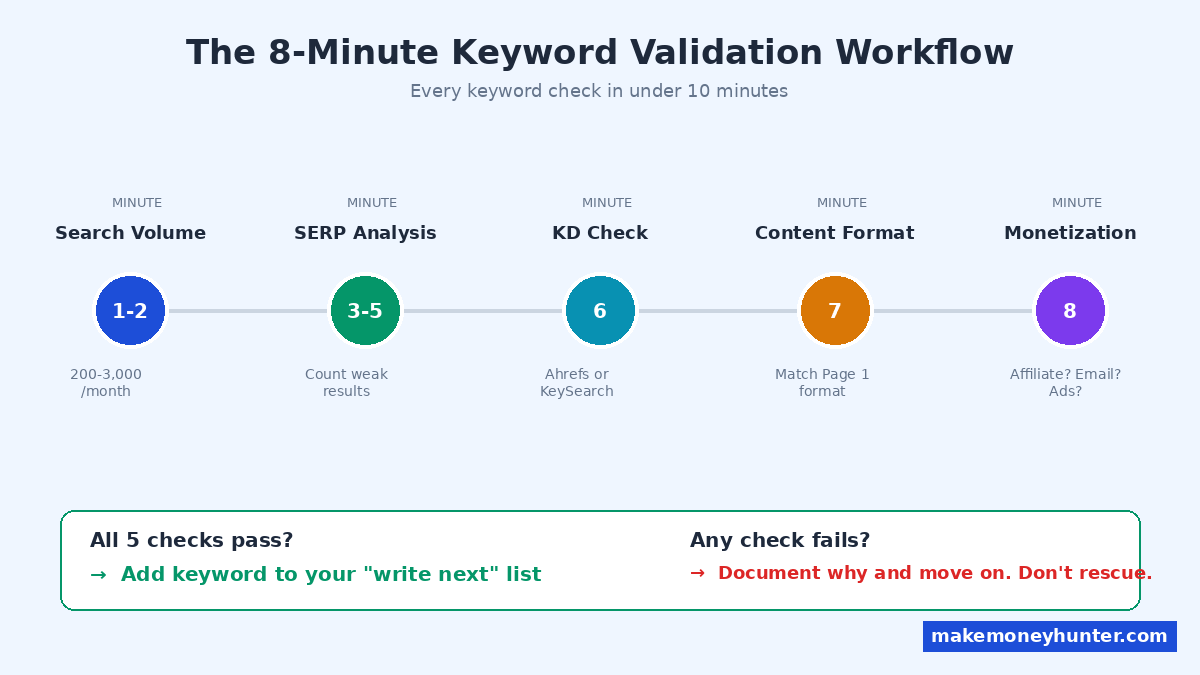
- Minute 1-2: Check search volume in any free tool. Aim for 200-3,000 monthly searches.
- Minute 3-5: Google the keyword in incognito mode. Count how many Page 1 results are from sites with under 50 referring domains. Need at least 2-3.
- Minute 6: Check the KD score in Ahrefs or KeySearch. Should be under 20 (Ahrefs) or under 30 (KeySearch).
- Minute 7: Identify the dominant content format on Page 1. Confirm you can write that format.
- Minute 8: Final gut check — is there a clear monetization path? Affiliate products to recommend? Email opt-in opportunity? Display ad revenue potential?
If all five checks pass, add the keyword to your “write next” list. If any fail, document why and move on. Don’t waste 30 minutes trying to rescue a bad keyword.
FAQ
What’s the difference between low-competition and long-tail keywords?
Long-tail keywords are defined by length (typically 4+ words). Low-competition keywords are defined by SERP difficulty. The two often overlap, but not always. A 3-word keyword can be low-competition (if the SERP is weak), and a 7-word long-tail can be high-competition (if Forbes happens to be ranking for it). Always evaluate the SERP, not the word count.
How long does it take to rank for a low-competition keyword?
For a new site (under 6 months old), expect 3-6 months to hit Page 1. For an established site with topical authority (20+ relevant articles), low-competition keywords often rank within 4-8 weeks. The site’s overall authority matters as much as the keyword’s competition.
Are low-competition keywords worth it if the search volume is small?
Yes — if you write at scale. Twenty articles each driving 500 monthly visitors is 10,000 monthly visitors. That’s the same as one article ranking for a high-volume keyword, but distributed across 20 monetization opportunities and dramatically less risky if one ranking drops.
Can I use AI to find low-competition keywords?
AI is excellent for generating seed keywords and brainstorming variations. It’s not reliable for validating competition — AI doesn’t see current SERPs and can’t assess real-time backlink data. Use AI to expand your candidate list, then validate with the 3-step filter manually.
What’s the best free tool for finding low-competition keywords in 2026?
Google Keyword Planner remains the most reliable free source for search volume data. For competition checking, the Ahrefs free Keyword Difficulty Checker gives you 3-5 daily checks, which is enough to validate a focused list. Combine these with manual SERP analysis and you can do the entire workflow for $0.
Final Thoughts
The biggest mistake I see new bloggers make isn’t using the wrong tool — it’s trusting any single tool’s KD score and skipping the manual SERP check. Tools see backlinks. They don’t see who’s on Page 1, what shape the content is in, or whether the SERP has Reddit threads telling you the door is open.
Here’s what to do next: pick one seed keyword from your niche and run it through the 3-step filter today. Just one. Spend 30 minutes generating candidates, do the SERP analysis on 10 of them, and verify 3-5 with KD checks. By the end of the session, you’ll have at least one validated keyword you can write about this week. That single article — written for a keyword that actually has a chance — will teach you more about SEO than 10 articles written on hope.
The math of low-competition keyword strategy is simple: find them, write them, stack them. The hard part is the discipline to do the SERP analysis on every candidate. Build that habit, and ranking on Page 1 stops being a mystery.