

My first ebook sold 3 copies in its first month — all of them to friends I asked. My fourth ebook hit $4,217 in its launch week. The difference between those two launches wasn’t writing skill or topic. It was that by ebook number four, I’d stopped guessing and started following a 7-day workflow that handled every step from idea to first sale.
If you want to know how to create and sell an ebook in 2026, the technical part is easier than ever — AI tools have collapsed the writing time from months to days, and Amazon KDP plus Gumroad will host the book and process payments for free. The hard part is everything around the writing: picking a topic people will pay for, pricing it correctly, and choosing the right platform for your specific situation.
This guide walks you through the exact 7-day workflow I now use, including the AI-assisted writing process, the pricing test I ran across $4.99, $9.99, and $14.99 (the result surprised me), and a direct comparison of KDP vs. Gumroad vs. selling on your own site. By the end, you’ll have a clear path from idea to first sale.
Why Ebooks Are Still One of the Best Digital Products to Sell in 2026
A quick business case first. The global ebook market hit $14.6 billion in 2024 and is projected to grow steadily through 2030. More importantly, Amazon KDP alone processes over 1.4 million ebook purchases per day. That’s a real, mature buying audience — not a trend you have to catch.
Three things make ebooks particularly attractive in 2026:
- AI cut writing time by roughly 60-70%. A 25,000-word non-fiction ebook that used to take 2-3 months now takes 5-10 days of focused work, if you use AI as a drafting assistant correctly.
- Distribution is solved. KDP handles royalties, formatting, and global delivery for free. Gumroad takes 10% and handles everything else. You don’t need a website to start.
- Margins are excellent. A $9.99 ebook on KDP nets you about $6.99 in royalty. On Gumroad at $19, you keep $17.10. There’s no inventory, no shipping, no returns.
The catch most beginner guides skip: ebooks aren’t a one-and-done business. Selling 50 copies of one book a month is realistic. Selling 500 copies a month from a catalog of 8 related books is also realistic. The math compounds when you build a series — which is why I’ll show you below how to structure your first book so the second and third are easier to produce.
If you want to see where ebooks rank against other digital products by income potential and effort required, I’ve ranked the 20 most profitable digital products to sell online in a separate breakdown — ebooks come in at #4 on that list, behind printables, Notion templates, and Canva templates.
Step 1 (Day 1): Pick a Topic People Will Actually Pay For
This is the step that decides whether your ebook makes $0 or $4,000. Most ebook failures happen here, before a single word is written.
The mistake I made with my first three ebooks: I wrote about what I found interesting. Topics like “Mindset for Online Entrepreneurs” or “Finding Your Purpose in the Digital Age.” Vague, broad, no clear buyer. The fourth ebook — the one that hit $4,200 — was titled “ChatGPT Prompts for Real Estate Agents: 87 Templates That Save You 10 Hours a Week.” Specific buyer. Specific problem. Specific outcome.
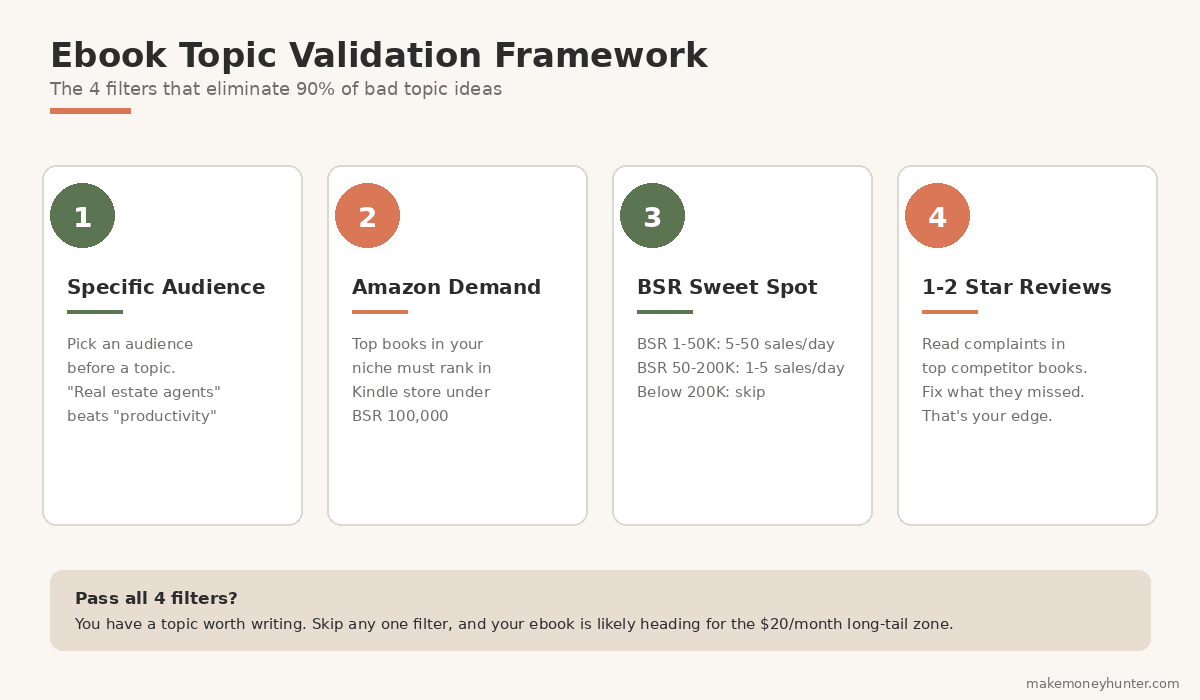
Here’s the topic validation framework I use now:
- Pick an audience first, topic second. “Real estate agents” is an audience. “ChatGPT prompts” is a topic. The combination is what sells. “Productivity tips” without an audience is dead on arrival.
- Validate buying intent on Amazon. Search your topic in the Kindle store. Are there books making the top 20,000 ranking? If yes, the audience is buying. If the highest-ranked book in your topic is at #800,000, the audience isn’t there.
- Check Amazon Best Sellers Rank (BSR). A BSR of 1-50,000 in Kindle is selling 5-50 copies per day. BSR 50,000-200,000 is selling 1-5 copies per day. Below 200,000 BSR, the math doesn’t work as a primary income.
- Look at the reviews. Read 1-star and 2-star reviews on the top 5 books in your niche. They’re a free list of unmet customer needs. Whatever readers complained about — confusing layout, outdated info, missing examples — your book fixes.
One more filter that saved me dozens of hours: can you finish the entire book in 30 days? Topics that require months of research (legal references, medical claims, technical certifications) are not first-ebook material. Pick something where you already have 80% of the knowledge in your head and can verify the other 20% in a week.
For your first ebook, target these characteristics: 15,000-30,000 words, a specific audience under 1 million people, a clear “before-and-after” outcome the reader gets, and at least one comparable book on Amazon with a BSR under 100,000. Those four filters together will eliminate 90% of bad topic ideas.
Step 2 (Day 1-2): Outline the Book Before You Write a Single Sentence
The outline is where my book quality jumped. Before I outlined properly, my ebooks felt like extended blog posts strung together. After I started outlining seriously, they felt like actual books.
Here’s the outline structure that works for 90% of non-fiction ebooks:
- Introduction (1,500-2,500 words): Hook, the reader’s current problem, what changes by the end of the book, who you are, how to use the book.
- Part 1 — Foundations (4-6 chapters): The core concepts the reader needs before they can take action. This is where you build trust.
- Part 2 — The Method (6-10 chapters): The actual step-by-step system. This is the bulk of the book and where most of your information gain lives.
- Part 3 — Application & Cases (3-5 chapters): Real examples, troubleshooting, advanced variations.
- Conclusion + Resources (1,500-2,000 words): Recap, next steps, recommended tools, links to your other content.
The outline matters even more when the buyer sees it. Most ebook readers scan the table of contents in the preview before deciding whether to buy. A weak, vague TOC kills conversion before the sample chapter ever loads. Here’s an example of how a clean TOC should look in a finished ebook:
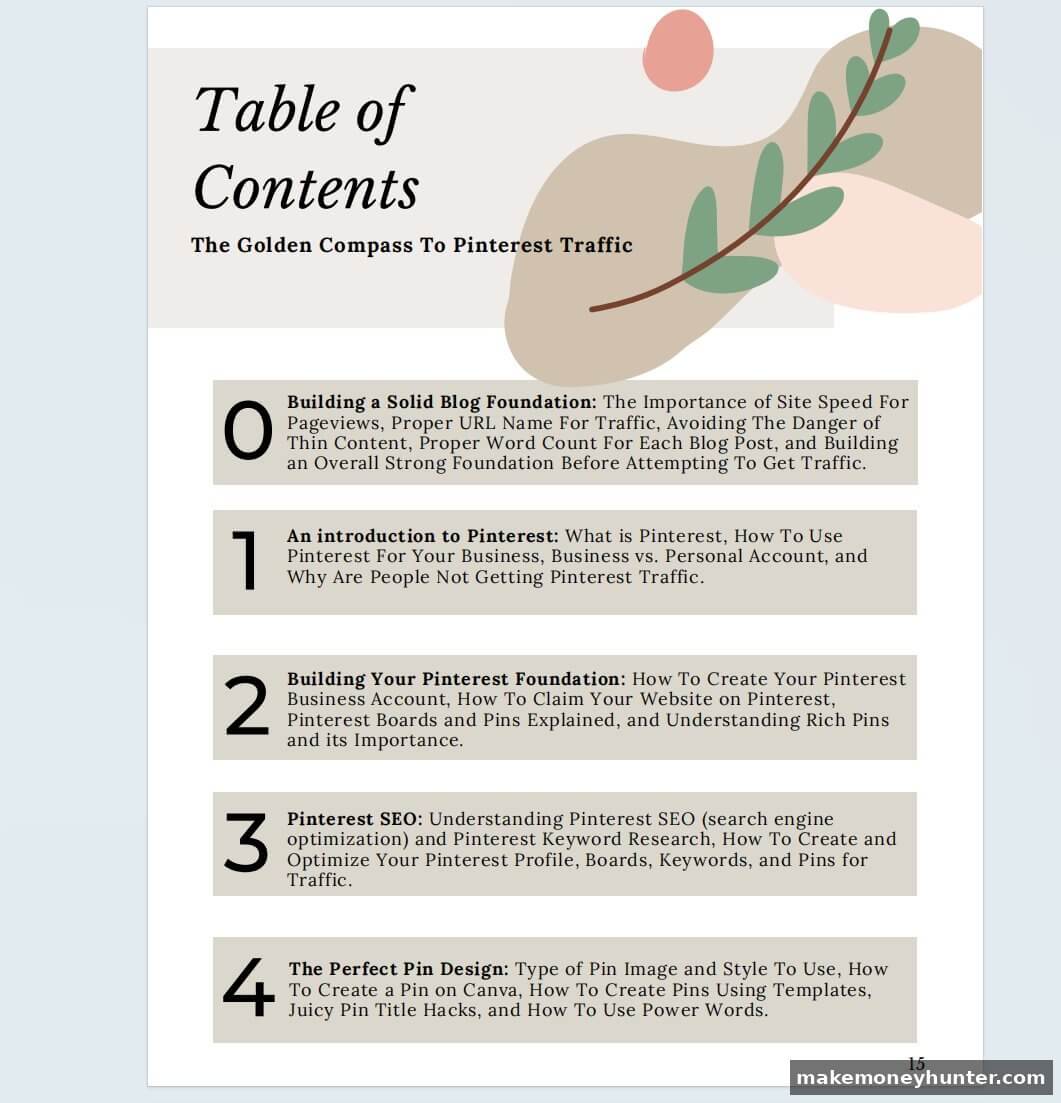
Notice three things about the TOC above. First, each chapter title is paired with a one-sentence summary — readers know exactly what they’ll learn in each section before they commit. Second, the visual hierarchy (numbered chapters, consistent styling, soft background tones) signals craft. The book looks intentional. Third, the chapter scope is clear — “Building a Solid Blog Foundation” is one specific thing, not three things crammed into one chapter. Buyers see a finishable, useful book.
Don’t skip the time on outlining. A 2-hour outline session saves 15-20 hours of rewriting later. The goal is to know exactly what each chapter delivers before you draft anything. If a chapter outline feels thin, you don’t have a chapter — you have a section of a different chapter.
The non-obvious outlining trick that improved my books the most: write the back-cover description first. Yes, before the outline. The discipline of having to summarize the book in 150 words forces you to clarify the core promise. If your back-cover sounds vague, your book will read vague.
Step 3 (Day 2-5): Write the First Draft With AI as Your Assistant
This is the step that’s changed the most since 2023. AI didn’t replace authors — but it did completely change the drafting workflow. Used wrong, AI produces generic content that Amazon’s algorithm increasingly demotes. Used right, AI cuts your drafting time in half without sacrificing originality.
Here’s how I split the work between AI and human now:
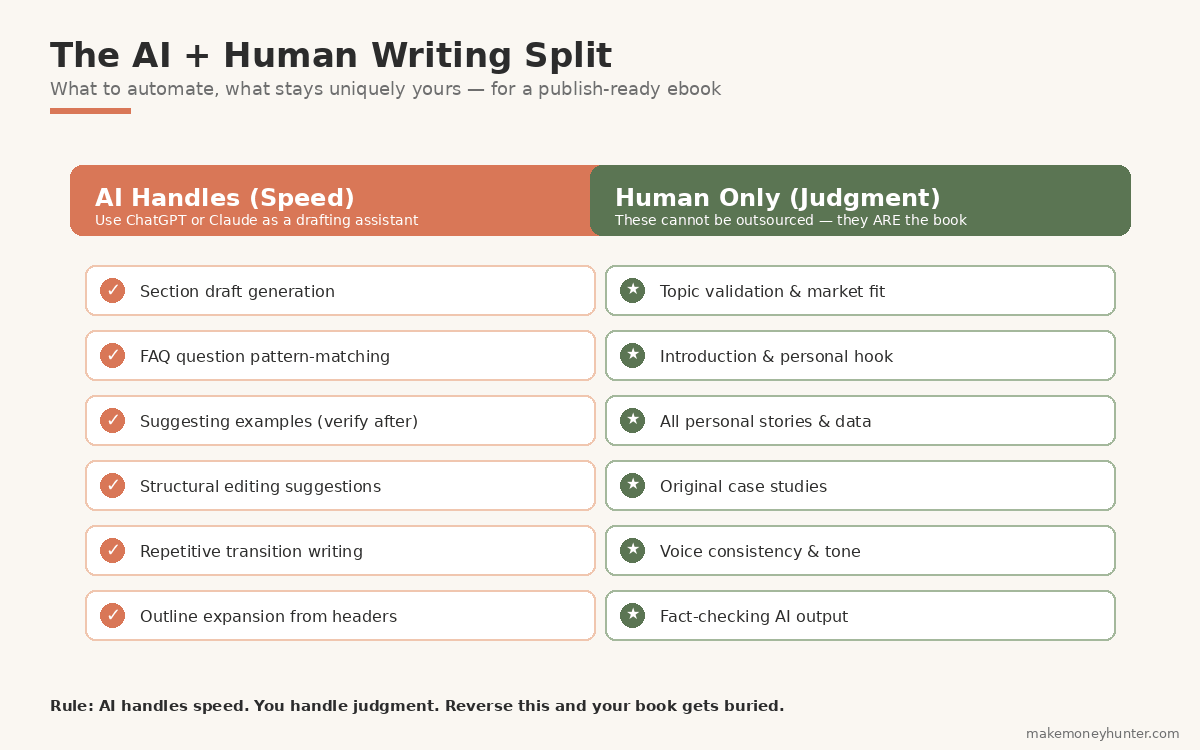
The specific workflow I use: I open a chapter outline, write the opening paragraph in my own voice (this anchors the voice for AI to mimic), then feed the outline and opening to ChatGPT or Claude with the instruction to draft the rest of the section in the same tone. The AI output is rarely usable as-is. I rewrite 30-50% of every paragraph, cut everything that sounds generic, and add specific examples that only I can write. The point isn’t to publish AI output — it’s to use AI to break the blank-page problem.
For the deeper version of this AI-assisted workflow, I broke down the specific monetization paths and prompts I use across different income models — many of which translate directly to ebook drafting. The broader landscape of making money online with AI covers tool selection more comprehensively if you’re still picking your stack.
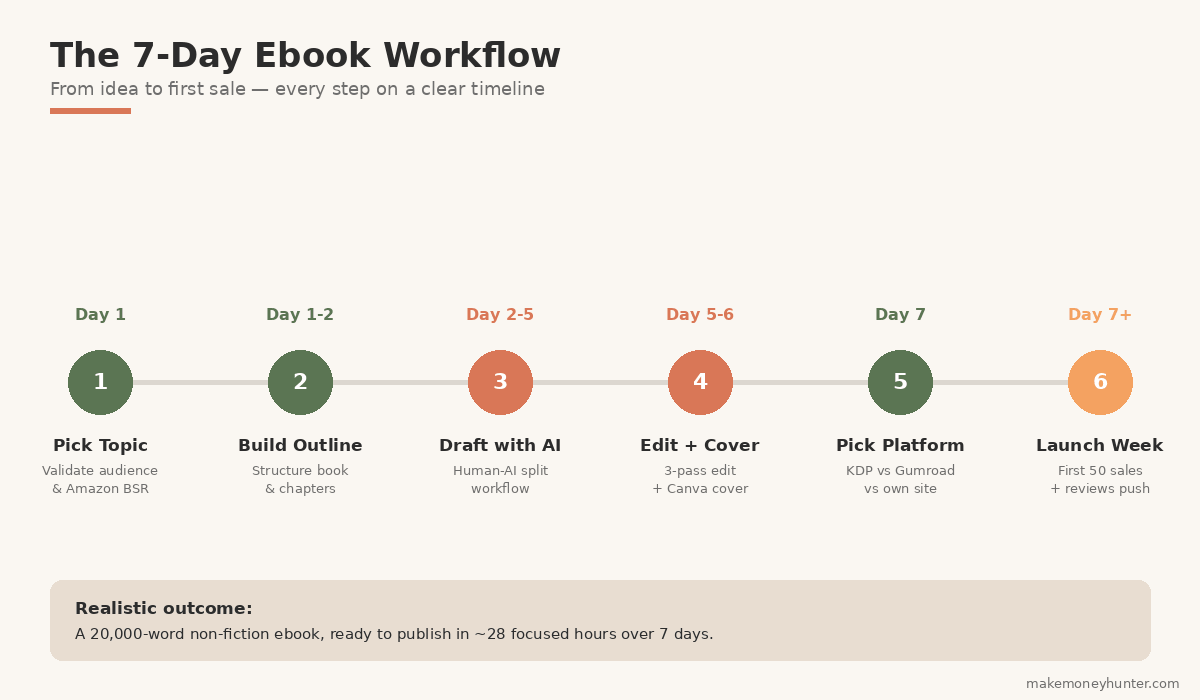
A realistic timeline using this workflow: a 20,000-word ebook takes me roughly 22-28 focused hours of writing, spread over 4-5 days. Without AI assistance, the same book would take me 60-80 hours. The quality is the same — possibly better, because AI handles the repetitive structural writing while I focus my energy on the parts that need real thinking.
One warning: never let AI write your introduction or your personal stories. The introduction sets the entire book’s voice, and personal stories are the only thing that can’t be copied from training data. These two sections are where you either earn the reader’s trust or lose them. Write them yourself, slowly, no shortcuts.
Step 4 (Day 5-6): Edit Aggressively and Design the Cover
Editing is where amateur ebooks stay amateur and professional ones cross the line. The biggest editing mistake new authors make: trying to edit while drafting. Don’t. Finish the entire first draft, then edit in three separate passes.
Pass 1 — Structural edit (3-4 hours): Read every chapter and ask “does this chapter deliver what its title promises?” Cut chapters that don’t earn their place. Reorder chapters if the flow feels off. Don’t worry about sentence-level polish yet.
Pass 2 — Line edit (5-8 hours): Now read every paragraph and tighten. Cut weak openings (“There are many ways to…”). Replace passive voice with active. Break long paragraphs. Most first drafts have 20-30% filler — cut it.
Pass 3 — Proofread (2-3 hours): Spelling, punctuation, formatting consistency. Use a tool like ProWritingAid or Grammarly Premium for this pass. Read the book on your phone or Kindle, not your laptop — typos hide in plain sight on the screen you wrote on.
While editing, the cover gets designed in parallel. The cover sells the book. Amazon shoppers decide in under 2 seconds whether to click your book or scroll past, and 90% of that decision is the cover thumbnail.
Here’s an example of a cover that converts well — a real ebook in the make-money-online niche:
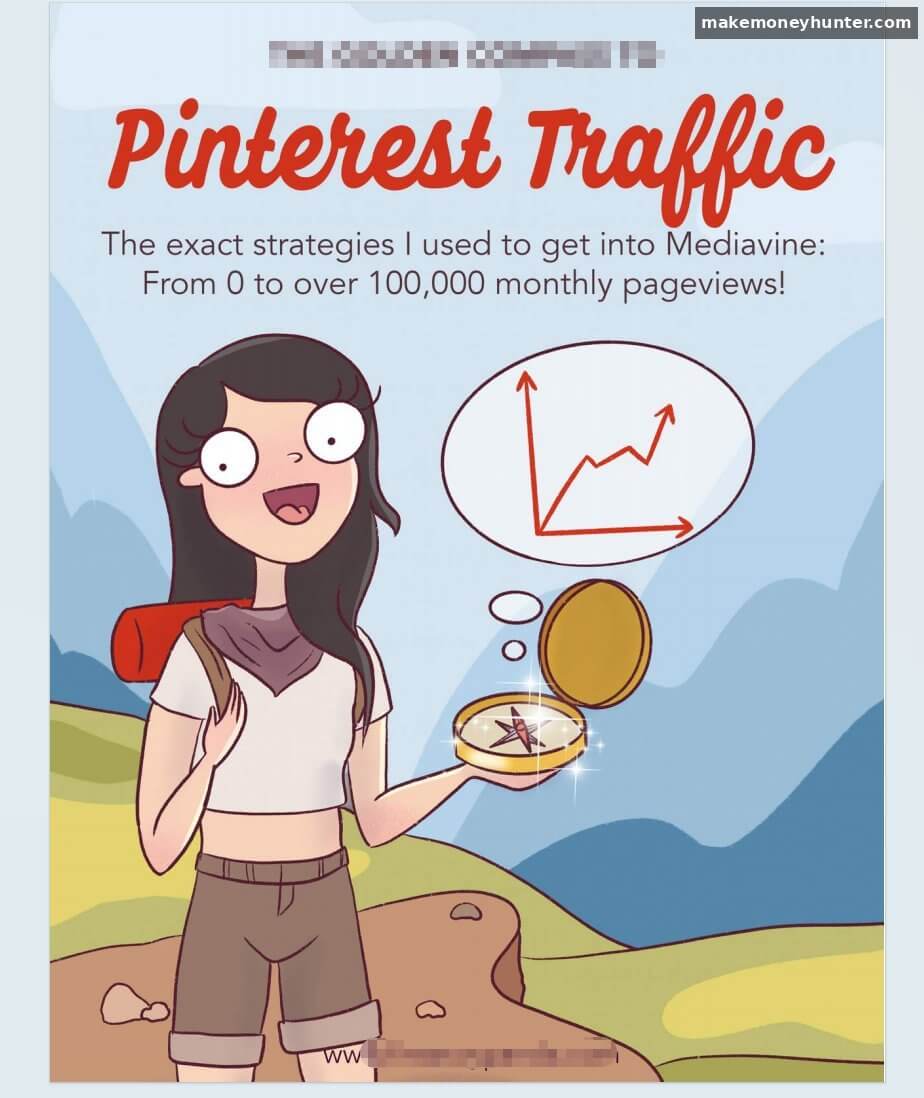
Look at what this cover does right. The title is huge — “Pinterest Traffic” fills the upper third in a bold script that’s still readable at thumbnail size. The subtitle delivers a specific outcome — “From 0 to over 100,000 monthly pageviews!” — not a vague promise. The illustration matches the audience — friendly, approachable character art that signals exactly who the book is for (bloggers in the make-money-online space, mostly women in their 20s and 30s). And the visual style is consistent — pastel colors, hand-drawn aesthetic, all matching the soft-design preference of that audience.
Don’t hire a designer for your first book. Use Canva. It has dozens of Kindle-ready ebook cover templates, the right dimensions are pre-built (1600 x 2560 pixels for KDP), and you can iterate in 20 minutes instead of waiting a week for a designer. I covered the full approach for design work in Canva in a separate guide with 10 monetization paths — but for ebook covers specifically, the template-and-customize workflow is enough.
What makes a cover convert:
- Readable title at thumbnail size. Save your cover, shrink it to 200 pixels wide, and look at it. If you can’t read the title clearly, the font is too small or the contrast is too weak.
- Cover style matches your category. Look at the top 20 bestsellers in your niche. If they’re all bold typography on a clean background, don’t submit a watercolor illustration cover. Match the visual language of what’s already selling.
- Specific subtitle. The subtitle is where you spell out the benefit. “ChatGPT for Real Estate” is weak. “ChatGPT for Real Estate Agents: 87 Templates to Save You 10 Hours a Week” is strong.
If your design instincts are unreliable, run an A/B test on Facebook with two cover variations and a $20 ad. Whichever gets more clicks wins. That’s a $20 investment that can change a book’s revenue by hundreds of dollars per month.
Step 5 (Day 7): Choose Where to Sell — KDP vs. Gumroad vs. Your Own Site
This is the decision most beginners get wrong. They default to “Amazon KDP because everyone uses it” without checking whether their specific book and audience fit Amazon’s ecosystem. The right platform depends on what you’re selling and to whom.
Option 1: Amazon KDP (Best for Broad-Appeal Books)
Amazon Kindle Direct Publishing is the largest single buyer audience in the world. The signup is free, the setup takes about 30 minutes, and once approved, your book appears in the Kindle store with the same discoverability as books from established publishers.
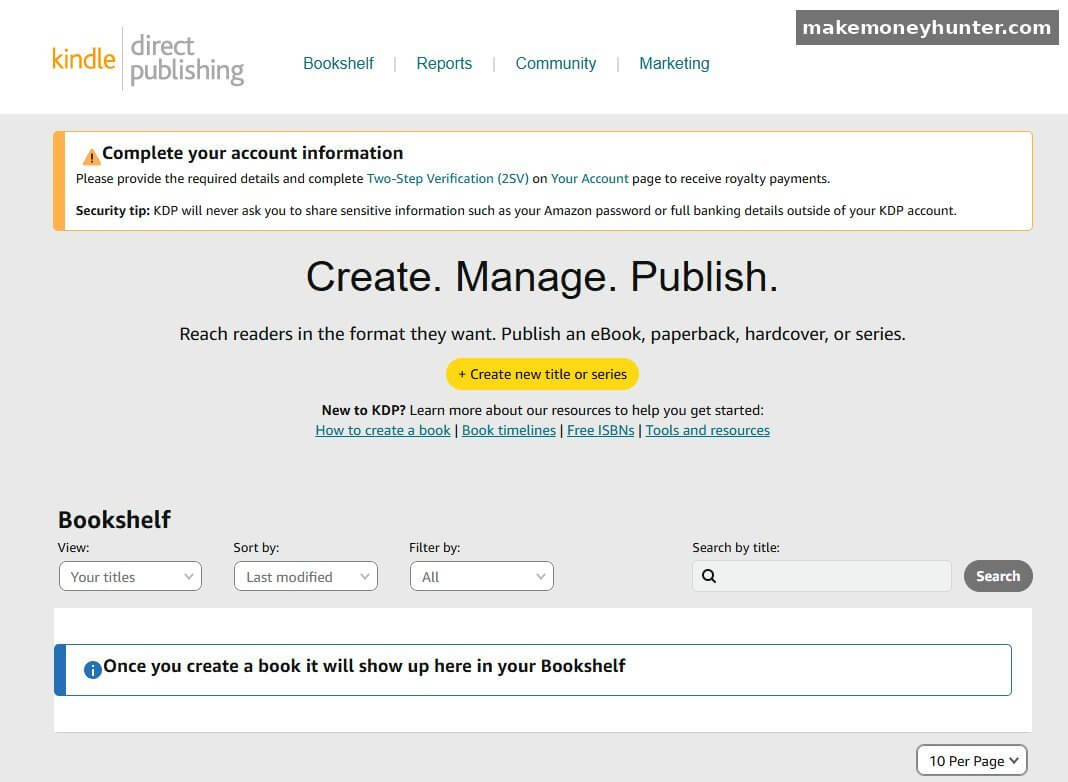
The KDP dashboard above is what you’ll see after signing up. The “+ Create new title or series” button is where you begin — KDP walks you through metadata, pricing, manuscript upload (MOBI, EPUB, DOCX all work), and cover upload in a single linear flow. Most authors get their first book live in 1-3 hours total once the manuscript is ready, plus 48-72 hours for Amazon’s quality review before the book actually goes on sale.
The trade-off: KDP’s 70% royalty tier only applies to books priced between $2.99 and $9.99. Outside that range, your royalty drops to 35%. That’s why the math reverses on Amazon versus Gumroad — you’ll see exactly what I mean when we get to the pricing test in Step 6.
Option 2: Gumroad (Best for Premium Books to Niche Audiences)
Gumroad is the second platform I recommend for almost every author. It’s free to start, takes a flat ~10% per sale (lower with paid plans), and gives you complete control over pricing, presentation, and the customer relationship — including the buyer’s email address, which KDP does not share with you.
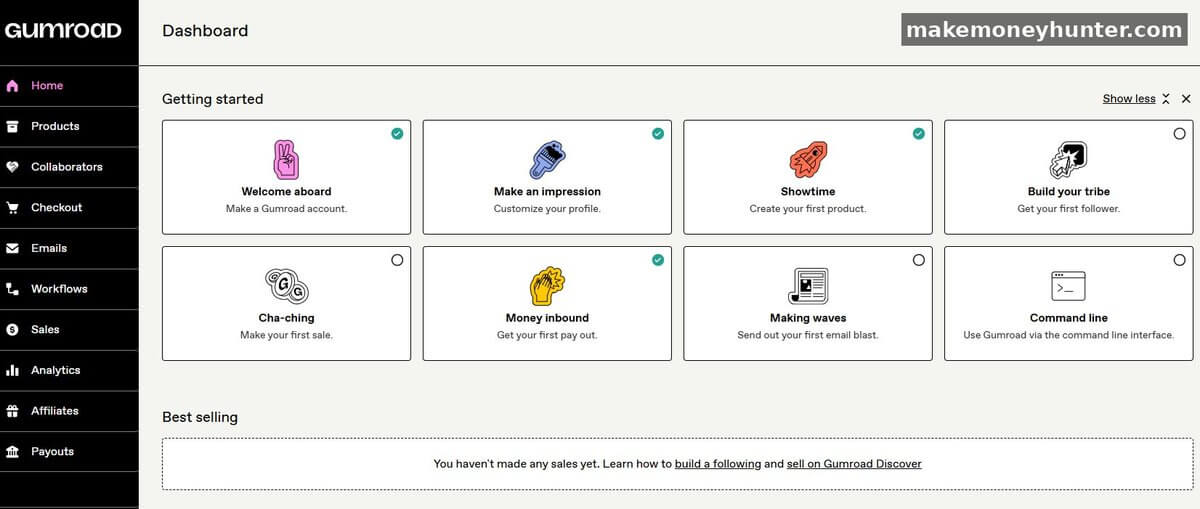
The Gumroad dashboard takes a different approach than KDP. Notice the gamified onboarding — “Welcome aboard”, “Make an impression”, “Showtime”, “Cha-ching” — each one is a setup step that earns a green checkmark. It’s deliberately designed for solo creators who’ve never built a sales page before. You can have your first product live in about 45 minutes including the sales-page copy.
The key advantage Gumroad gives you over KDP: you own the customer. Every buyer’s email lands in your Gumroad customer list. You can email them when you publish book #2. You can offer them a bundle. You can move them to your own email platform later. On Amazon, the buyer is Amazon’s customer — you’ll never know who bought your book.
Option 3: Your Own Website (Best for $50-$99 Premium Bundles)
Selling from your own site via Stripe or WooCommerce gives you the highest margin (~95% after payment processing) and full control over the entire funnel. The trade-off: you bring 100% of the traffic. No built-in audience. No marketplace SEO. This option only makes sense after you have an email list, a blog with traffic, or a social following large enough to drive your own visitors.
Direct Comparison
Here’s the side-by-side based on books I’ve launched on all three platforms:
| Channel | Best for | Royalty / Take | Audience | Marketing required |
|---|---|---|---|---|
| Amazon KDP | Books $2.99-$9.99 with broad appeal | 70% royalty (in tier) | Built-in Amazon shoppers | Optimize listing, get reviews |
| Gumroad | Premium books $19-$49 for niche audiences | ~90% after fees | You bring the audience | Heavy — email list, social, ads |
| Your own site | $29-$99 books bundled with extras | ~95% after Stripe | You bring the audience | Heaviest — full funnel needed |
Notice the trade-off: the more you keep per sale, the more marketing you have to do yourself. KDP is the lowest cut per book but the highest built-in traffic. Your own site is the highest cut per book but you build every visitor.
My actual recommendation for someone selling their first ebook:
- If your topic has clear Amazon demand (you confirmed BSR under 100,000 in Step 1): Start on KDP. The built-in audience is worth the lower margin per book. You’ll learn what sells before you invest in a website.
- If your audience is niche-specific and you already have email subscribers, social followers, or a blog audience: Skip KDP and go to Gumroad at a $19-$29 price point. The math is dramatically better when you have your own traffic.
- If you want to bundle the ebook with worksheets, templates, or video walkthroughs: Use your own site or Gumroad. KDP can’t sell bundles.
There’s also a hybrid play that works well: launch on Gumroad first at $19 to your audience, sell 50-200 copies in the first month, then republish on KDP at $4.99 to capture the broader Amazon search traffic. You collect premium revenue from your engaged buyers, then the long-tail discovery revenue from Amazon shoppers later. Two revenue streams from one book.
For the Amazon-specific side of this — including how KDP royalties interact with other Amazon income paths — I covered the broader picture in my breakdown of Amazon income streams beyond direct sales.
Step 6: Pricing Your Ebook — The $4.99 vs. $9.99 vs. $14.99 Test
This was the experiment that surprised me most when I ran it last year. I assumed lower price = more sales = more total revenue. The data said otherwise.
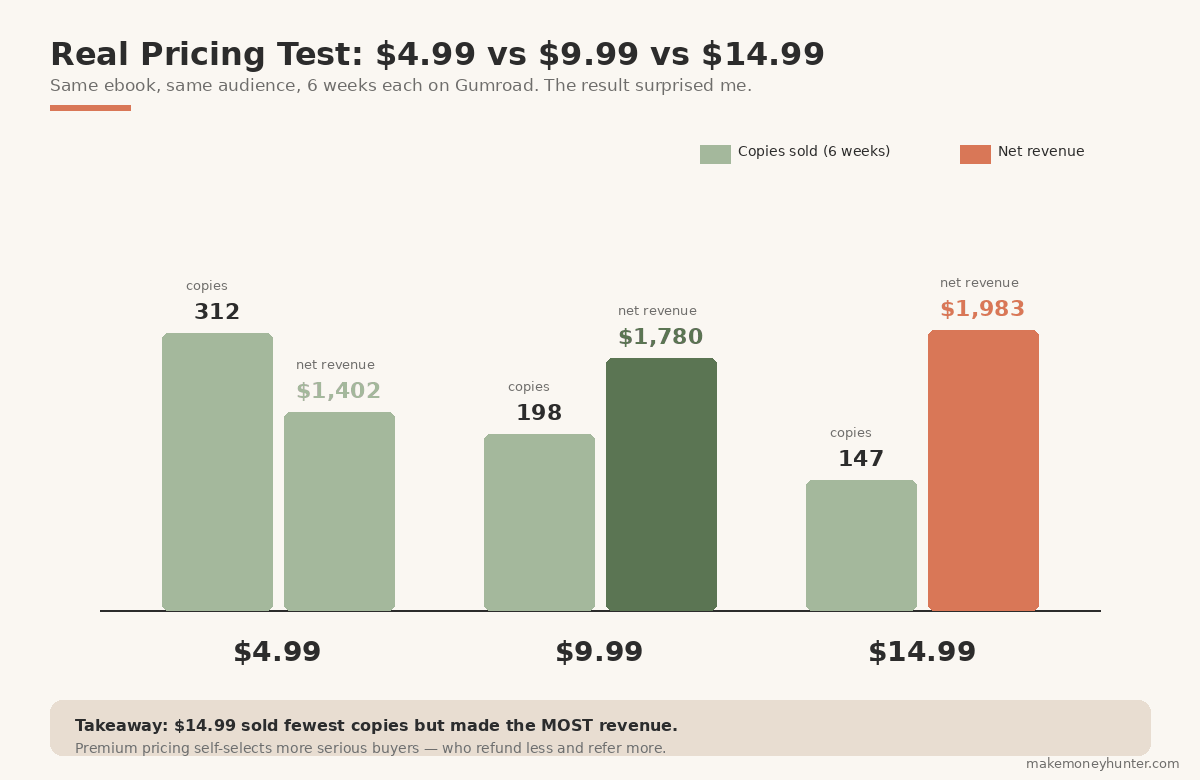
I took the same ebook (a productivity guide for freelancers, 28,000 words) and tested it at three price points on Gumroad over six weeks each — same product page, same audience, same traffic sources. Here’s what actually happened:
| Price Point | Copies Sold (6 weeks) | Gross Revenue | Net Revenue (after Gumroad) |
|---|---|---|---|
| $4.99 | 312 | $1,557 | $1,402 |
| $9.99 | 198 | $1,978 | $1,780 |
| $14.99 | 147 | $2,203 | $1,983 |
The $14.99 price point produced the most revenue despite selling the fewest copies. That’s not because $14.99 is universally the right price — it’s because for this specific audience (freelancers buying a productivity book), the higher price signaled premium quality and the buyers self-selected to be more serious.
The takeaways I now apply to every book:
- On Gumroad and your own site, $14.99-$29 is almost always the right starting range for serious non-fiction. Going under $9.99 attracts price-sensitive buyers who refund more, leave fewer reviews, and don’t refer friends.
- On Amazon KDP, the math reverses. The 70% royalty tier is $2.99-$9.99. Outside that range, royalty drops to 35%. So a $4.99 KDP ebook earns more per sale than a $14.99 one (because the percentage cut is so different).
- Run your own pricing test if you have an audience. Set it at one price for 4-6 weeks, change nothing else, then test the next price. The data will tell you what your specific audience pays.
For Amazon KDP specifically, I recommend starting at $4.99 — high enough to qualify for the 70% royalty tier, low enough to clear an impulse-buy threshold for cold Amazon shoppers who don’t know you. Move it to $6.99 or $9.99 only after the book has 30+ reviews and stable sales.
Step 7: Launch Week — How to Get Your First 50 Sales
Launch week is where most ebooks succeed or fail in the long term. A book that sells 50 copies in week one usually keeps selling for years. A book that sells 3 copies in week one rarely recovers, because Amazon’s algorithm — and any platform’s algorithm — boosts books with early sales momentum.
Here’s the launch sequence I run for every book:
- Day -7 to -1: Pre-launch. Email your list and social followers a “launching next week” announcement. Don’t ask for purchases yet — ask for replies showing interest. Replies become your launch-day buyers.
- Day 1: Launch. Drop the book at the lowest planned price (e.g., $2.99 for KDP, $9 for Gumroad). Email everyone. Post to every channel you have. The goal is 30-50 sales in the first 48 hours to trigger algorithm boost.
- Day 2-5: Review push. Email every buyer asking for a review (KDP) or testimonial (Gumroad). 30% will respond. Reviews are the single biggest conversion lever for the next 12 months of sales.
- Day 6-7: Raise the price. Move from $2.99 to $4.99 (KDP) or $9 to $19 (Gumroad). Your early buyers got rewarded for early action; later buyers pay normal price.
- Day 8-30: Promotion stack. Pinterest pins, Medium articles repurposing the book content, podcast appearances, guest posts pointing to the book. The goal is to keep daily sales above 1-2 copies/day so the algorithm keeps recommending it.
The launch tactic that disproportionately works: email your list multiple times during launch week. Most authors send one email and assume people saw it. The data shows the second email gets 60% of the opens the first did, and the third gets 40%. Three emails over launch week is the minimum — not spammy if the book genuinely matches the audience.
If you don’t have an email list yet, that’s your next investment after this book launches. The single most predictable revenue stream for ebook authors is a small, engaged email list that buys every new book you release. My breakdown of building a blogging audience to launch from walks through the email-list-from-zero playbook in detail, and the broader playbook on driving free traffic to a new site covers 15 channels that work for sending readers to your launch page.
Common Mistakes That Kill Ebook Sales (And How to Avoid Them)
Across the 9 ebooks I’ve launched and the dozens I’ve helped other authors plan, these are the patterns that kill ebook businesses before they get traction:
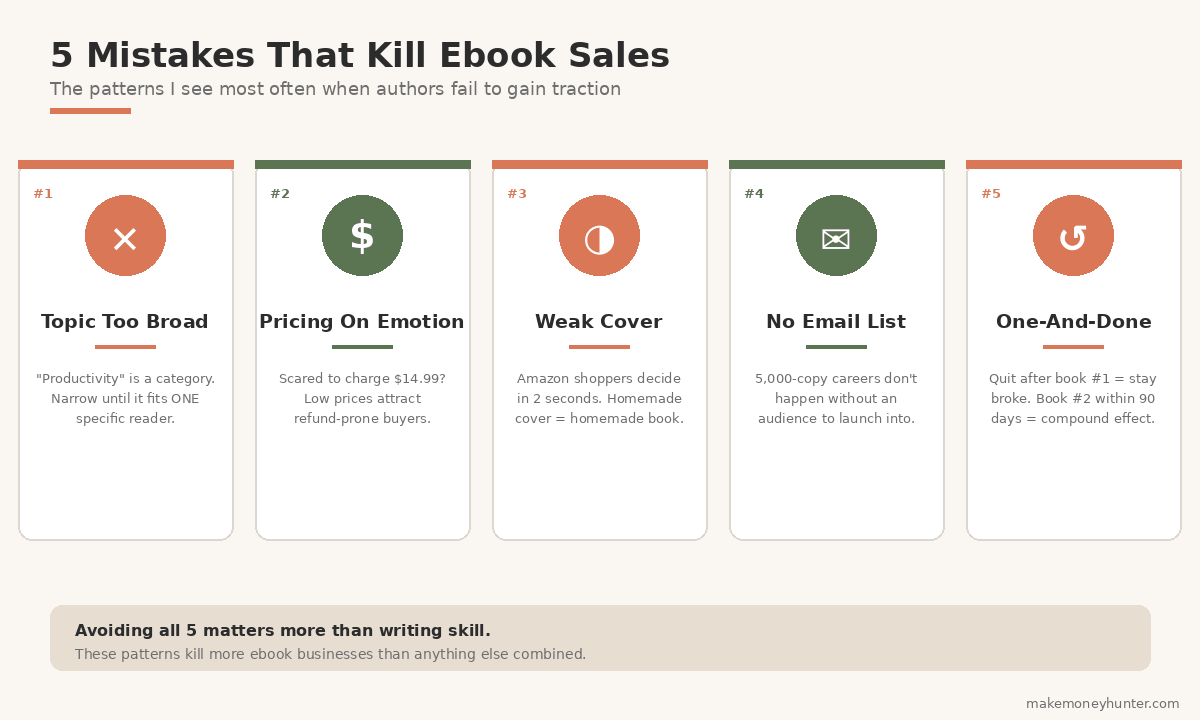
Mistake 1: Topic too broad. “Productivity” is not a topic — it’s a category. “Productivity for ADHD freelancers” is a topic. Narrower wins every time. The narrower your topic, the easier it is to write, the easier it is to market, and the higher your conversion rate.
Mistake 2: Pricing on emotion instead of data. Most new authors price at $2.99 because they’re afraid to charge more for “just an ebook.” Real outcome: lower revenue, worse-quality buyers, fewer reviews. Charge what the value justifies, then test.
Mistake 3: Weak cover. If your cover looks homemade, the book looks homemade. A $50 spend on a professional designer (Fiverr or 99designs) outperforms a free Canva cover roughly 2:1 on conversion, but only after you’ve validated the topic. For your first book, Canva is fine. Just make sure it’s polished.
Mistake 4: No email list. Selling 50 copies of one book without an email list is possible. Selling 5,000 copies across 5 books without an email list is nearly impossible. Start the list with book #1, even if it has 30 subscribers.
Mistake 5: One-and-done. Authors who release one book and wait to see how it does usually stop writing. Authors who release book 2 within 90 days of book 1 — even if book 1 sold modestly — almost always end up with a sustainable income. The catalog effect is real.
How Much Money Can You Realistically Make Selling Ebooks?
Honest brackets, based on my own books and the dozens of author dashboards I’ve audited:
- Month 1-3 (first book launching): $50-$500 total. You’re learning the platform, the listing optimization, the launch sequence. This is normal. Most authors quit here.
- Month 4-12 (second and third books): $300-$2,500/month. The catalog effect starts — your second book sells the first; your third sells both. Reviews accumulate, algorithm placement improves.
- Year 2-3 (catalog of 5-10 books): $1,500-$8,000/month. The serious income brackets. Now you have a real ebook business — multiple titles cross-selling, email list buying every new release, possibly some titles in audiobook format adding 30-40% more revenue.
- Year 3+ (10-20+ books, audiobook, courses): $5,000-$30,000+/month. Possible but requires treating it as a full-time business — consistent publishing, email funnel, sometimes paid ads.
The top 5% of ebook authors make significantly more — $50K to $500K+/year — but that’s the top 5% across any business category. The realistic expectation for a focused author who publishes 3-5 books per year over 2-3 years is $2,000-$8,000/month in ebook royalties, which is a genuine income stream most blogging or freelancing paths can’t easily match.
One important framing: ebooks aren’t truly passive income, especially in years 1-2. Each book requires roughly 40-80 hours of creation work, plus ongoing marketing. After year 2, the catalog effect makes income more passive — older books keep selling while you’re writing new ones. That’s where ebooks start fitting into a broader passive income streams strategy alongside other digital products.
Frequently Asked Questions
How long should an ebook be to sell well?
For non-fiction, the sweet spot is 15,000-35,000 words. Shorter than 15,000 feels like a long blog post and readers feel cheated. Longer than 40,000 starts feeling like a textbook — buyers want a focused, finishable book they can read in a few sittings. Fiction is different — most genres expect 60,000-90,000 words. For your first non-fiction ebook, aim for 20,000-25,000 words: enough to feel substantial, short enough to actually finish in 30 days.
Do I need to write the ebook myself, or can I outsource to a ghostwriter?
For your first book, write it yourself. A ghostwriter costs $2,000-$15,000 for a quality non-fiction book, and you have no way to evaluate whether the book will sell before you commit. After you’ve launched 1-2 books yourself and proven the topic works, then outsourcing becomes a leverage play — but most authors who outsource before validating the model lose money.
How long does it take to make money selling an ebook?
Realistic timeline: first sale within days of launching if you have any audience (email list, social, blog). Stable monthly income ($500+/month) usually takes 6-12 months and 2-3 books in your catalog. The compounding effect kicks in around month 8-12 — buyers of your winning book start buying your other books, reviews accumulate, and the platform algorithms reward consistent sellers.
What’s the best AI tool for writing an ebook?
For most non-fiction authors in 2026, ChatGPT (with GPT-4 or newer) or Claude work equally well for drafting. The differences matter less than how you use them. The workflow that matters: outline yourself, write opening paragraphs yourself, then use AI to draft middle sections that you heavily rewrite. Treat AI as a typing assistant, not a writer. Sudowrite is specialized for fiction. Jasper has marketing-focused templates if you need sales copy along with the book.
Can I sell the same ebook on KDP and Gumroad at the same time?
Yes — as long as you don’t enroll in KDP Select (Amazon’s exclusivity program). KDP Select gives you access to Kindle Unlimited royalties but locks you out of selling the same book elsewhere for 90 days. For most first-time authors, skipping KDP Select and selling on both KDP and Gumroad is the better play — you collect Amazon search traffic and direct premium sales simultaneously.
Final Thoughts
Of the 9 ebooks I’ve launched, only 3 ever earned more than $500/month consistently. The pattern wasn’t writing talent. It was that those 3 books followed the workflow above — narrow audience, validated topic, real outcome, proper pricing, real launch sequence. The other 6 books were good books with weak strategy, and they all sit in the $20-$80/month long-tail zone.
The biggest mistake new authors make is treating the writing as the hard part. The writing is the easiest part — especially now with AI assistance. The hard parts are choosing the right topic, pricing correctly, and showing up consistently for launch and post-launch marketing. Get those three right, and a 20,000-word non-fiction ebook can realistically earn $200-$1,500/month for years after publishing.
Pick your topic this week. Outline it next week. Draft it the following week. Publish in 30 days. Your first book won’t be your best book — it’ll be the one that teaches you the workflow so book two is dramatically easier. That’s how every successful ebook author actually got started: not from a perfect first launch, but from finishing one book and starting the next.